


'%3e%3cpath%20d='M6.42532%207.40439C6.16072%207.40439%205.94575%207.48708%205.78037%207.65244C5.615%207.80127%205.53231%208.01627%205.53231%208.2974V23.7018C5.53231%2023.9664%205.615%2024.1813%205.78037%2024.3467C5.94575%2024.5122%206.16072%2024.5947%206.42532%2024.5947H8.4842C8.76533%2024.5947%208.98032%2024.5203%209.12916%2024.3715C9.29452%2024.2062%209.3772%2023.9829%209.3772%2023.7018V8.2974C9.3772%208.01627%209.29452%207.80127%209.12916%207.65244C8.98032%207.48708%208.76533%207.40439%208.4842%207.40439H6.42532ZM3.42383%208.09895C3.42383%207.25556%203.67188%206.57753%204.168%206.06487C4.68064%205.55223%205.3504%205.2959%206.17727%205.2959H8.68264C9.52604%205.2959%2010.2041%205.55223%2010.7167%206.06487C11.2294%206.561%2011.4857%207.23075%2011.4857%208.07414V11.7702C11.6841%2011.7206%2011.8991%2011.6958%2012.1306%2011.6958H16.7197H16.9677L16.6949%2010.7532C16.5957%2010.4224%2016.5461%2010.1165%2016.5461%209.83535C16.5461%209.24001%2016.7197%208.72737%2017.0669%208.2974C17.4308%207.85089%2017.9353%207.54495%2018.5801%207.37958L20.9615%206.75943C21.2095%206.69329%2021.4825%206.66022%2021.7801%206.66022C22.425%206.66022%2022.9791%206.84212%2023.4421%207.20595C23.9217%207.56975%2024.2524%208.07414%2024.4343%208.7191L28.4529%2022.5358C28.5356%2022.8667%2028.5769%2023.1643%2028.5769%2023.429C28.5769%2024.0243%2028.3949%2024.5451%2028.0311%2024.9917C27.6839%2025.4382%2027.1877%2025.7442%2026.5428%2025.9094L24.1615%2026.5048C23.8306%2026.5875%2023.5413%2026.6288%2023.2932%2026.6288C22.6813%2026.6288%2022.1356%2026.4469%2021.6561%2026.0832C21.193%2025.7194%2020.8705%2025.2149%2020.6887%2024.5699L19.498%2020.4522V23.9002C19.498%2024.7437%2019.2417%2025.4216%2018.729%2025.9342C18.2329%2026.4469%2017.5714%2026.7032%2016.7445%2026.7032H12.1803C11.4692%2026.7032%2010.8904%2026.5296%2010.4439%2026.1824C9.98082%2026.5296%209.41028%2026.7032%208.73226%2026.7032H6.22688C5.38348%2026.7032%204.70546%2026.4469%204.1928%2025.9342C3.68015%2025.4382%203.42383%2024.7766%203.42383%2023.9498V8.09895ZM12.3787%2013.8043C12.1141%2013.8043%2011.8991%2013.887%2011.7337%2014.0523C11.5684%2014.2012%2011.4857%2014.4162%2011.4857%2014.6973V23.7018C11.4857%2023.9664%2011.5684%2024.1813%2011.7337%2024.3467C11.8991%2024.5122%2012.1141%2024.5947%2012.3787%2024.5947H16.4964C16.7777%2024.5947%2016.9925%2024.5203%2017.1413%2024.3715C17.3068%2024.2062%2017.3895%2023.9829%2017.3895%2023.7018V14.6973C17.3895%2014.4162%2017.3068%2014.2012%2017.1413%2014.0523C16.9925%2013.887%2016.7777%2013.8043%2016.4964%2013.8043H12.3787ZM19.3988%209.33924C18.9522%209.47153%2018.729%209.73614%2018.729%2010.133C18.729%2010.1992%2018.7455%2010.2984%2018.7786%2010.4307L22.673%2023.8506C22.8385%2024.2971%2023.1196%2024.5203%2023.5165%2024.5203C23.6322%2024.5203%2023.7233%2024.5122%2023.7893%2024.4955L25.7242%2023.9498C26.1708%2023.8176%2026.394%2023.553%2026.394%2023.156C26.394%2023.0899%2026.3773%2022.9907%2026.3444%2022.8584L22.4746%209.46327C22.4085%209.24828%2022.301%209.08291%2022.1522%208.96715C22.0199%208.83486%2021.8628%208.76871%2021.6809%208.76871C21.6148%208.76871%2021.5154%208.78524%2021.3833%208.81831L19.3988%209.33924Z'%20fill='%23802FFB'/%3e%3c/g%3e%3cdefs%3e%3cclipPath%20id='clip0_11502_53434'%3e%3crect%20width='32'%20height='32'%20fill='white'/%3e%3c/clipPath%3e%3c/defs%3e%3c/svg%3e)

Developers and open-source contributors
Writing a README file for a GitHub repository and needing to format headings, lists, and code blocks correctly.
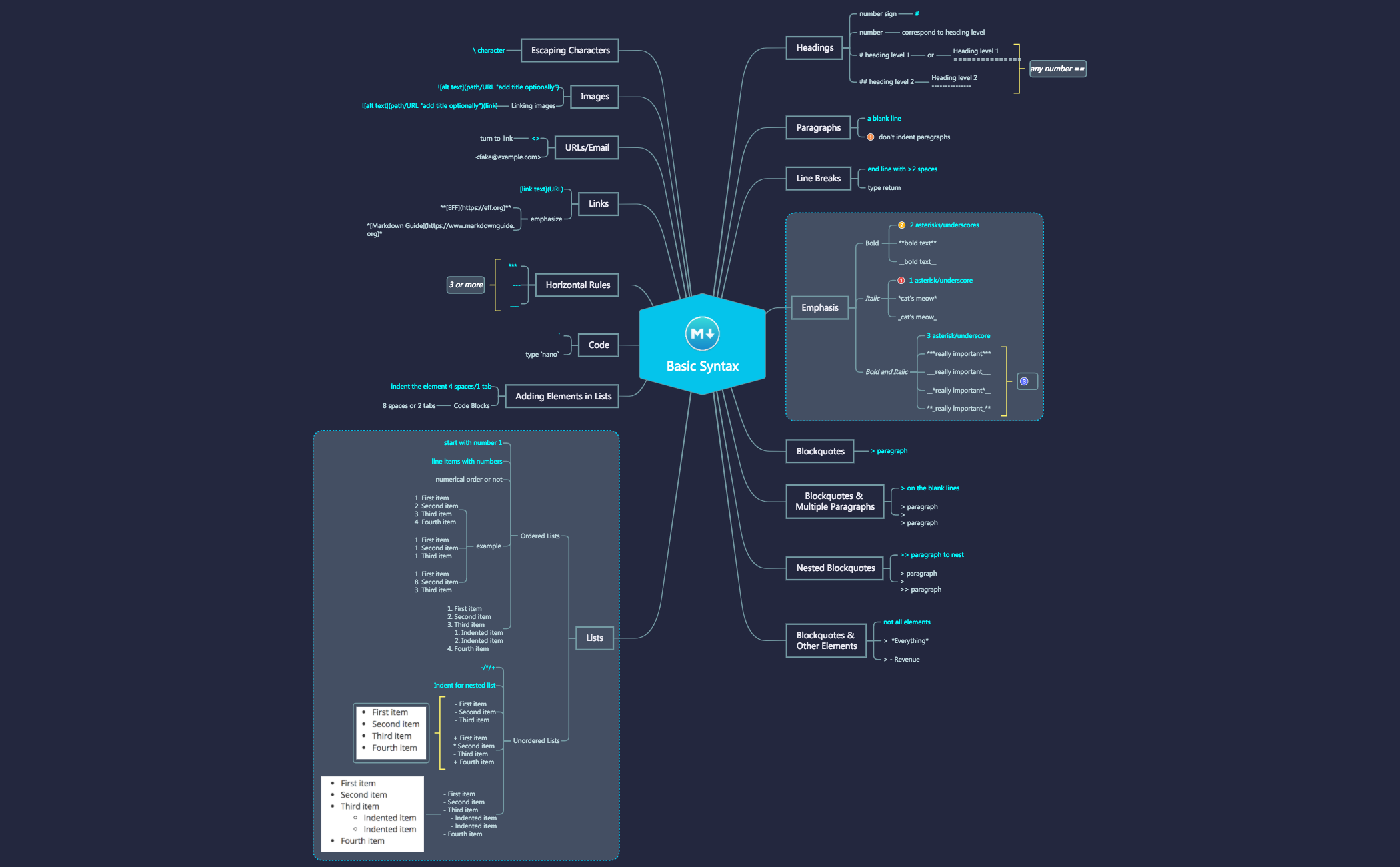
The Markdown Basic Syntax mind map template from Xmind provides a comprehensive visual reference for the core elements of Markdown formatting, covering 91 nodes across headings, paragraphs, emphasis, blockquotes, lists, code, links, images, and escaping characters. Designed for writers, developers, and content creators, this template organizes syntax rules into clear branches, including specific examples like '# heading level 1' and '**bold text**'. It serves as a quick cheat sheet for anyone learning or referencing Markdown, with nodes detailing ordered and unordered lists, nested blockquotes, and image linking. The template's structured layout makes it easy to find and compare syntax variations, such as using asterisks versus underscores for bold and italic.
Điều khoản sử dụngWriting a README file for a GitHub repository and needing to format headings, lists, and code blocks correctly.
Creating documentation for a software project and ensuring consistent use of Markdown for emphasis, links, and images.
Learning Markdown for the first time and wanting a visual reference to understand syntax rules and examples.
Open the .xmind file to browse the structured branches covering headings, emphasis, and lists with their corresponding examples.
Select specific nodes to add personal notes or create new branches for advanced Markdown features to tailor the guide to your needs.
Save your customized mind map as an image or PDF to serve as a permanent visual cheat sheet for your writing projects.
The template covers all core Markdown elements: headings, paragraphs, line breaks, emphasis (bold, italic, bold+italic), blockquotes (including nested and with other elements), ordered and unordered lists, code blocks, horizontal rules, links, URLs/email, images, and escaping characters.
Open the .xmind file in Xmind and navigate through the branches. Each node shows a syntax rule with an example, like '# heading level 1' for headings. Use the visual map to quickly reference formatting options and practice writing Markdown.
Yes, the template is fully editable in Xmind. You can add notes, change colors, or reorganize branches to suit your learning style. It's a flexible reference that you can personalize.
Use the template as a study guide: review one branch at a time (e.g., Emphasis), then practice writing the examples. The visual hierarchy helps you see relationships between syntax rules, like how nested blockquotes use '>>'.
Absolutely. The template's clear structure and examples make it an excellent teaching aid. You can present it in a workshop or share it as a handout for students to follow along.
Chia sẻ mẫu sơ đồ tư duy của bạn với người sáng tạo trên khắp thế giới và bắt đầu kiếm tiền từ tác phẩm của mình.

