




New Xmind users and students
Learning Xmind for the first time and wanting to memorize essential shortcuts quickly.
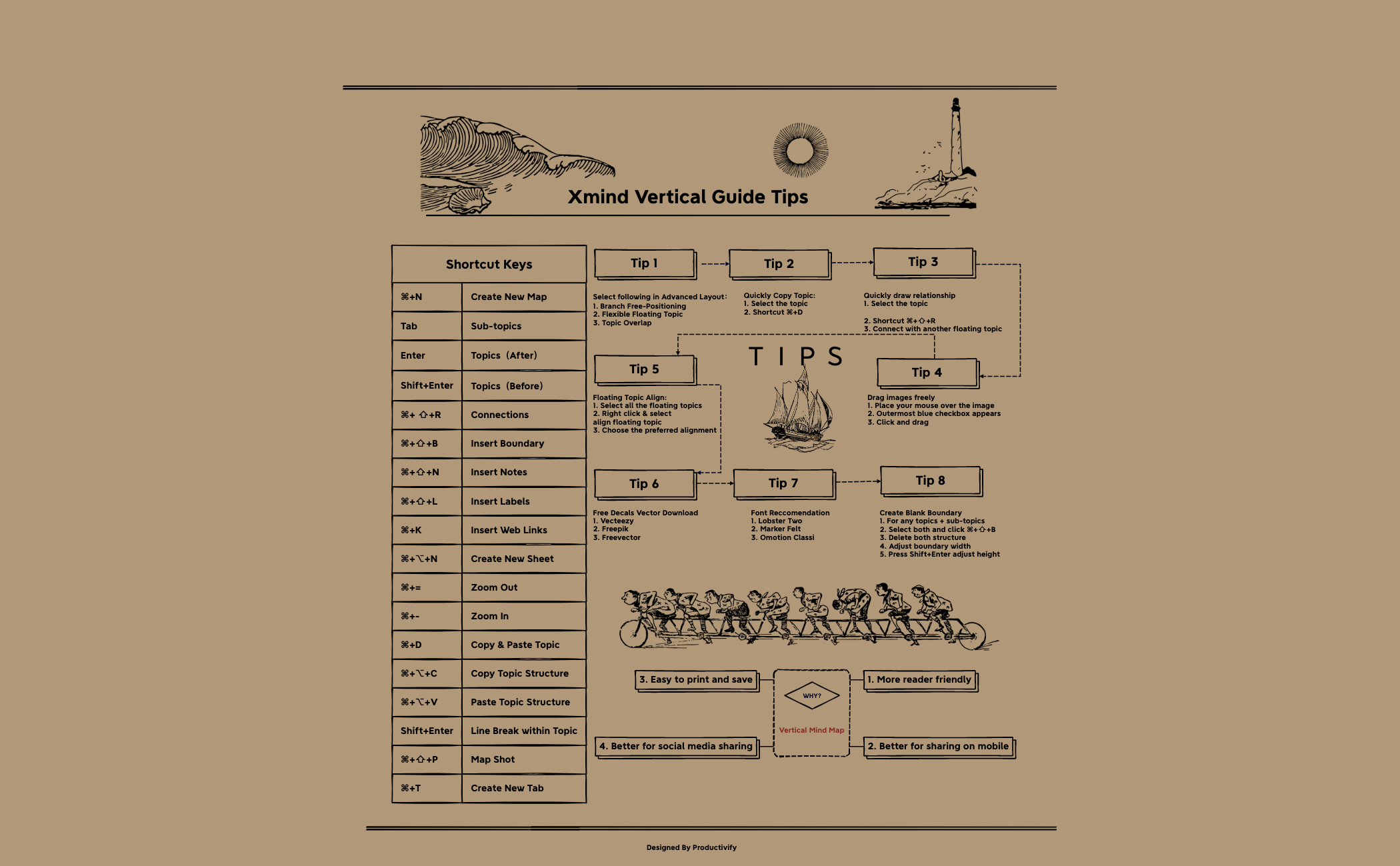
The Xmind Vertical Guide Tips template is a comprehensive cheat sheet for Xmind users, featuring over 90 nodes covering essential shortcuts, layout techniques, and design recommendations. It includes specific node names like 'Create Blank Boundary', 'Quickly draw relationship', and 'Font Reccomendation' with fonts such as Lobster Two and Marker Felt. This template serves as a quick reference to boost productivity, offering tips on vertical mind maps, floating topic alignment, and free decal vector downloads from Vecteezy, Freepik, and Freevector. Designed by Productivify, it is organized into branches like 'WHY?', 'Shortcut Keys', and practical tips, making it an indispensable resource for both beginners and advanced users.
使用條款Learning Xmind for the first time and wanting to memorize essential shortcuts quickly.
Designing a vertical mind map and needing tips on boundary creation and floating topic alignment.
Preparing a presentation or report and wanting to apply professional fonts and free decal vectors.
Launch the .xmind file to browse the main branches including Shortcut Keys, Vertical Mind Map techniques, and design tips.
Expand the tip nodes to follow detailed instructions for creating blank boundaries, drawing relationships, or aligning floating topics.
Customize the template with your own shortcuts or keep the Shortcut Keys branch open as a quick reference while you work.
The template includes over 90 nodes covering Xmind shortcuts, layout tips (e.g., vertical mind maps, boundaries), design recommendations (fonts, decal vectors), and advanced features like floating topic alignment and relationship drawing.
Select topics and subtopics, press ⌘+⇧+B to insert a boundary, delete the structure, adjust boundary width, and press Shift+Enter to adjust height. This creates a clean, custom boundary.
Yes, the template is free to download and fully editable in Xmind. You can customize tips, add your own shortcuts, and modify the layout to suit your workflow.
The template recommends Lobster Two, Marker Felt, and Omotion Classi for styling topics, giving your mind maps a creative and professional look.
The template lists default Xmind shortcuts, but you can edit the nodes to reflect your custom key bindings if you have changed them in Xmind settings.
把你的心智圖範本分享給全球創作者,從你的作品中獲得收益。

