




Product trainers and customer support teams
Creating a quick-reference guide for new coffee machine users during onboarding
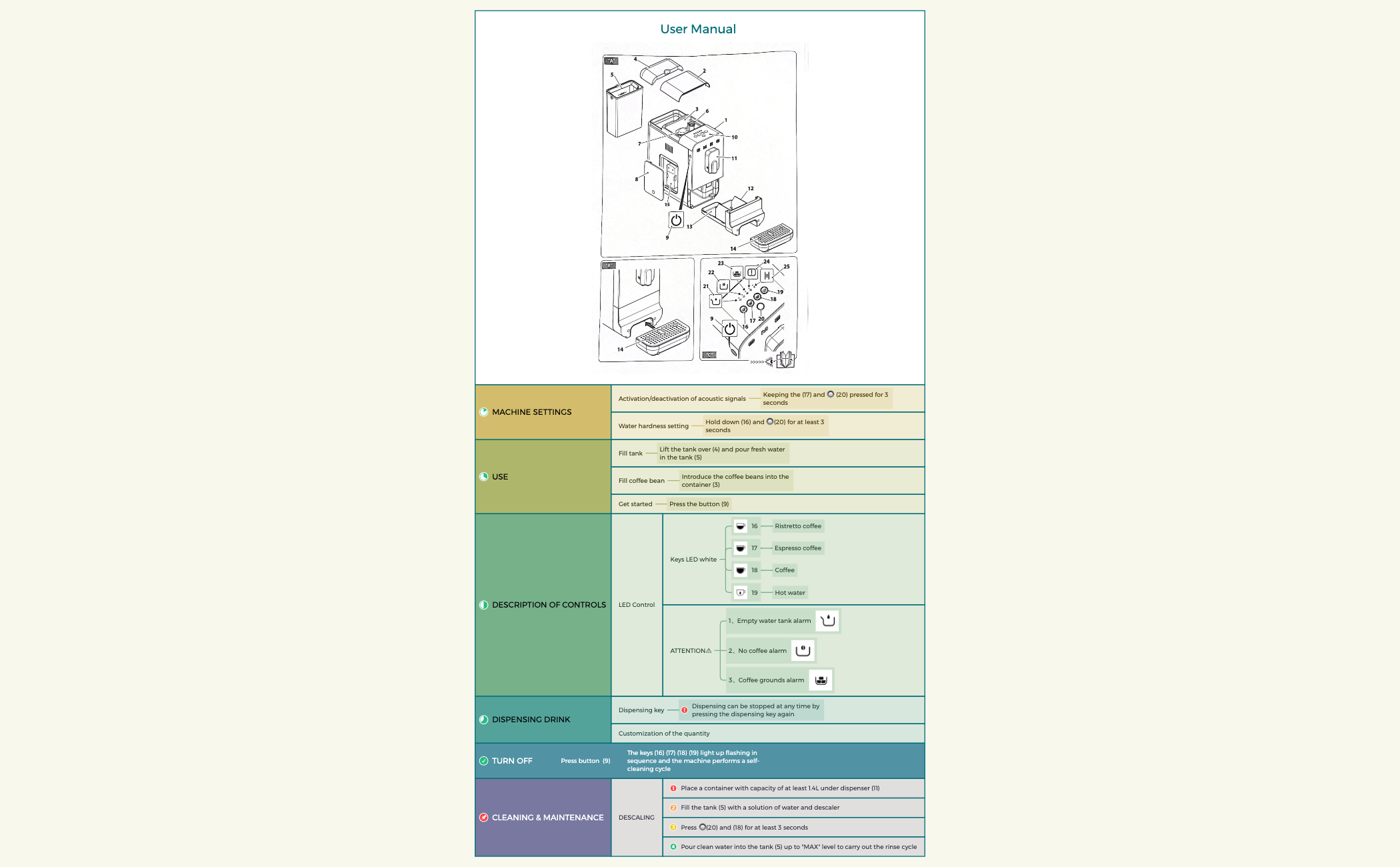
The User Manual mind map template provides a structured overview of a coffee machine's operation, covering 6 main branches and 41 nodes. It details machine settings like water hardness and acoustic signals, dispensing drinks, cleaning and maintenance including descaling, and LED control alerts such as 'Empty water tank alarm'. This template serves as a quick-reference cheat sheet for users, technicians, and support teams. Organized into clear sections like 'MACHINE SETTINGS' and 'DESCRIPTION OF CONTROLS', it maps out step-by-step procedures for daily use and upkeep. The visual layout uses a central root with radial branches, making it easy to locate information like 'Activation/deactivation of acoustic signals' or 'DESCALING' instructions at a glance. Ideal for product documentation, this mind map condenses a traditional manual into an interactive, scannable format.
使用條款Creating a quick-reference guide for new coffee machine users during onboarding
Troubleshooting a machine error like 'No coffee alarm' during daily operations
Standardizing maintenance procedures for a fleet of machines in a café chain
Launch the .xmind file to review the pre-defined branches like Machine Settings and Description of Controls.
Edit the node text and icons to match your specific device's button layouts and technical specifications.
Add or remove branches to suit your product model and export the map as a PDF for a printable quick-reference guide.
The template covers 6 main sections: MACHINE SETTINGS, USE, DESCRIPTION OF CONTROLS, DISPENSING DRINK, TURN OFF, and CLEANING & MAINTENANCE, with 41 nodes detailing button functions, alarms, and maintenance steps.
Navigate to the 'DESCRIPTION OF CONTROLS' branch to identify LED alarms like 'Empty water tank alarm' or 'Coffee grounds alarm'. Then refer to the relevant section (e.g., 'CLEANING & MAINTENANCE') for step-by-step solutions.
Yes, you can open the .xmind file in Xmind desktop or web, then edit node text, add images, or reorganize branches to match your specific device's manual.
Absolutely. Replace the placeholder button numbers (e.g., 16, 17, 20) and icons (🔘) with your machine's actual control labels or images.
It instructs to place a 1.4L container under the dispenser, fill the tank with water and descaler solution, press 🔘 (20) and (18) for 3 seconds, then rinse with clean water to 'MAX' level.
把你的心智圖範本分享給全球創作者,從你的作品中獲得收益。

