




New users and IT administrators
Setting up XMind 2020 for the first time on a new computer
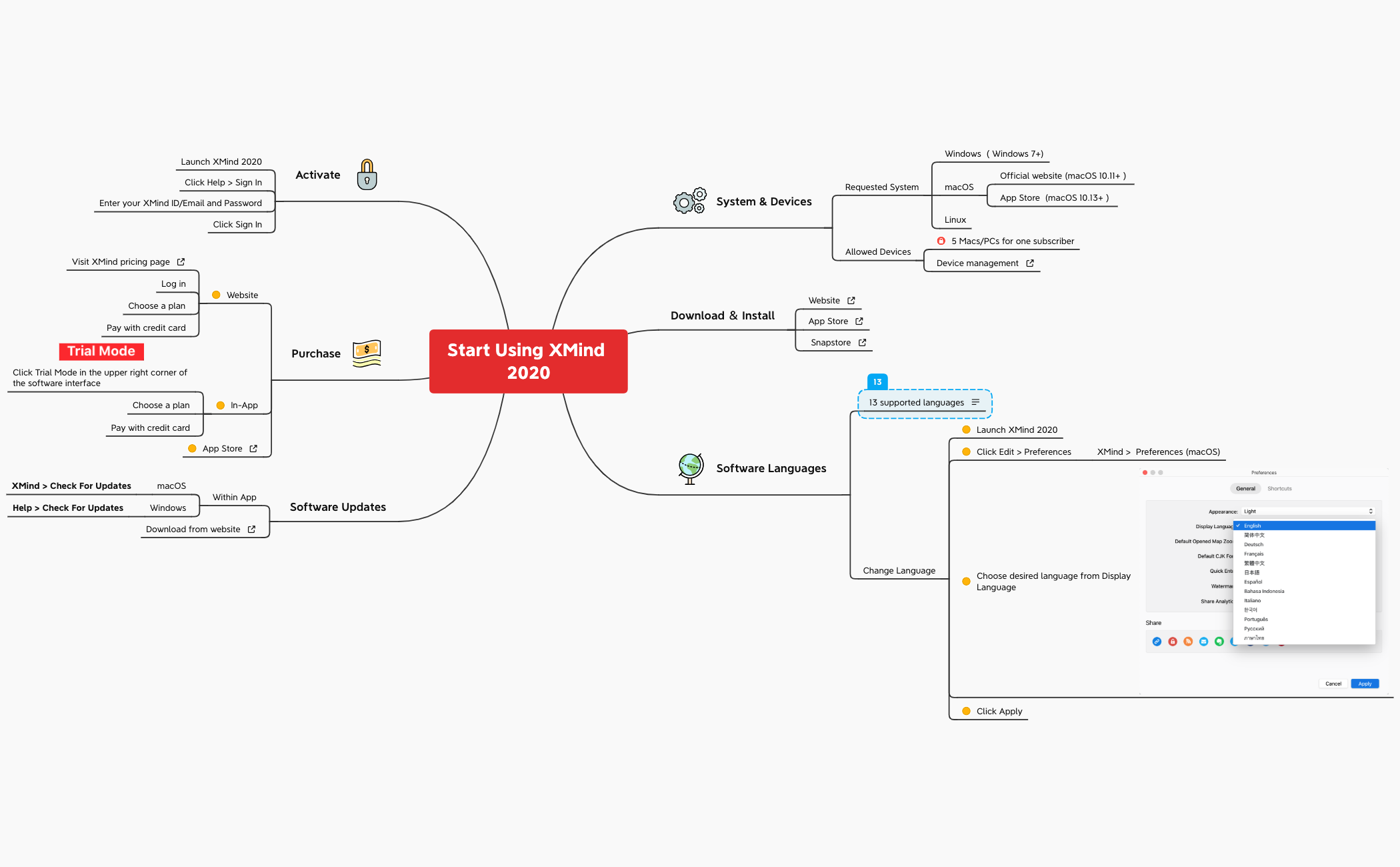
The Start Using XMind 2020 mind map template is a quick-start guide for new users, covering system requirements, installation, language settings, updates, purchase options, and activation across 46 nodes. It details supported platforms including Windows 7+, macOS 10.11+, and Linux, with device management allowing up to 5 devices per subscriber. Key nodes like '13 supported languages' and 'Change Language' explain how to switch the interface via Edit > Preferences. This template serves as a comprehensive onboarding cheat sheet for XMind 2020.
使用條款Setting up XMind 2020 for the first time on a new computer
Choosing a purchase plan and activating the software
Troubleshooting language or update issues during daily use
Launch the .xmind file to explore the 'System & Devices' branches for platform compatibility and installation sources.
Navigate to the 'Software Languages' nodes to learn how to switch the interface via the preferences menu.
Follow the 'Purchase' and 'Activate' branches to sign in and manage your license across up to five devices.
The template lists Windows 7+, macOS 10.11+ (via official website or App Store), and Linux. It also allows up to 5 devices per subscriber.
Launch XMind 2020, click Edit > Preferences (or XMind > Preferences on macOS), choose your desired language from the Display Language dropdown, and click Apply.
You can download from the official website, the App Store (macOS), or the Snapstore (Linux). The template provides all three sources.
Launch XMind 2020, click Help > Sign In, enter your XMind ID/Email and password, then click Sign In.
You can purchase via the XMind pricing page (website), in-app by clicking Trial Mode, or through the App Store. All options accept credit card.
On macOS, go to XMind > Check For Updates. On Windows, go to Help > Check For Updates. Alternatively, download the latest version from the website.
把你的心智圖範本分享給全球創作者,從你的作品中獲得收益。

