




Product managers and UX designers
Planning a new project dashboard for a SaaS product
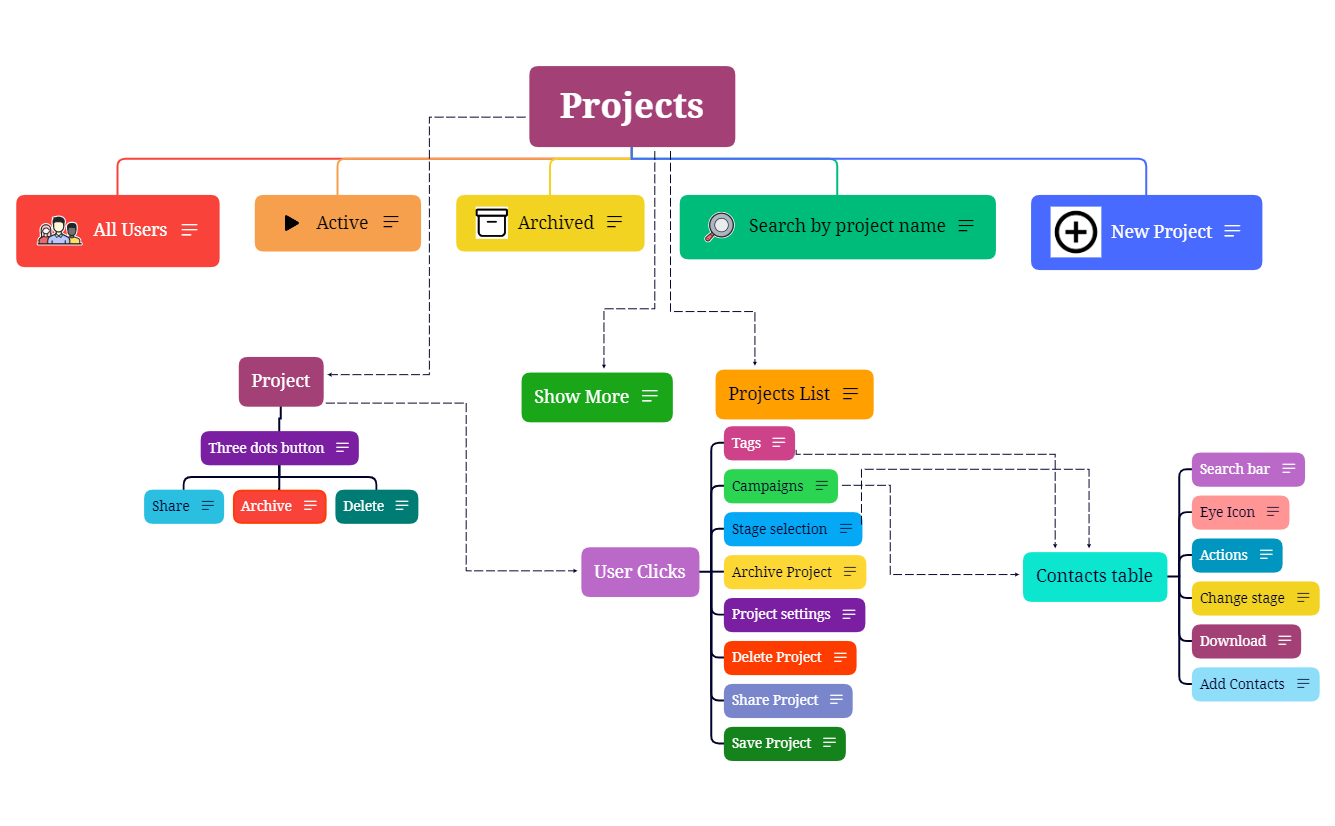
The Projects-MindMap template is a project management dashboard mind map designed for product managers, team leads, and operations professionals. It covers 29 nodes across a single sheet, organizing key project lifecycle actions such as creating, filtering, archiving, and sharing projects. The template includes branches for 'All Users', 'Active', 'Archived', and 'Search by project name', as well as a 'User Clicks' section detailing interactions like 'Tags', 'Campaigns', and 'Stage selection'. A 'Contacts table' branch adds contact management with actions like 'Change stage' and 'Add Contacts'. This Projects-MindMap template provides a structured overview to enhance project organization and efficiency, making it a practical cheat sheet for daily project oversight.
使用条款Planning a new project dashboard for a SaaS product
Onboarding a new team member to project management processes
Reviewing user interaction patterns across projects
Download the .xmind file and replace the central root node with your specific project category or organization name.
Expand the 'All Users', 'Active', and 'Archived' branches to define custom project statuses and lifecycle stages for your team.
Modify the 'User Clicks' and 'Contacts table' branches to match your specific project features, tags, and contact management requirements.
The template includes 29 nodes covering project filters (All Users, Active, Archived), project actions (Share, Archive, Delete), user interaction tracking (Tags, Campaigns, Stage selection), and a Contacts table with search and add functions.
Open the .xmind file in Xmind. The central 'Projects' node branches into filters and actions. Customize node labels to match your own projects, then expand branches like 'User Clicks' to track specific interactions.
Yes, the template is fully editable in Xmind. You can add, remove, or rename nodes, change colors, and attach notes or links to tailor it to your workflow.
Absolutely. The 'Projects List' and filter branches (Active, Archived) are designed to help you organize and switch between multiple projects efficiently.
The 'User Clicks' branch captures common user actions like 'Tags', 'Campaigns', and 'Stage selection', helping you map out user workflows and feature usage.
把你的思维导图模板分享给全球创作者,从你的作品中获得收益。

