




Recruiters and sourcers
Onboarding a new batch of leads from a sourcing campaign and needing to filter by source and assign tags.
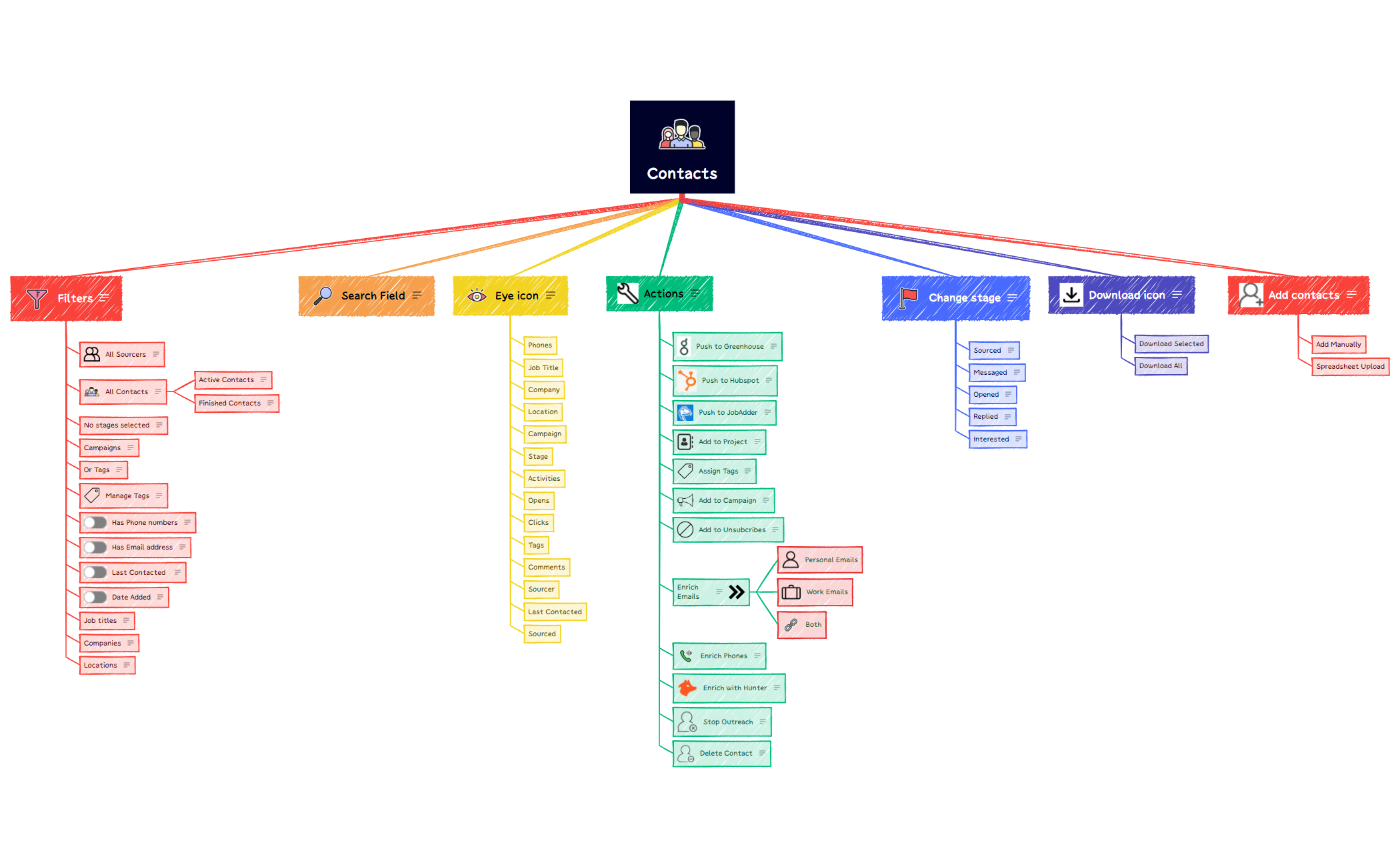
The Contacts mind map template provides a structured interface for managing a contact database, covering filtering, searching, editing, and adding entries. With 61 nodes organized under one root, it includes specific features like 'Filters' (by source, campaign, tags, phone, email, date, job title, company, location), 'Actions' (push to Greenhouse, Hubspot, JobAdder, enrich emails/phones, stop outreach), and 'Change stage' (Sourced, Messaged, Opened, Replied, Interested). This Contacts mind map template is ideal for recruiters and sales teams who need a visual cheat sheet for CRM workflows.
Terms and ConditionsOnboarding a new batch of leads from a sourcing campaign and needing to filter by source and assign tags.
Preparing to push enriched contact data into Hubspot or Greenhouse after email verification.
Reviewing outreach pipeline stages and updating contact statuses from 'Messaged' to 'Replied'.
Launch the template in Xmind and use the Filters branch to organize your database by source, campaign, or specific tags.
Customize the Actions branch to align with your specific CRM workflows like HubSpot or Greenhouse and set up your data enrichment steps.
Update the Change stage branch to monitor contact status and export the final mind map as a visual reference for your team.
It includes 61 nodes covering filters, search, visibility toggles, actions (push to CRM, enrich data), stage changes, downloads, and adding contacts manually or via spreadsheet.
Open the .xmind file, then customize the 'Filters' and 'Actions' branches to match your CRM fields. Use 'Change stage' to track contact progress and 'Add contacts' to import new leads.
Yes, all nodes are fully editable. You can add, remove, or rename branches like 'Push to Hubspot' or 'Enrich Emails' to fit your workflow.
The template includes action nodes for 'Push to Greenhouse', 'Push to Hubspot', and 'Push to JobAdder', which you can map to your actual integration steps.
It lets you toggle visibility of contact fields such as 'Phones', 'Job Title', 'Company', 'Location', 'Campaign', 'Stage', and 'Tags' in your contact list view.
Share your mind map templates with creators around the world and start earning from your work.

