




Chatbot developers and UX designers
Designing a mental health chatbot that needs to triage users based on their emotional state.
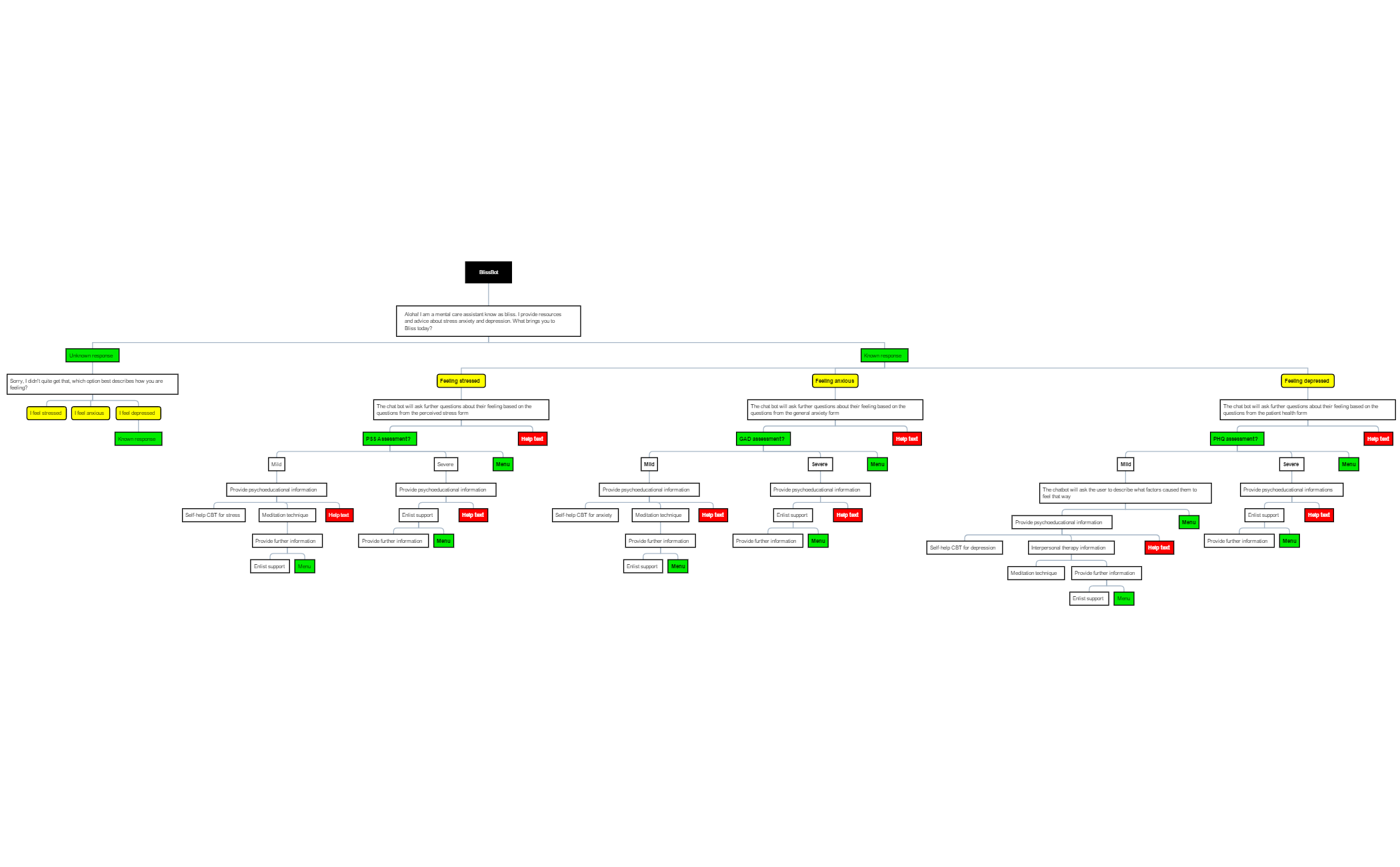
BlissBot is a mental care assistant mind map template that guides users through structured conversations about stress, anxiety, and depression. With 69 nodes across a single sheet, it branches from the root 'BlissBot' into 'Unknown response' and 'Known response' pathways. The 'Known response' branch covers three core feelings: 'Feeling stressed', 'Feeling anxious', and 'Feeling depressed', each linking to validated screening forms like the 'perceived stress form', 'general anxiety form', and 'patient health form'. This template serves as a conversational flowchart for mental health support, enabling chatbots or human assistants to triage and respond empathetically. The 'Unknown response' node handles unrecognized inputs by offering a menu of options: 'I feel stressed', 'I feel anxious', or 'I feel depressed'. Designed for mental health professionals, app developers, and support teams, the BlissBot mind map provides a ready-to-use framework for building compassionate, evidence-based digital care interactions.
Terms and ConditionsDesigning a mental health chatbot that needs to triage users based on their emotional state.
Training support staff to conduct structured mental health check-ins using validated screening forms.
Building a prototype for a wellness app that offers guided stress, anxiety, or depression assessments.
Open the template in Xmind to review the structured pathways branching from the BlissBot root into known and unknown response nodes.
Personalize the screening questions for stress, anxiety, and depression or add new branches to include specific coping tips and emergency contacts.
Save your finalized mind map as an image or PDF to use as a conversational guide or integrate the hierarchy into your chatbot logic.
BlissBot is a conversational flowchart for mental health support. It helps chatbots or human assistants triage users feeling stressed, anxious, or depressed by guiding them through validated screening questions from forms like the perceived stress scale, GAD-7, and PHQ-9.
When the user's input is not recognized, the 'Unknown response' node offers a menu of three options: 'I feel stressed', 'I feel anxious', or 'I feel depressed'. This ensures the conversation stays on track and directs users to the appropriate assessment pathway.
Yes, the template references three validated forms: the 'perceived stress form' (PSS), 'general anxiety form' (GAD-7), and 'patient health form' (PHQ-9). These are widely used in mental health settings to assess stress, anxiety, and depression severity.
Absolutely. You can open the .xmind file in Xmind desktop or web, then edit node text, add new branches, or modify the screening questions to fit your specific use case, such as adding coping resources or referral links.
Mental health app developers, chatbot designers, therapists, and support teams can use BlissBot to create empathetic, structured mental health conversations. It's also useful for training AI assistants in mental health triage.
No, BlissBot is a conversational framework for initial triage and support. It does not replace professional medical advice, diagnosis, or treatment. Users should always consult a qualified mental health professional for personalized care.
Share your mind map templates with creators around the world and start earning from your work.

