




HR managers and new hires
Onboarding new employees to understand company hierarchy and departmental relationships.
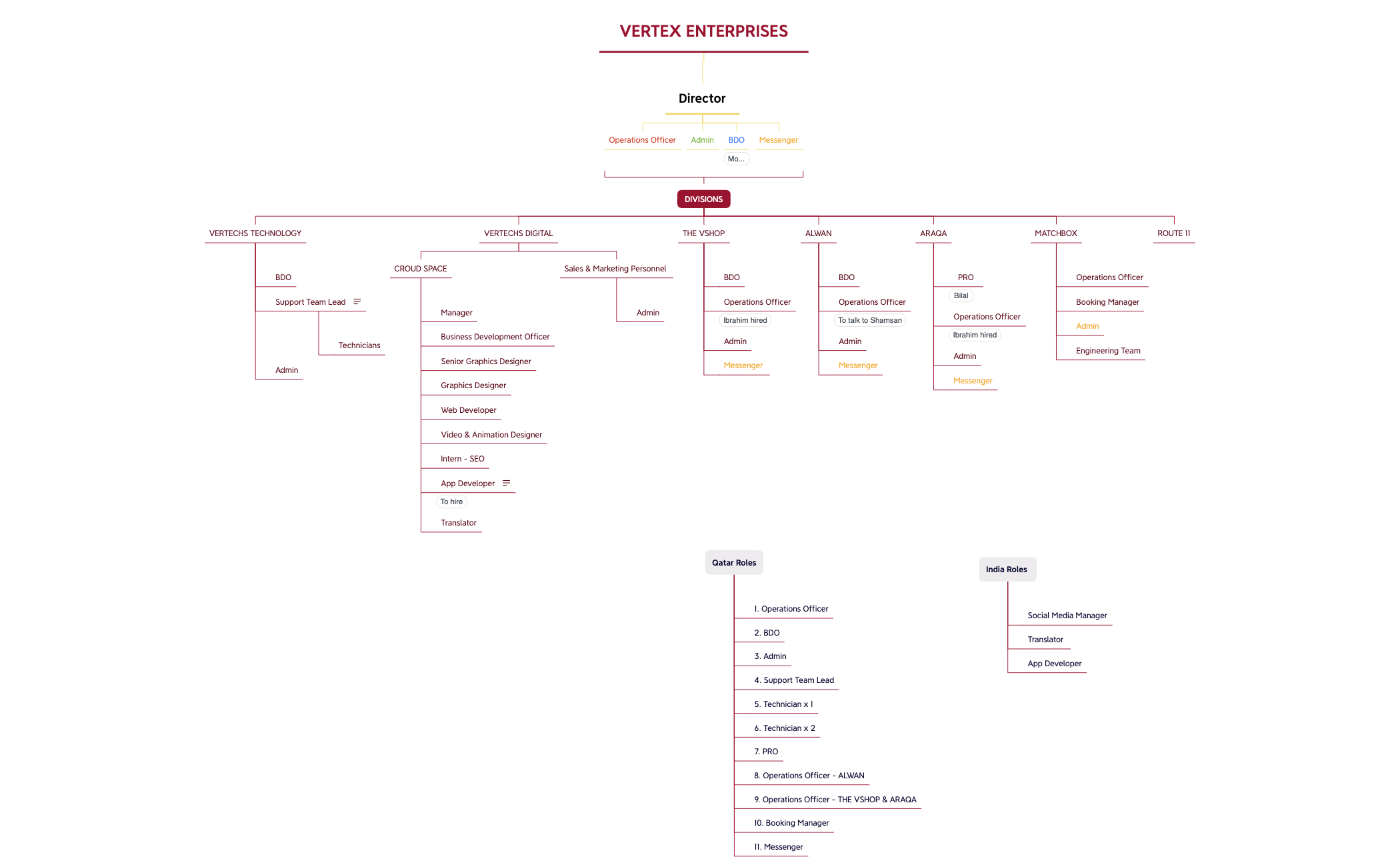
The Vertex Enterprises organizational chart mind map provides a comprehensive hierarchy of a multi-division company with 62 nodes across Qatar, India, and divisional roles. It includes specific positions such as 'Operations Officer', 'Support Team Lead', and 'Booking Manager', and covers divisions like VERTECHS TECHNOLOGY, VERTECHS DIGITAL, THE VSHOP, ALWAN, ARAQA, MATCHBOX, and ROUTE 11. This Vertex Enterprises template is ideal for HR managers and executives to visualize reporting lines and departmental structures. The map is organized with a central 'VERTEX ENTERPRISES' root branching into Director, Qatar Roles, India Roles, and DIVISIONS, making it a practical Vertex Enterprises cheat sheet for onboarding and restructuring.
Terms and ConditionsOnboarding new employees to understand company hierarchy and departmental relationships.
Planning a corporate restructuring or merger to visualize reporting lines across divisions.
Creating a staffing plan for a multi-location company with roles in Qatar and India.
Open the Vertex Enterprises template in Xmind to explore the existing hierarchy across Qatar, India, and various divisions.
Edit existing nodes to match your specific positions and add new child topics to reflect your company's unique reporting lines.
Export your completed organizational map as a PDF or image to facilitate onboarding and internal restructuring efforts.
The template includes a full organizational chart with 62 nodes covering the Director, Qatar and India roles, and seven divisions such as VERTECHS TECHNOLOGY and THE VSHOP, with specific positions like Operations Officer and Support Team Lead.
Open the .xmind file in Xmind, then modify the node titles and hierarchy to reflect your company's structure. You can add or remove branches under each division to match your reporting lines.
Yes, the template is fully editable in Xmind desktop or web. You can export it as an image or PDF for printing or sharing.
Use the 'DIVISIONS' branch to see each subsidiary's team, then expand nodes like 'Support Team Lead' under VERTECHS TECHNOLOGY to view sub-roles like Technicians.
Absolutely. You can rename any node, add new branches for additional roles, or reorganize the hierarchy by dragging nodes in Xmind.
Share your mind map templates with creators around the world and start earning from your work.

