




Travel managers and finance teams
Reconciling travel expenses after a business trip, ensuring all tickets, forex, and visa costs are accounted for.
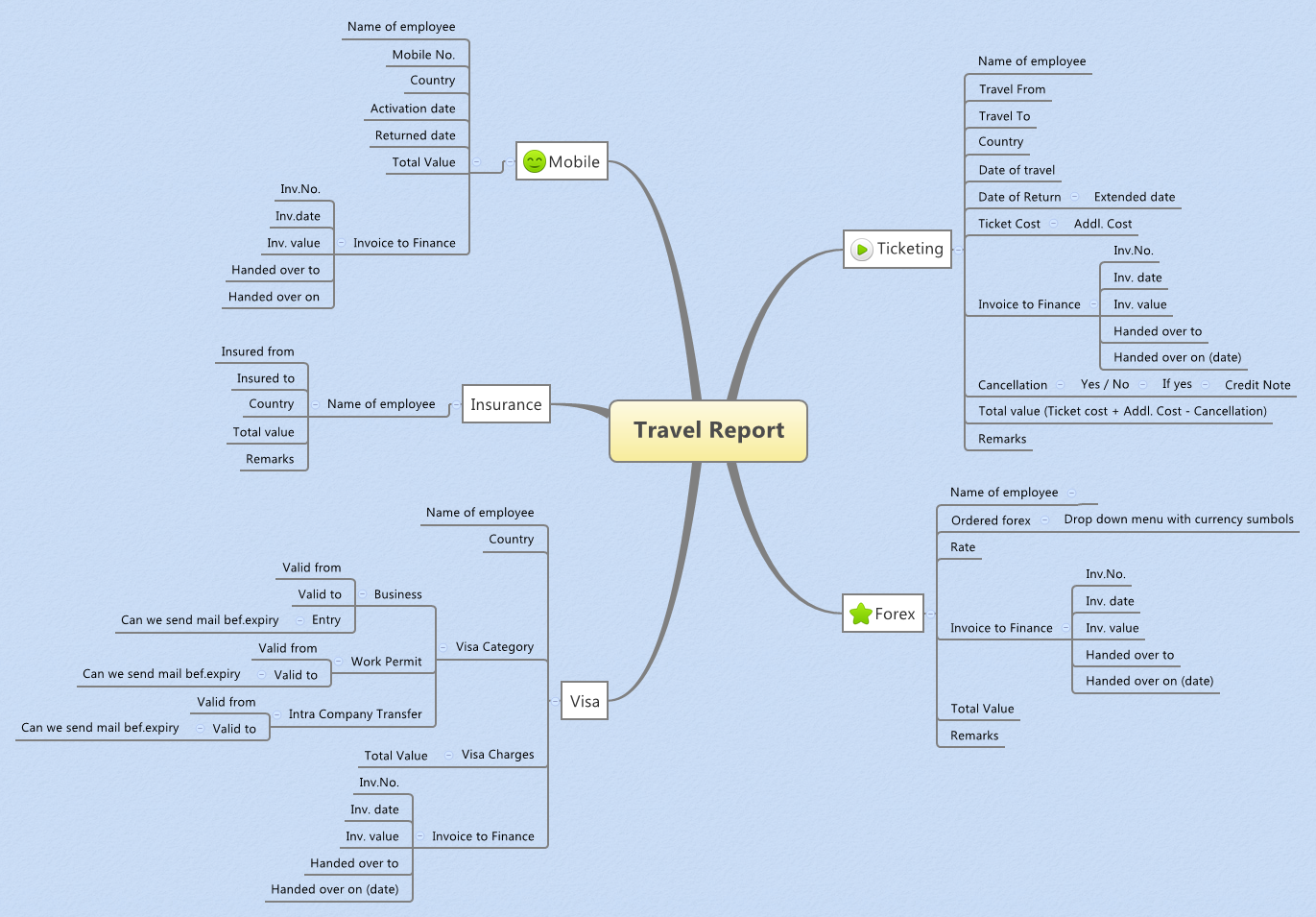
The Travel Report mind map template is a structured tool for corporate travel managers and finance teams to track and reconcile expenses across five core categories: Ticketing, Forex, Visa, Insurance, and Mobile. With 83 nodes organized under a single root, it covers every step from employee name and travel dates to invoice submission and cancellation handling. Key fields include 'Ticket Cost', 'Addl. Cost', and 'Total value (Ticket cost + Addl. Cost - Cancellation)' for ticketing, while Visa branches into categories like 'Business', 'Work Permit', and 'Intra Company Transfer' with validity dates. This template serves as a comprehensive travel expense tracker and invoice management cheat sheet, ensuring no financial detail is overlooked.
使用條款Reconciling travel expenses after a business trip, ensuring all tickets, forex, and visa costs are accounted for.
Preparing monthly travel expense reports for multiple employees across different countries.
Auditing travel invoices and verifying handover of documents to finance department.
Open the template in Xmind and expand the five core branches including Ticketing, Forex, Visa, Insurance, and Mobile.
Replace placeholder text with specific employee data and record all financial values within the dedicated invoice sub-branches.
Review the calculated totals for accuracy before saving and exporting your completed travel report to share with stakeholders.
The template covers five main categories: Ticketing, Forex, Visa, Insurance, and Mobile. Each includes fields for employee details, costs, invoice tracking, and remarks, with 83 nodes total.
Open the .xmind file, then fill in each branch: enter employee name, travel dates, costs, and invoice numbers. Use the 'Cancellation' node to mark if a ticket was canceled and adjust totals accordingly.
Yes, it is fully editable in Xmind. You can customize fields, add or remove nodes, and export as PDF or image for printing or sharing with finance.
The template is designed per trip per employee. For multiple employees, duplicate the template or create separate files for each traveler.
It includes fields for Invoice Number, Invoice Date, Invoice Value, Handed Over To, and Handed Over On (date), ensuring a clear audit trail for finance teams.
把你的心智圖範本分享給全球創作者,從你的作品中獲得收益。

