




Students and self-learners
Preparing for a final exam with multiple subjects and limited time.
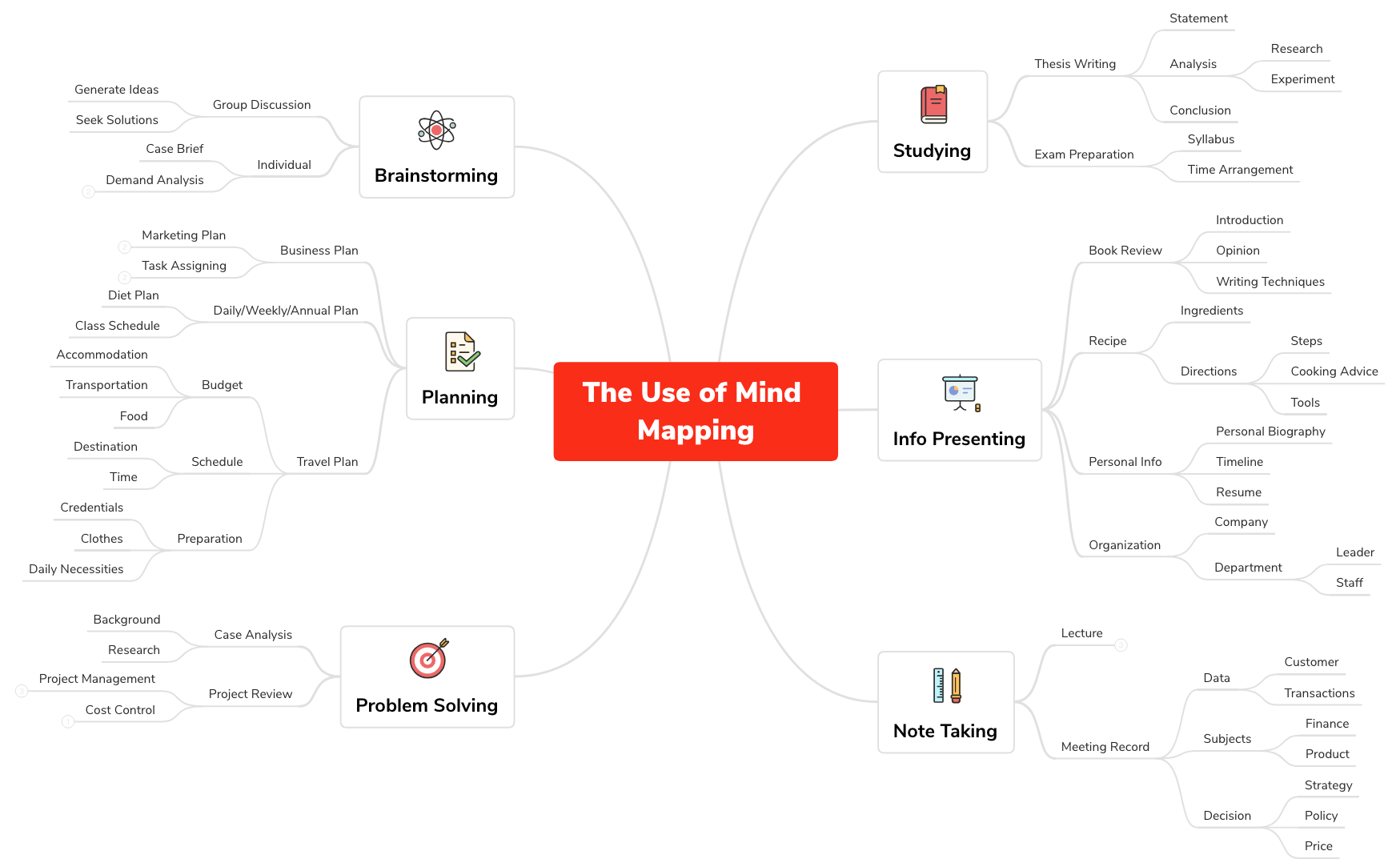
The Use of Mind Mapping template from Xmind provides a structured framework for applying mind maps across six core domains: Studying, Info Presenting, Note Taking, Problem Solving, Planning, and Brainstorming. With 90 nodes organized into 6 main branches, it covers practical scenarios such as 'Thesis Writing' (including Statement, Analysis, and Conclusion), 'Meeting Record' (with Data, Subjects, and Decision sub-nodes), and 'Travel Plan' (Budget, Schedule, Preparation). This template serves as a comprehensive cheat sheet for students, professionals, and creatives looking to leverage mind maps for enhanced productivity and clarity. It is designed to be a versatile template that can be adapted to various tasks, from exam preparation to business planning.
Términos y condicionesPreparing for a final exam with multiple subjects and limited time.
Organizing a business plan for a new product launch, including marketing and task assignments.
Taking structured notes during a client meeting to capture decisions and action items.
Launch the template in Xmind and expand one of the six core domains like Studying or Planning to find a structure that fits your current task.
Replace the placeholder text with your specific information and use the Insert key to add new child nodes for detailed sub-points.
Apply unique colors, icons, and formatting styles using the Xmind toolbar to visually distinguish between different categories and priorities.
The template includes 90 nodes across 6 main branches: Studying, Info Presenting, Note Taking, Problem Solving, Planning, and Brainstorming. Each branch contains detailed sub-nodes for specific use cases like Thesis Writing, Meeting Record, and Travel Plan.
Navigate to the 'Studying' branch and expand 'Exam Preparation'. Use the 'Syllabus' node to list topics and 'Time Arrangement' to create a study schedule. Customize nodes with your exam dates and subjects.
Yes, the template is fully editable in Xmind. You can add, remove, or modify nodes. To print, export the mind map as PDF or image from Xmind's export options.
Go to the 'Planning' branch and expand 'Business Plan'. Use 'Marketing Plan' for competitor analysis and sales goals, and 'Task Assigning' to divide labor and set deadlines. Customize each node with your specific business data.
Absolutely. Under 'Brainstorming', you'll find 'Group Discussion' with sub-nodes 'Generate Ideas' and 'Seek Solutions'. Use it to capture and organize ideas collaboratively during meetings.
Comparte tus plantillas de mapas mentales con creadores de todo el mundo y empieza a ganar con tu trabajo.

