




Backend architects and senior developers
Designing the initial system architecture for a new web application that requires async task processing and search functionality.
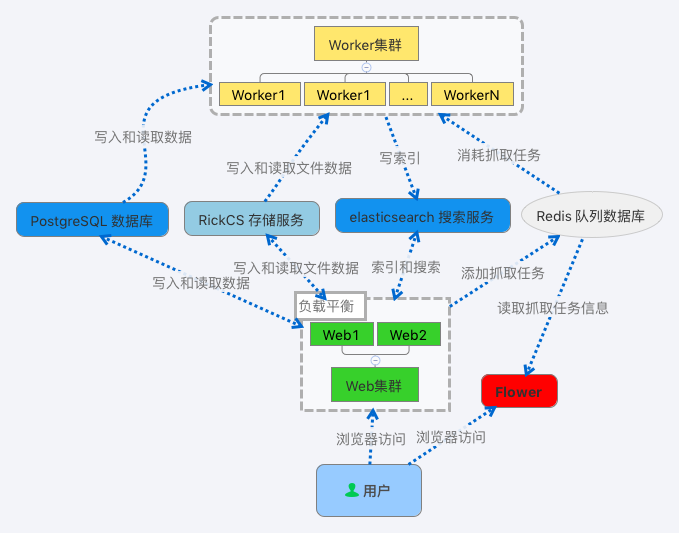
The '用户' mind map template provides a system architecture overview for a user-facing web application, covering 7 core service components including Redis 队列数据库, PostgreSQL 数据库, and elasticsearch 搜索服务. This template is designed for backend engineers and system architects to visualize the relationship between a Web集群, Worker集群, and supporting infrastructure like RickCS 存储服务 and Flower monitoring. With 14 nodes organized in a single sheet, it offers a concise cheat sheet for deployment planning or documentation. The structure highlights key dependencies such as the Worker集群 with multiple worker instances and the Web集群's load-balanced servers.
Terms and ConditionsDesigning the initial system architecture for a new web application that requires async task processing and search functionality.
Documenting an existing production environment for onboarding new team members or creating runbooks.
Reviewing and optimizing the current deployment topology during a capacity planning or scaling exercise.
在 Xmind 中打开此模板并根据实际业务需求重命名 Redis、PostgreSQL 等核心服务节点。
根据系统负载增删 Web 或 Worker 集群节点,并使用联系线标明各组件之间的数据依赖关系。
完成系统架构的可视化配置后,将思维导图保存并导出为图片或 PDF 以供技术文档使用。
The template includes 7 main service components: Redis 队列数据库, RickCS 存储服务, Flower, Worker集群, PostgreSQL 数据库, elasticsearch 搜索服务, and Web集群. It also shows sub-nodes like Worker1, Worker2, Web1, and Web2.
Open the .xmind file in Xmind, then replace the generic node names (e.g., Worker1, Web1) with your actual server hostnames or IPs. You can also add new nodes for additional services or scale the cluster sizes.
Yes, the template is fully editable in Xmind. You can add, remove, or rename nodes, change colors, and attach notes or links to each component for detailed documentation.
Flower is a monitoring tool for Celery distributed task queues. In this template, it oversees the Worker集群 that processes tasks from Redis 队列数据库.
Yes, the template's structure suits microservices documentation. You can adapt each service node (e.g., PostgreSQL 数据库, elasticsearch 搜索服务) to represent individual microservices with their own databases.
Share your mind map templates with creators around the world and start earning from your work.

