




HR managers and team leads
Onboarding new employees to understand team structure
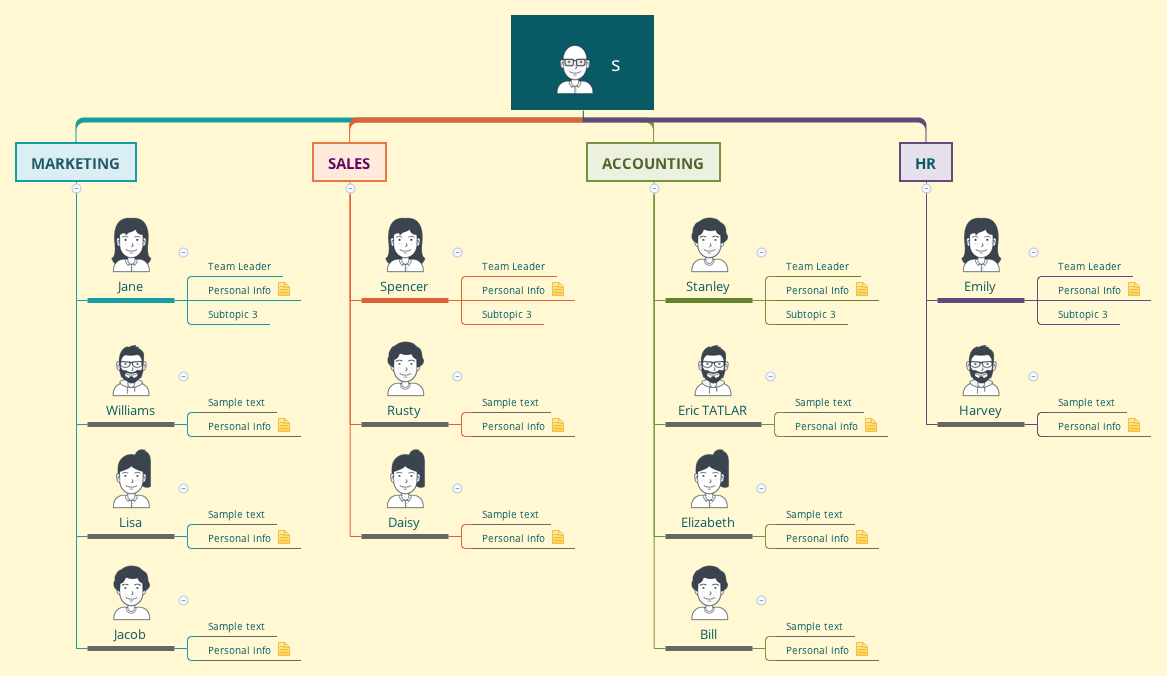
This organizational chart mind map template, titled 'ssdfsfdsfsdf', provides a structured overview of a company's departments and key personnel across 48 nodes. It covers four core departments — Marketing, Sales, Accounting, and HR — each listing team members such as 'Jane' (Team Leader in Marketing) and 'Stanley' (Team Leader in Accounting). The template serves as a quick-reference org chart for visualizing reporting lines and team composition. It is designed for managers and HR professionals to map out their teams efficiently. The structure includes personal info fields for each employee, making it a practical 'ssdfsfdsfsdf mind map' for onboarding or team overviews.
Terms and ConditionsOnboarding new employees to understand team structure
Restructuring departments and visualizing new reporting lines
Presenting company hierarchy in a team meeting or stakeholder update
Open the .xmind file to explore the pre-defined organizational branches for Marketing, Sales, Accounting, and HR.
Replace the placeholder names and update the personal information fields for each team leader and employee node.
Add or remove nodes to match your specific company size before exporting or sharing the final organizational chart.
The template includes four departments: Marketing, Sales, Accounting, and HR. Each department lists team members with roles like 'Team Leader' and fields for personal info, making it a ready-to-use org chart.
Open the .xmind file in Xmind, then replace the sample names and personal info with your actual team data. You can add or remove nodes to match your organization's structure.
Yes, the template is fully editable in Xmind. You can customize text, add icons, and export it as an image or PDF for printing or sharing.
Absolutely. Each employee node has a 'Personal Info' subtopic that you can expand with details like email, phone, or role-specific notes.
Use the built-in relationship lines in Xmind to connect team leaders to their members. You can also color-code departments for clarity.
Share your mind map templates with creators around the world and start earning from your work.

