




Individuals or families managing household finances
Creating a personal monthly budget to control discretionary spending
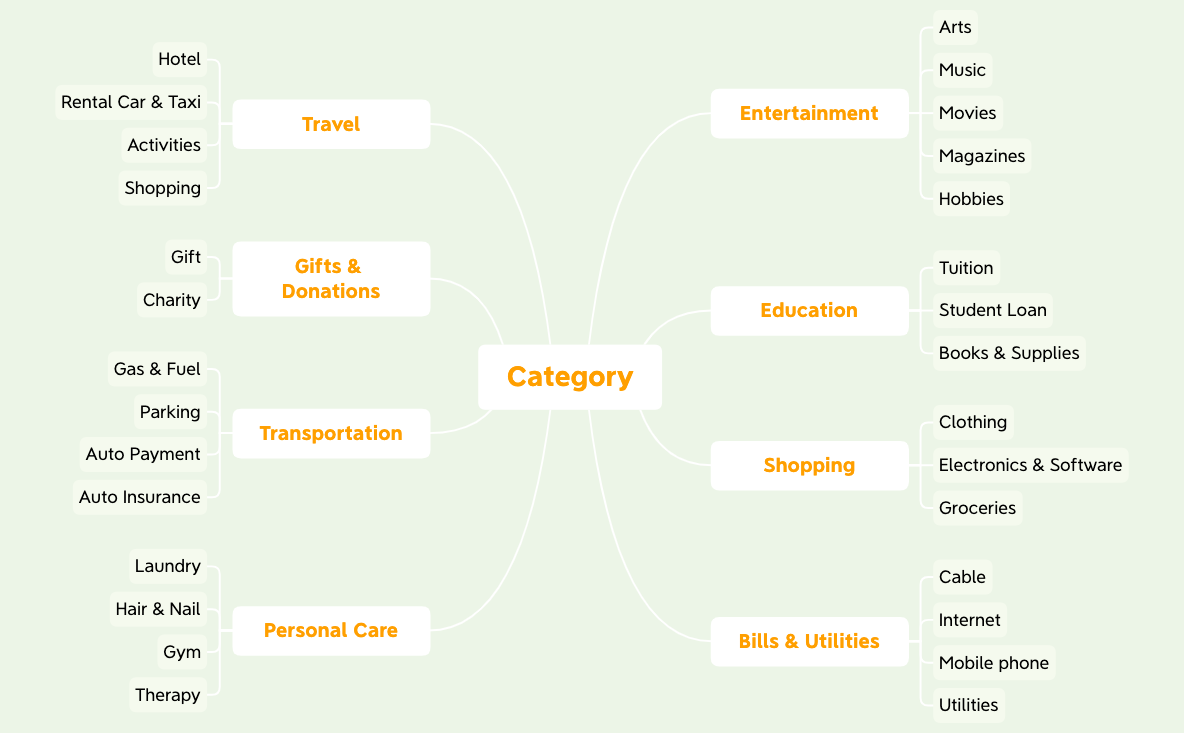
The Spending Category mind map template organizes personal expenses into 8 major categories with 38 sub-nodes, covering Entertainment (Arts, Music, Movies, Magazines, Hobbies), Education (Tuition, Student Loan, Books & Supplies), Shopping (Clothing, Electronics & Software, Groceries), Bills & Utilities (Cable, Internet, Mobile phone, Utilities), Personal Care (Laundry, Hair & Nail, Gym, Therapy), Transportation (Gas & Fuel, Parking, Auto Payment, Auto Insurance), Gifts & Donations (Gift, Charity), and Travel (Hotel, Rental Car & Taxi, Activities, Shopping). This template helps users track and categorize spending for budgeting or financial review. It is structured as a radial mind map with the root node 'Category' and eight first-level branches, each containing 2–5 specific expense items. Ideal for personal finance management, this Spending Category mind map template can be customized in Xmind to add or remove categories as needed.
Terms and ConditionsCreating a personal monthly budget to control discretionary spending
Reviewing past expenses to identify overspending in categories like Entertainment or Shopping
Setting up a new expense tracking system for a small business or freelancer
Launch the Spending Category template in Xmind to view the eight pre-defined expense branches and their sub-nodes.
Modify the existing branches and sub-items to match your personal spending habits by adding, removing, or renaming nodes.
Input your budget limits using the Notes feature and export the final map as a PDF or image for your financial review.
The template includes 8 main categories: Entertainment, Education, Shopping, Bills & Utilities, Personal Care, Transportation, Gifts & Donations, and Travel, each with 2–5 specific sub-items like Tuition, Groceries, and Auto Insurance.
Open the .xmind file in Xmind, then replace the placeholder sub-items with your actual expenses. You can add spending amounts as notes or use the map as a checklist to review your spending by category.
Yes, the template is fully editable in Xmind (desktop, web, or mobile). You can add, remove, or rename categories. To print, export the mind map as PDF or image from Xmind.
Absolutely. You can rename branches like 'Entertainment' to 'Client Entertainment' or add new categories such as 'Office Supplies' to adapt the template for business expense tracking.
Use the template as a visual budget tracker: assign a budget amount to each category, then periodically update the map with actual spending. The mind map layout gives you a quick overview of where your money goes.
Share your mind map templates with creators around the world and start earning from your work.

