




Product managers and UX designers
Kicking off a product design review to identify core issues and potential solutions.
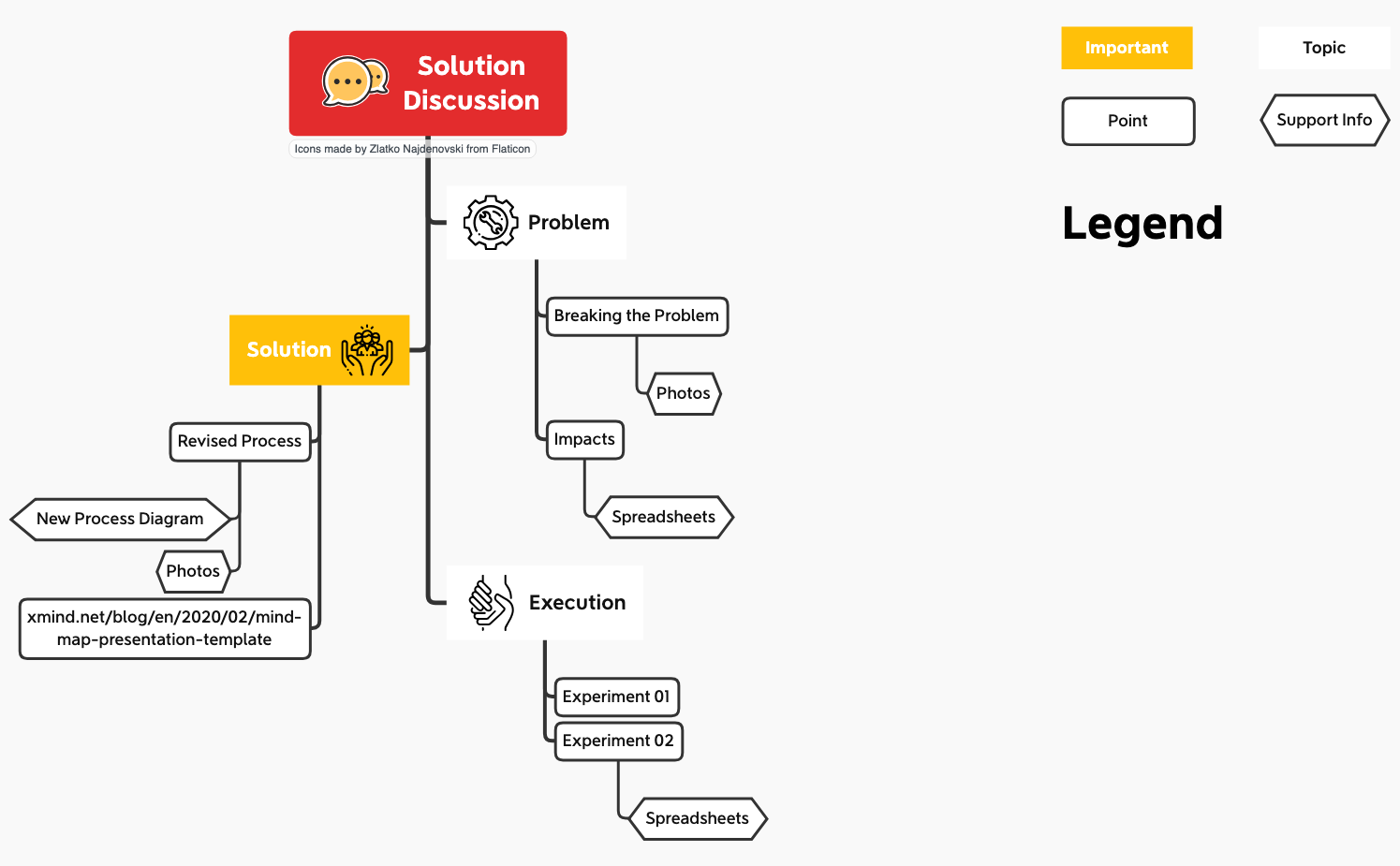
The Solution Discussion mind map template from Xmind provides a structured framework for presenting and analyzing problem-solving workflows. With 20 nodes organized around eight core branches—Problem, Solution, Execution, Topic, Important, Support Info, Point, and Legend—it enables teams to break down issues, propose solutions, and track experiments. The template includes specific elements like 'Breaking the Problem' with photos, 'Impacts' tracked via spreadsheets, and 'Revised Process' diagrams. It also links to external resources such as the Xmind blog for presentation tips. This template is ideal for product managers, engineers, and consultants who need a clear, visual discussion guide.
使用条款Kicking off a product design review to identify core issues and potential solutions.
Preparing a structured presentation for a cross-functional team to align on execution steps.
Documenting a series of experiments and their outcomes during a process improvement sprint.
Open the template in Xmind and replace the placeholder content within the eight core branches to reflect your specific problem and solution.
Configure the legend for clarity and enhance your nodes by dragging in photos, diagrams, or linking external spreadsheets for supporting data.
Review your structured workflow and export the mind map as a PDF, image, or slide deck to present your findings to the team.
The template includes 20 nodes across eight branches: Problem, Solution, Execution, Topic, Important, Support Info, Point, and Legend. It features sub-nodes like 'Breaking the Problem', 'Impacts', 'Revised Process', and 'Experiment 01'.
Open the .xmind file in Xmind, then populate each branch with your discussion points. Use the 'Problem' branch to define challenges, 'Solution' for proposed fixes, and 'Execution' for experiments. Customize icons and colors via the Legend.
Yes, the template is fully editable in Xmind Desktop or Web. You can add, remove, or rearrange nodes. Export as PDF or image for printing.
Yes, the template already includes placeholders for 'Spreadsheets' under 'Impacts' and 'Experiment 02'. You can attach files or add hyperlinks to any node.
The 'Legend' branch helps define visual cues such as color codes, icons, or priority markers used throughout the mind map, making it easier for viewers to interpret the diagram.
把你的思维导图模板分享给全球创作者,从你的作品中获得收益。

