




IT administrators and production managers
Setting up access control for a new SMT production line
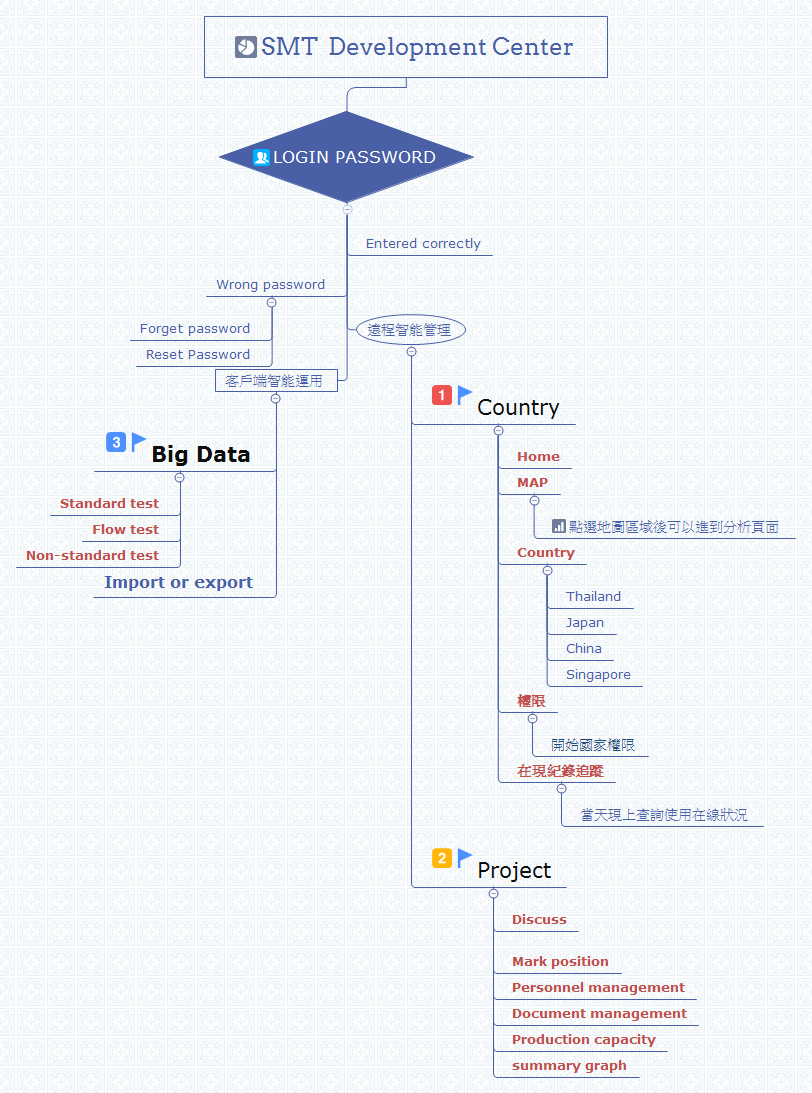
The SMT Development Center mind map template provides a structured overview of system access, remote intelligent management, and client-side smart applications in a Surface Mount Technology environment. Covering 33 nodes across three main branches, this template helps engineers and managers visualize login workflows, project oversight, and data-driven testing processes. Key branches include 'Login password' with sub-nodes for 'Entered correctly' and 'Wrong password' handling, '遠程智能管理' (Remote Intelligent Management) featuring 'Country' and 'Project' sub-trees, and '客戶端智能運用' (Client-Side Smart Applications) covering 'Big Data' testing categories. This SMT Development Center mind map serves as a practical cheat sheet for streamlining operations and troubleshooting in electronics manufacturing.
NutzungsbedingungenSetting up access control for a new SMT production line
Planning remote project tasks across multiple countries
Organizing testing workflows for client data applications
Open the template in Xmind and expand the Login branch to customize your specific password recovery and system access workflows.
Utilize the Remote Intelligent Management branch to input country-specific settings and organize personnel or document management details for your projects.
Populate the Client-Side Smart Applications branch with big data testing protocols before saving the file to share with your engineering team.
The template covers login password management, remote intelligent management (including country and project settings), and client-side smart applications like big data testing and import/export functions.
Navigate to the '遠程智能管理' branch, then expand 'Project' to access sub-nodes like 'Discuss', 'Mark position', 'Personnel management', and 'Document management' to organize project tasks.
Yes, you can edit the 'Wrong password' and 'Reset Password' nodes in Xmind to match your organization's password recovery procedures.
Yes, the 'Production capacity' node under 'Project' allows you to monitor and plan manufacturing output within the template.
The 'Big Data' node includes 'Standard test', 'Flow test', and 'Non-standard test' to categorize different testing methodologies for data analysis.
Teilen Sie Ihre Mindmap-Vorlagen mit Erstellern weltweit und verdienen Sie mit Ihrer Arbeit.

