




UX designers and product managers
Planning the screen hierarchy for a new EV charging mobile app
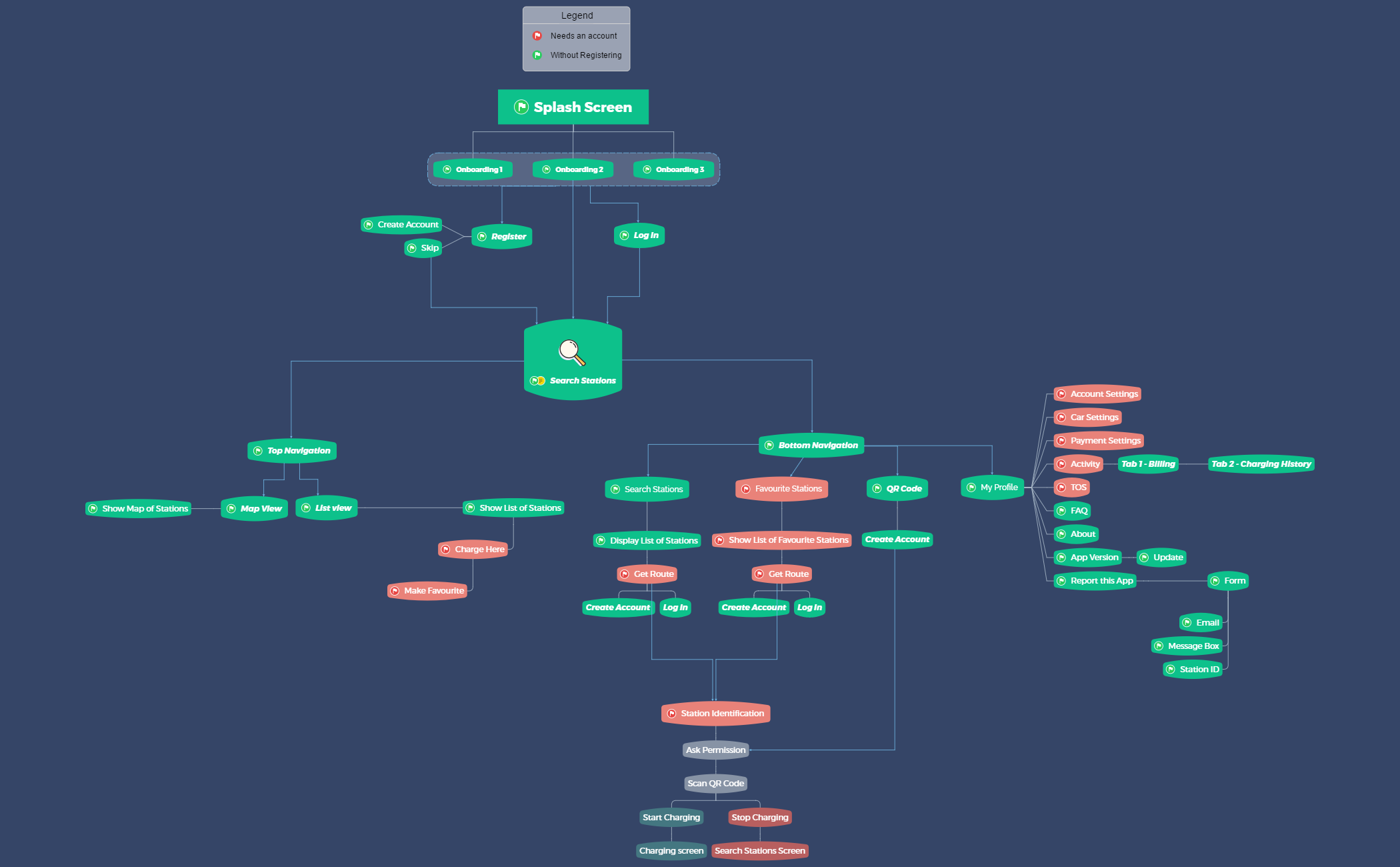
The Sitemap mind map template provides a comprehensive visual breakdown of an EV charging app's screen hierarchy, covering 53 nodes across onboarding, authentication, navigation, and station interaction flows. It includes verbatim nodes such as 'Splash Screen', 'Bottom Navigation', and 'Station Identification', making it an essential sitemap template for UX designers and product managers. Organized from initial app launch through core features like 'Search Stations', 'My Profile', and 'QR Code', this sitemap cheat sheet maps every user-facing screen and action, including edge cases like 'Create Account' prompts during route requests. The template serves as a ready-to-use sitemap template for mapping mobile app information architecture.
Términos y condicionesPlanning the screen hierarchy for a new EV charging mobile app
Reviewing and optimizing existing app navigation flows before a major redesign
Documenting app features for stakeholder presentations or developer handoffs
Open the template in Xmind to analyze the pre-built hierarchy from the Splash Screen through to Station Identification.
Modify the 53 existing nodes by renaming placeholders and right-clicking to add or remove branches that match your app's specific features.
Refine the information architecture for your UX project and export the final map as an image or PDF for team collaboration.
The template includes 53 nodes covering the full app flow: splash screen, onboarding, registration, login, bottom/top navigation, search stations, user profile, map and list views, favourites, QR code, and station identification with charging controls.
Open the .xmind file in Xmind, then replace placeholder screen names (e.g., 'Onboarding 1') with your own screens. Add or remove branches to match your app's features, and use the visual layout to present the information architecture to stakeholders.
Yes, the template is fully editable in Xmind (desktop, web, or mobile). You can export it as an image or PDF for printing or sharing with your team.
It represents the flow where the app asks permission to scan a QR code at a charging station, then allows the user to start or stop charging—a critical interaction for EV charging apps.
Absolutely. The 'Activity' node includes 'Tab 1 - Billing' and 'Tab 2 - Charging History' as examples. You can rename, reorder, or add more tabs to fit your app's reporting needs.
Comparte tus plantillas de mapas mentales con creadores de todo el mundo y empieza a ganar con tu trabajo.

