




Sitecore team leads and technical managers
Onboarding new Sitecore developers or architects to understand the platform's ecosystem and terminology.
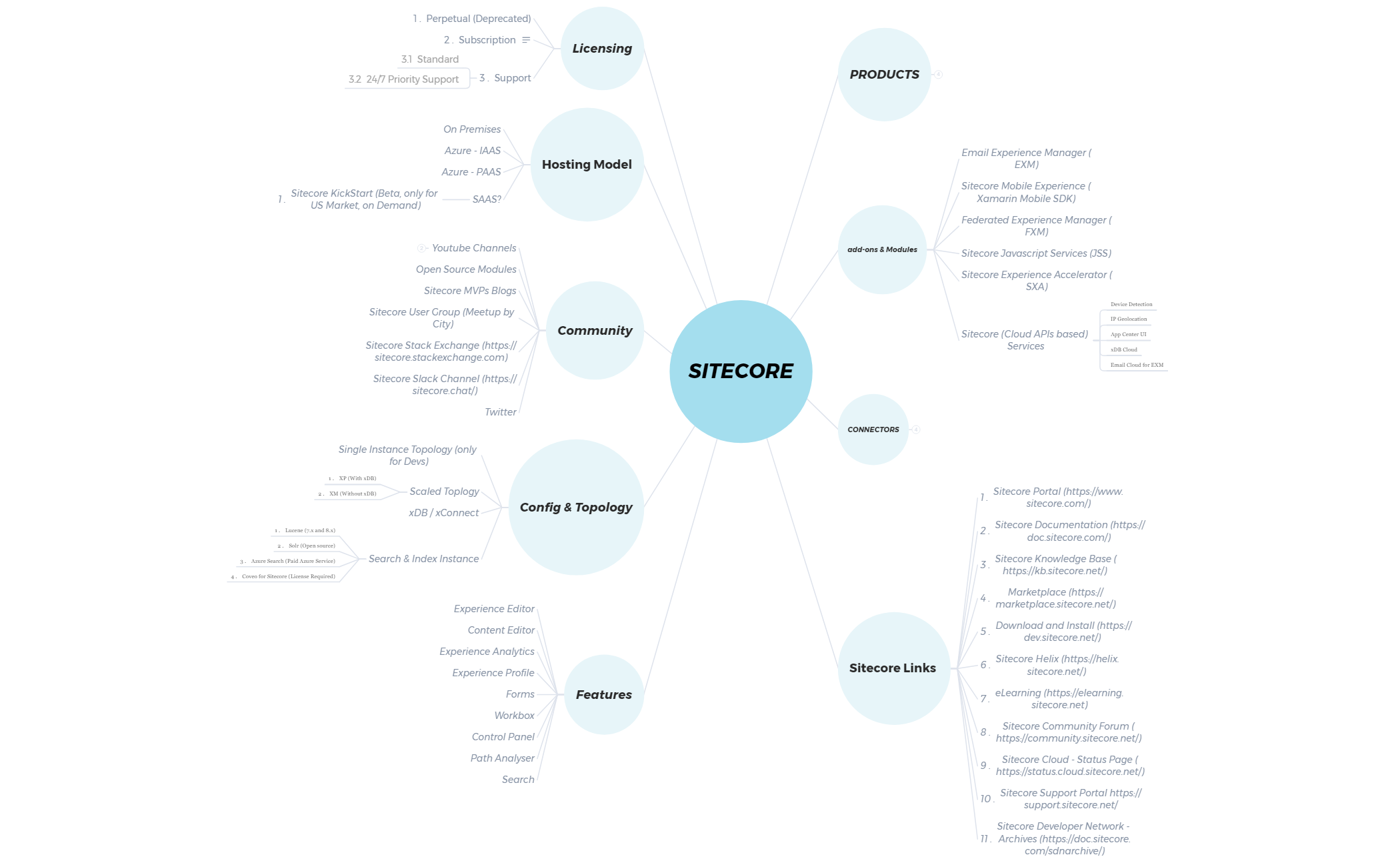
The Sitecore Terminology mind map template is a comprehensive reference for developers, architects, and marketers working with the Sitecore digital experience platform. It covers over 70 nodes across 10 major branches, including PRODUCTS, add-ons & Modules, CONNECTORS, and Features. This cheat sheet organizes key concepts like Experience Platform, Experience Commerce, and Content Hub, as well as modules such as Email Experience Manager (EXM) and Sitecore Experience Accelerator (SXA). It also details hosting models (On Premises, Azure - IAAS, Azure - PAAS) and licensing options (Subscription, Perpetual). The template serves as a quick lookup for Sitecore terminology, making it ideal for onboarding, exam prep, or daily reference.
Terms and ConditionsOnboarding new Sitecore developers or architects to understand the platform's ecosystem and terminology.
Preparing for Sitecore certification exams by reviewing key products, modules, and configuration options.
Planning a Sitecore deployment architecture, including hosting model and search index selection.
Launch the .xmind file to browse the main branches covering Sitecore products, modules, and hosting models.
Click on specific nodes like Content Hub or SXA to read details and add your own custom notes for reference.
Personalize the branches to match your project needs before exporting the final map as a PDF or image for sharing.
The template covers 10 major branches including PRODUCTS, add-ons & Modules, CONNECTORS, Sitecore Links, Features, Config & Topology, Community, Hosting Model, and Licensing, with over 70 nodes detailing specific tools and concepts.
Use the template to review key terms like Experience Editor, Experience Analytics, and xDB/xConnect. Focus on branches like Config & Topology to understand deployment options, and Licensing to differentiate between Subscription and Perpetual models.
Yes, the .xmind file is fully editable. You can add notes, links, or reorganize branches to suit your learning or project needs.
The Scaled Topology node distinguishes between XP (with xDB) and XM (without xDB) deployments, helping architects choose the right configuration for their Sitecore implementation.
Absolutely. The Sitecore Links branch contains URLs to resources like Sitecore Documentation and Marketplace. You can update or add new links directly in Xmind.
Share your mind map templates with creators around the world and start earning from your work.

