




Project managers and team leads
Kicking off a new project to assign roles based on team members' natural productivity styles.
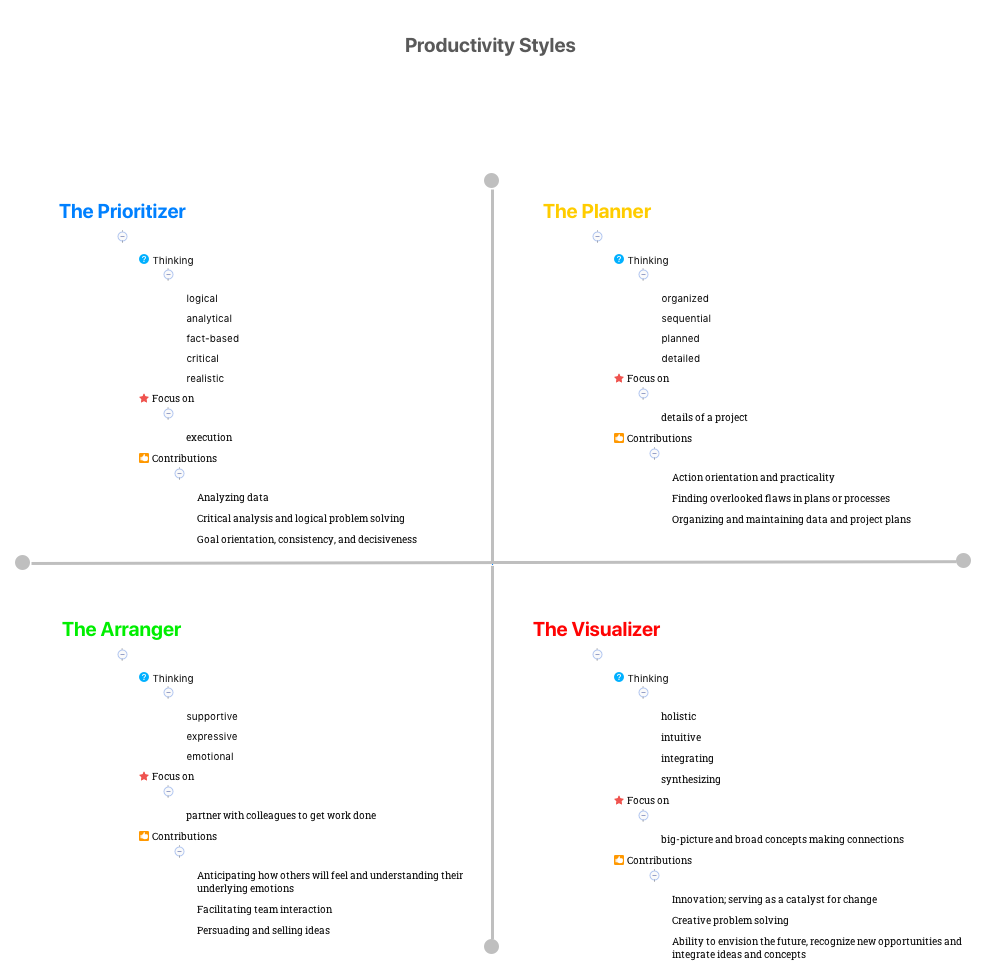
The Productivity Styles mind map template helps individuals and teams identify their dominant work style among four distinct profiles: The Prioritizer, The Planner, The Arranger, and The Visualizer. Based on a 53-node framework, it explores each style's thinking patterns, focus areas, and contributions. For example, The Prioritizer is described as 'logical, analytical, fact-based' and contributes through 'Critical analysis and logical problem solving', while The Arranger focuses on 'partner with colleagues to get work done' and excels at 'Facilitating team interaction'. This template serves as a self-assessment and team-building tool, enabling users to leverage diverse productivity approaches. By mapping out these styles, teams can improve collaboration and task delegation. The Visualizer, with a 'holistic, intuitive' thinking style, drives 'Innovation; serving as a catalyst for change'. This Productivity Styles cheat sheet is ideal for workshops, coaching sessions, and personal development planning.
Terms and ConditionsKicking off a new project to assign roles based on team members' natural productivity styles.
Running a self-awareness workshop where participants identify their dominant style and learn to appreciate others' approaches.
During a performance review to discuss how an employee's style contributes to team success and areas for growth.
Open the template in Xmind to explore the four core productivity branches including The Prioritizer, The Planner, The Arranger, and The Visualizer.
Expand the sub-nodes for each style to understand specific thinking patterns, focus areas, and unique contributions to the team.
Add personal examples or team-specific branches using the note and icon features to better reflect your collective productivity approaches.
The template includes four main branches—The Prioritizer, The Planner, The Arranger, and The Visualizer—each with sub-nodes for thinking style, focus, and contributions. It contains 53 nodes total.
Use the template to map each team member's dominant style. Discuss how The Prioritizer's analytical thinking complements The Arranger's supportive approach, and adjust task assignments accordingly.
Yes, the .xmind file is fully editable. You can add notes, icons, or new branches to customize it for your team's specific needs.
Review each style's characteristics, such as The Planner's 'organized, sequential, detailed' thinking. Reflect on which description resonates most with your work habits.
Absolutely. Identify your primary style and its contributions, like The Visualizer's 'ability to envision the future', then set goals to leverage those strengths.
Share your mind map templates with creators around the world and start earning from your work.

