




IVR developers and contact center managers
Auditing an existing Porsche IVR system for missing or redundant paths
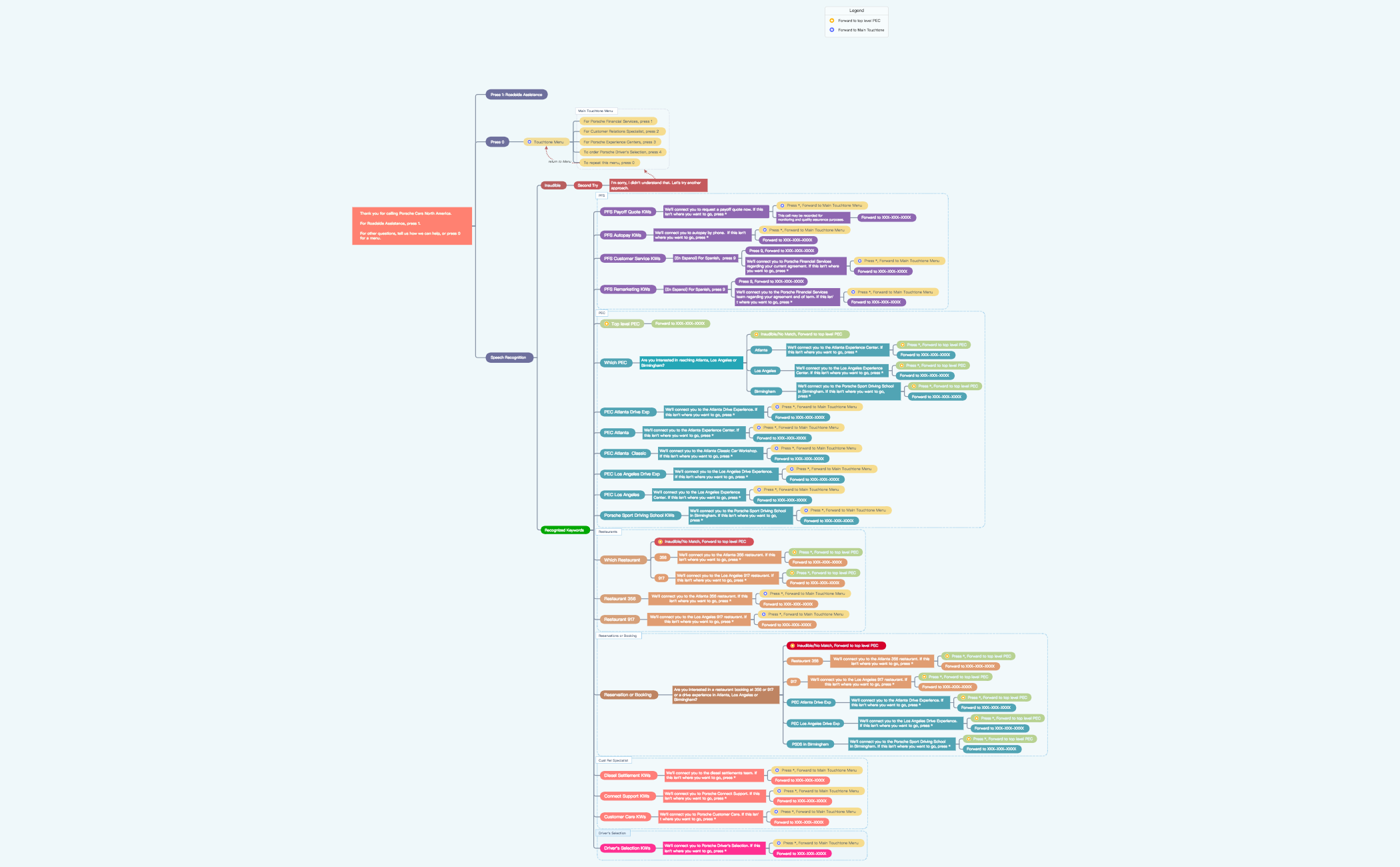
This Porsche IVR 2.0 mind map template maps the complete interactive voice response (IVR) call flow for Porsche Cars North America, covering over 130 decision nodes across three main paths: Roadside Assistance (Press 1), Touch-Tone Menu (Press 0), and Speech Recognition. Designed for contact center managers and IVR developers, the template details keyword-driven routing for services like 'PFS Payoff Quote KWs', 'PEC Atlanta Drive Exp', and 'Restaurant 917'. It serves as a cheat sheet for auditing, updating, or documenting the IVR tree, ensuring every caller utterance and keypress is handled correctly. The visual layout organizes branches by input method, with speech recognition sub-branches for inaudible responses and recognized keywords, making it easy to trace call flows and identify gaps.
Terms and ConditionsAuditing an existing Porsche IVR system for missing or redundant paths
Designing a new IVR menu for a luxury automotive brand with multiple services
Training new support staff on how the IVR routes calls to different departments
Open the template in Xmind to explore the three primary navigation paths including Roadside Assistance, Touch-Tone Menu, and Speech Recognition.
Expand the speech recognition branches to audit keyword mappings and edit node text to update specific system prompts or phone numbers.
Save your finalized IVR tree as a PDF or image file to provide clear documentation for your contact center management team.
The template includes the complete call flow for Porsche Cars North America's IVR system, covering Roadside Assistance, a touch-tone menu with five options, and speech recognition paths for keywords like 'PFS Payoff Quote KWs' and 'PEC Atlanta Drive Exp'.
Open the .xmind file in Xmind, then modify branch labels (e.g., change phone numbers or add new keywords) to reflect your updated IVR logic. Use the visual tree to trace each path and ensure no call scenario is missed.
The template is available on Xmind's marketplace; check the listing for pricing. It is fully editable in Xmind desktop or web, allowing you to customize node text, add branches, or export as an image for documentation.
It handles caller utterances by matching recognized keywords (e.g., 'PFS Autopay KWs', 'Connect Support KWs') to route calls, and includes an 'Inaudible' sub-branch for unclear speech with a second attempt prompt.
Yes, you can edit the keyword nodes (e.g., 'PFS Payoff Quote KWs') to add or remove terms, and update the corresponding action nodes (e.g., 'We'll connect you to request a payoff quote now') to match your IVR system.
Share your mind map templates with creators around the world and start earning from your work.

