




Real estate investors and wholesalers
Walking a new neighborhood to identify potential investment properties
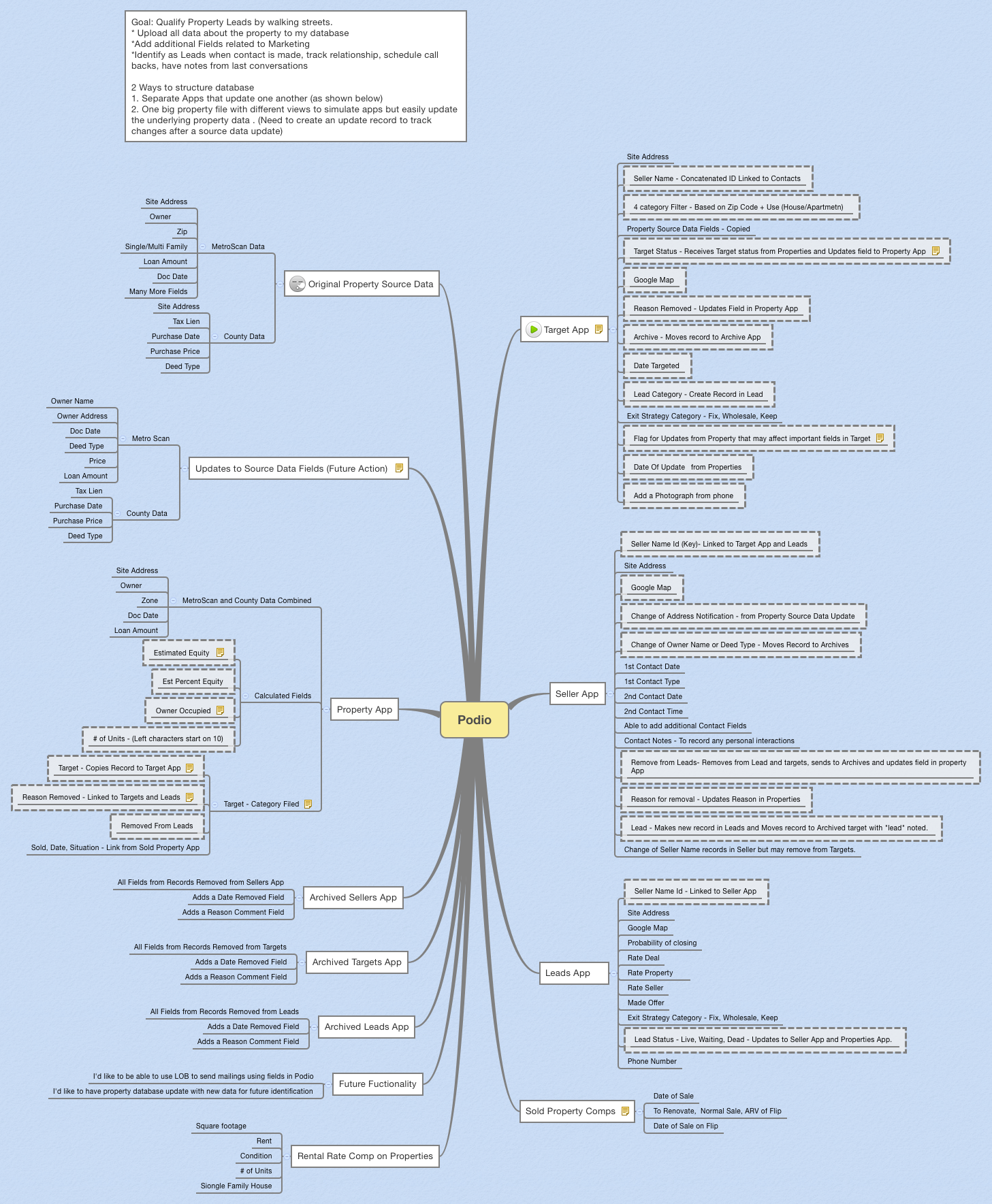
The Podio mind map template is a real estate lead qualification system designed for property investors and agents who walk streets to identify and track leads. It covers 12 interconnected apps—Target, Seller, Leads, Sold Property Comps, Rental Rate Comp, Property, and three Archive apps—with 115 nodes. The template organizes workflows around key nodes like 'Target Status - Receives Target status from Properties' and 'Lead Status - Live, Waiting, Dead - Updates to Seller App and Properties App', enabling users to upload property data, add marketing fields, and track contacts until conversion. This Podio template streamlines the entire pipeline from street-level targeting to deal closure, with built-in archiving for removed records.
이용약관Walking a new neighborhood to identify potential investment properties
Following up with property sellers after initial contact to track interactions
Evaluating multiple leads to prioritize deals based on probability of closing
Open the Podio template in Xmind to explore the interconnected branches covering the twelve essential real estate apps.
Tailor specific nodes like Lead Status and Exit Strategy Category to align with your unique investment criteria and property data.
Add new property leads using the outline mode for efficient data entry and export your finalized pipeline as an image or PDF.
The template includes 12 apps: Target, Seller, Leads, Sold Property Comps, Rental Rate Comp, Property, and three Archived apps, plus Future Functionality and Original Property Source Data sections. It covers property data upload, lead tracking, and archiving.
Start by walking streets and uploading property data to the Target App. As you make contact, move records to the Seller App, then to Leads App when ready. Use 'Lead Status' to track progress and archive removed records.
Yes, the template is fully editable in Xmind. You can add custom fields, modify status options like 'Exit Strategy Category', and adjust workflows to match your process.
'Target Status' receives status from the Property App and updates the field in the Property App, ensuring synchronization between targeted properties and the master property database.
Yes, the Archived Leads, Targets, and Sellers apps store all fields from removed records plus 'Date Removed' and 'Reason Comment' fields for complete audit trails.
Sold Property Comps tracks 'Date of Sale', 'To Renovate, Normal Sale, ARV of Flip', and flip sale dates. Rental Rate Comp tracks 'Square footage', 'Rent', 'Condition', and '# of Units'.
전 세계 크리에이터와 마인드맵 템플릿을 공유하고 작품으로 수익을 창출하세요.

