




Finance administrators and billing staff
Generating monthly tuition payment advices for multiple students at a learning center.
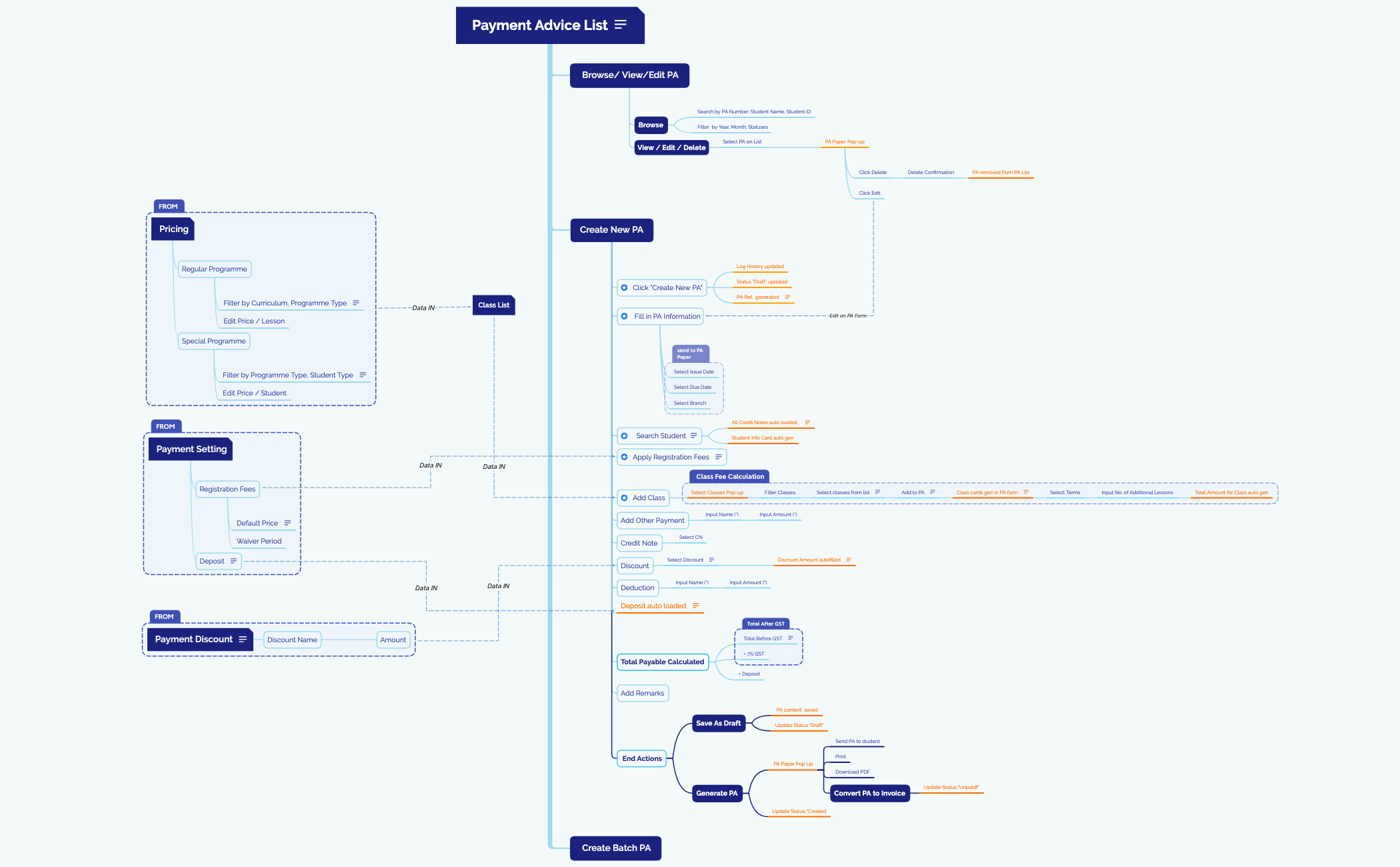
The Payment Advice mind map template is a comprehensive tool for education administrators managing student billing and payment workflows. It covers 80 nodes across 6 major branches, including 'Create New PA', 'Browse/ View/Edit PA', 'Payment Setting', 'Payment Discount', 'Pricing', and 'Class List'. This template provides a structured approach to generating payment advices, applying discounts, and configuring registration fees. Key features include automated 'Total Payable Calculated' with GST and deposit, and a 'Search Student' function that auto-loads credit notes. Ideal for finance teams in schools or tuition centers, this Payment Advice template streamlines the entire payment collection process.
Termos e condiçõesGenerating monthly tuition payment advices for multiple students at a learning center.
Configuring registration fee waivers and deposit amounts for a new academic term.
Applying bulk discounts or promotional pricing to special programmes during enrollment periods.
Open the .xmind file to explore the six major branches designed for managing student billing and payment workflows.
Use the 'Create New PA' and 'Browse' branches to generate new payment advices or search for existing records to update student details.
Customize the 'Payment Setting', 'Discount', and 'Pricing' branches to automate fee calculations and reflect your institution's specific financial rules.
The template covers 6 main branches: Browse/View/Edit PA, Create New PA, Create Batch PA, Payment Setting, Payment Discount, Pricing, and Class List. It includes 80 nodes detailing steps for generating payment advices, applying discounts, and managing registration fees.
Click 'Create New PA', fill in PA information (Issue Date, Due Date, Branch), search for a student, add classes via the 'Select Classes Pop-up', apply registration fees, add other payments, credit notes, discounts, and deductions. The total payable is calculated automatically including GST and deposit.
Yes, the 'Pricing' branch lets you edit prices per lesson for regular programmes and per student for special programmes. The 'Payment Discount' branch allows you to set discount names and amounts that autofill when applied.
Yes, the template is fully editable. You can add, remove, or modify nodes to fit your institution's payment workflow. Open the .xmind file in Xmind desktop or web and customize the branches as needed.
It allows users to search for existing payment advices by PA Number, Student Name, or Student ID, filter by Year, Month, and Statuses, and then view, edit, or delete selected PAs from a pop-up interface.
Compartilhe seus modelos de mapas mentais com criadores ao redor do mundo e comece a ganhar com seu trabalho.

