




Engineering leads or product managers overseeing mobile platform teams.
Weekly workload review to balance iOS and Android revamp efforts with adhoc meetings and people management.
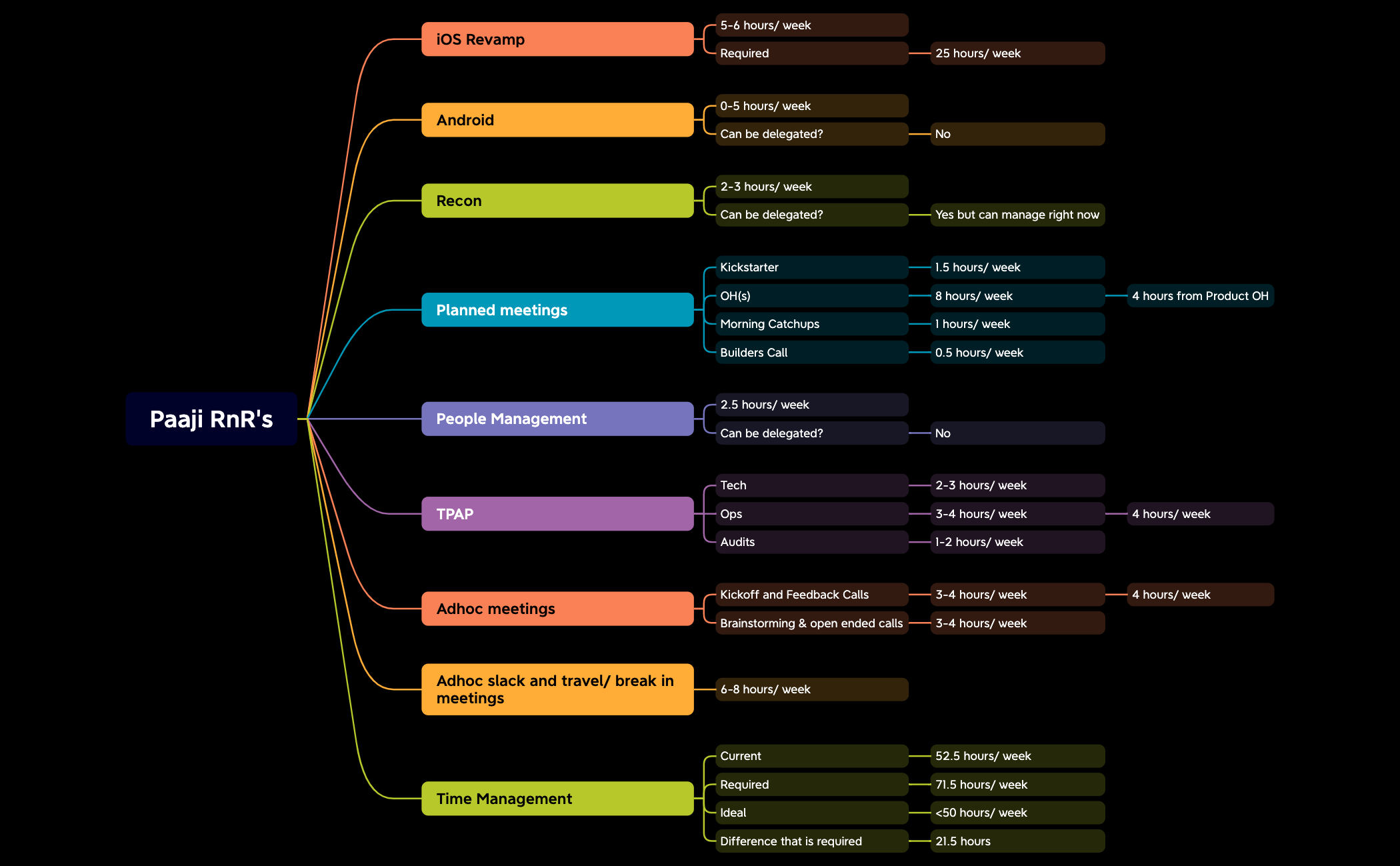
The Paaji RnR's mind map template provides a structured weekly time allocation breakdown for a senior engineering or product lead managing iOS and Android revamps, reconnaissance (Recon), planned meetings, people management, TPAP (Tech, Ops, Audits), adhoc meetings, and slack time. It covers 52 nodes across 9 major branches, including specific time estimates such as 'iOS Revamp' requiring 25 hours/week and 'Planned meetings' totaling 11 hours/week (Kickstarter 1.5h, OH(s) 8h, Morning Catchups 1h, Builders Call 0.5h). The template also features a 'Time Management' section comparing current (52.5h), required (71.5h), and ideal (<50h) weekly hours, highlighting a 21.5-hour gap. This Paaji RnR's template is ideal for leads who need to visualize and optimize their weekly workload across engineering, people management, and adhoc tasks.
Termos e condiçõesWeekly workload review to balance iOS and Android revamp efforts with adhoc meetings and people management.
Quarterly planning to reallocate time between planned meetings (e.g., OH(s), Morning Catchups) and operational tasks like TPAP audits.
Identifying time management gaps by comparing current vs. required hours, especially when facing a 21.5-hour deficit.
Open the template in Xmind and modify the time estimates across the nine main branches to reflect your specific weekly workload.
Review the delegation notes for Android and Recon tasks while updating the Time Management section to calculate your current weekly hour gap.
Save your optimized schedule and export the mind map as a PDF or image to share your capacity planning with your team.
The template includes 9 major branches: iOS Revamp, Android, Recon, Planned meetings, People Management, TPAP, Adhoc meetings, Adhoc slack and travel/break in meetings, and Time Management. Each branch contains specific time allocations and delegation notes.
Open the .xmind file in Xmind, then replace the placeholder time estimates (e.g., '5-6 hours/ week') with your own data. Adjust the 'Required' and 'Ideal' targets in the Time Management branch to reflect your workload.
Yes, the template is fully editable in Xmind (desktop, web, or mobile). You can customize any node, add new branches, and export as PDF or image for printing.
TPAP stands for Tech, Ops, and Audits. It allocates 2-3 hours/week for Tech, 3-4 hours/week for Ops, and 1-2 hours/week for Audits, helping track cross-functional operational tasks.
The template includes 'Can be delegated?' notes for Android (No), Recon (Yes but can manage right now), and People Management (No). You can modify these based on your team's capacity.
It compares 'Current' (52.5h), 'Required' (71.5h), and 'Ideal' (<50h) weekly hours, with a 'Difference that is required' of 21.5 hours, helping identify workload gaps.
Compartilhe seus modelos de mapas mentais com criadores ao redor do mundo e comece a ganhar com seu trabalho.

