


'%3e%3cpath%20d='M4.7998%204.80029V24.8003C4.7998%2026.1283%205.8718%2027.2003%207.1998%2027.2003H27.1998'%20stroke='%234FA49A'%20stroke-width='1.92'%20stroke-linecap='round'%20stroke-linejoin='round'/%3e%3cpath%20d='M8.7998%2020.8001L14.3998%2015.2001L18.3998%2018.4001L25.5998%209.6001'%20stroke='%234FA49A'%20stroke-width='1.92'%20stroke-linecap='round'%20stroke-linejoin='round'/%3e%3cpath%20d='M20.7998%209.6001H25.5998V14.4001'%20stroke='%234FA49A'%20stroke-width='1.92'%20stroke-linecap='round'%20stroke-linejoin='round'/%3e%3c/g%3e%3cdefs%3e%3cclipPath%20id='clip0_11502_53026'%3e%3crect%20width='32'%20height='32'%20fill='white'/%3e%3c/clipPath%3e%3c/defs%3e%3c/svg%3e)

Web developers and SEO specialists
Launching a new e-commerce website or redesigning product pages to improve load speed and SEO.
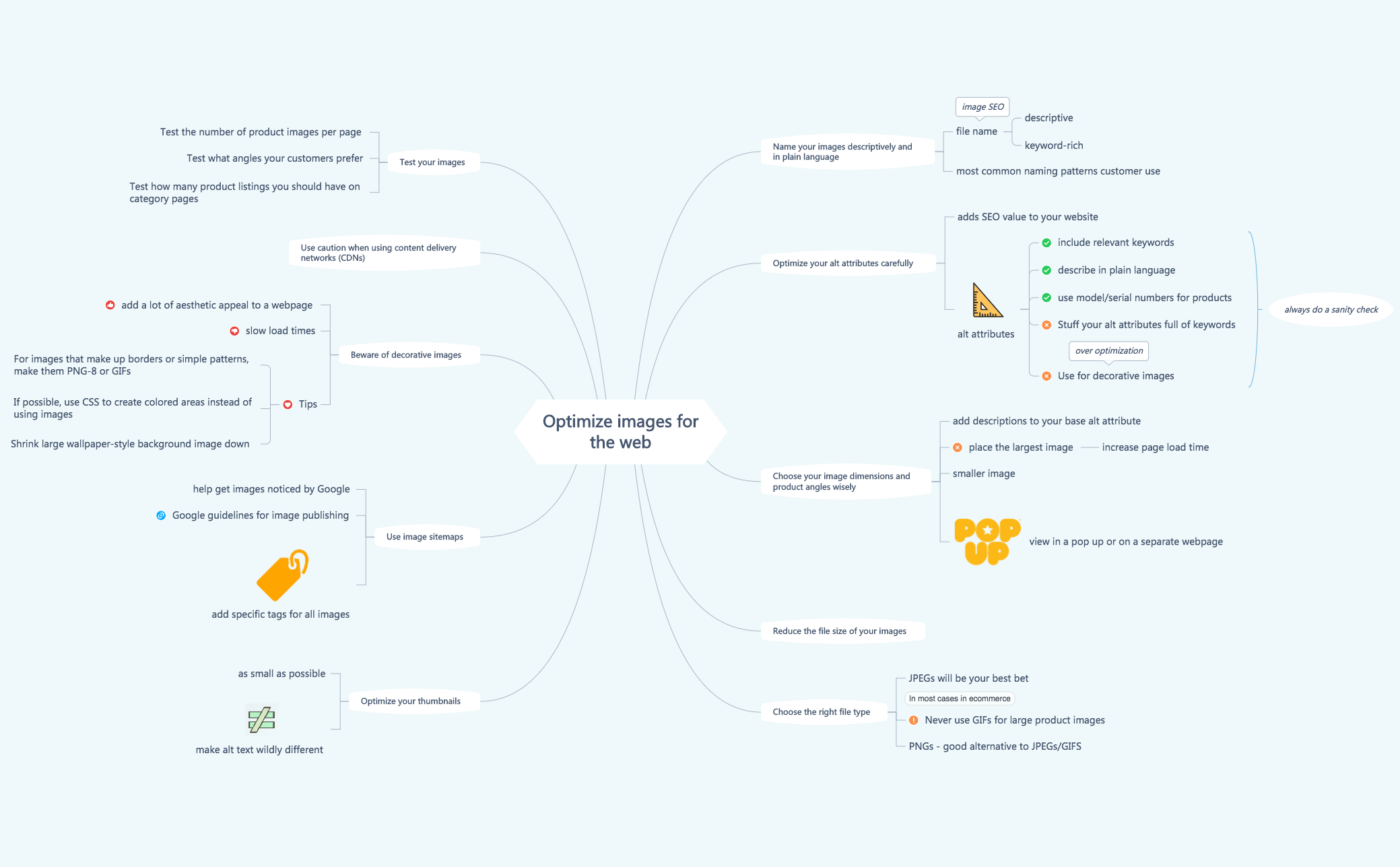
The 'Optimize images for the web' mind map template provides a structured 10-branch framework for e-commerce and web professionals to improve page speed, SEO, and user experience through image optimization. It covers naming conventions, alt attributes, dimensions, file types, thumbnails, sitemaps, decorative images, CDNs, and testing. Key nodes include 'Name your images descriptively and in plain language', 'Optimize your alt attributes carefully', and 'Choose the right file type'. This template is ideal for SEO specialists, web developers, and content managers seeking a systematic approach to image optimization.
Terms and ConditionsLaunching a new e-commerce website or redesigning product pages to improve load speed and SEO.
Conducting a site audit to identify image-related performance bottlenecks and optimization opportunities.
Training a content team on best practices for uploading and naming product images consistently.
Launch the template in Xmind to review the ten core branches covering SEO, file types, and optimization strategies.
Replace the placeholder text with your specific project requirements and add new branches to tailor the checklist to your team's needs.
Save your completed image optimization plan as a PDF or image file to distribute it among your web development and SEO teams.
The template includes 10 main branches covering image naming, alt attributes, dimensions, file size reduction, file types, thumbnails, sitemaps, decorative images, CDNs, and testing. It contains 45 nodes with actionable tips.
Start by applying the naming and alt attribute guidelines from the first two branches. Then choose the right file type (JPEG, PNG) and reduce file sizes. Finally, use image sitemaps and test your images to maximize SEO impact.
Yes, the template is free to download and fully editable in Xmind. You can customize each node to fit your specific workflow or add your own tips.
The template recommends reducing file size as a dedicated branch, but does not specify exact tools. It suggests choosing the right file type (JPEG for photos) and optimizing thumbnails to be as small as possible.
Absolutely. The template provides a starting point for testing product images per page, customer-preferred angles, and category page listings. You can add your own test metrics and results.
Share your mind map templates with creators around the world and start earning from your work.

