




HR managers and hiring coordinators
Creating a new Office Assistant job posting for the first time
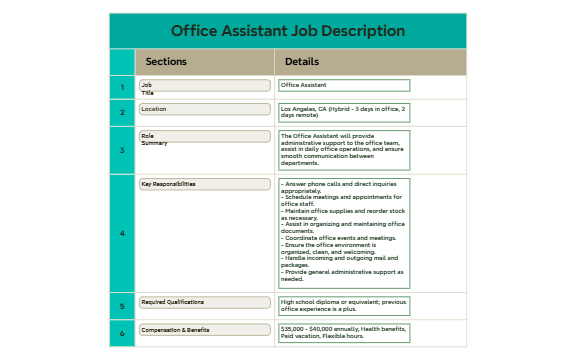
The Office Assistant Job Description mind map provides a structured template for hiring managers and HR professionals to define the role of an Office Assistant. It covers six key sections: 'Job Title', 'Location', 'Role Summary', 'Key Responsibilities', 'Required Qualifications', and 'Compensation & Benefits'. The template includes specific details such as 'Los Angeles, CA (Hybrid - 3 days in office, 2 days remote)' and a salary range of '$35,000 - $40,000 annually'. This Office Assistant template streamlines the hiring process by ensuring all essential job elements are clearly outlined. The mind map is organized into two main branches—'Sections' and 'Details'—making it easy to customize for any organization.
Terms and ConditionsCreating a new Office Assistant job posting for the first time
Reviewing and updating an existing Office Assistant job description with a team
Onboarding a new Office Assistant and clarifying role expectations
Open the .xmind file in Xmind (desktop, web, or mobile).
Review the two main branches: 'Sections' and 'Details'. The 'Sections' branch contains the job description structure; 'Details' holds example content.
Customize each node: click on a node (e.g., 'Location') and edit the text to match your company's details.
Add or remove nodes as needed: right-click to add subtopics or delete irrelevant sections.
Export the final mind map as an image, PDF, or share it directly with your team via Xmind Cloud.
The template includes six sections: Job Title, Location, Role Summary, Key Responsibilities, Required Qualifications, and Compensation & Benefits. Each section has detailed example content that you can customize.
Open the .xmind file in Xmind, then replace the example details (e.g., location, salary) with your own. Share the mind map with your team to align on the role before posting the job.
Yes, the template is fully editable in Xmind. You can add, remove, or modify nodes. Export it as an image or PDF for printing or sharing.
Review the example bullet points (e.g., 'Answer phone calls') and replace them with tasks specific to your office. You can add sub-nodes for each responsibility to organize them further.
Absolutely. The structure (Sections and Details) is generic enough to adapt for any job description. Just rename the root node and update the content accordingly.
Share your mind map templates with creators around the world and start earning from your work.

