




Scrum masters and product owners
Kicking off a sprint planning session where the team needs to prioritize user stories and tasks.
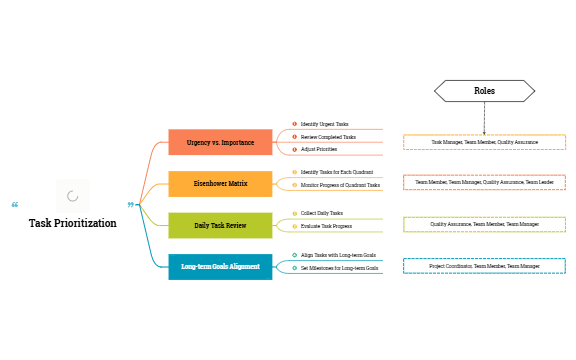
The Task Prioritization mind map template helps project managers, team leads, and individual contributors systematically evaluate tasks by urgency and importance. It covers 19 nodes across 5 main branches, including the Eisenhower Matrix, Daily Task Review, and Long-term Goals Alignment. Users can identify urgent tasks, align daily activities with long-term goals, and assign responsibilities to roles like Team Manager and Quality Assurance. This template serves as a practical cheat sheet for structured decision-making in fast-paced work environments.
使用条款Kicking off a sprint planning session where the team needs to prioritize user stories and tasks.
During a weekly one-on-one to review a team member's workload and realign priorities.
When a project faces scope creep and the team must re-evaluate which tasks are truly urgent.
Open the .xmind file to explore the five main branches including the Eisenhower Matrix and Long-term Goals Alignment.
Replace placeholder nodes with your own tasks and drag them into the appropriate urgency and importance quadrants.
Link specific roles like Team Manager to your tasks to define clear responsibilities and complete your decision-making process.
The template includes 19 nodes organized into branches: Urgency vs. Importance, Eisenhower Matrix, Daily Task Review, Long-term Goals Alignment, and Roles. It provides a structured framework for evaluating and aligning tasks with goals.
Start by collecting daily tasks under 'Daily Task Review', then evaluate their urgency and importance. Use the Eisenhower Matrix to categorize tasks into quadrants, and adjust priorities based on progress and long-term goals.
Yes, it includes role-specific nodes like Team Manager, Quality Assurance, and Project Coordinator, making it easy to assign responsibilities and track task ownership across the team.
Absolutely. You can edit the quadrant labels, add or remove tasks, and adjust the matrix structure to fit your specific prioritization criteria.
Use the 'Long-term Goals Alignment' branch to define milestones, then link each daily task to a specific goal. The 'Daily Task Review' helps ensure your daily actions support strategic objectives.
把你的思维导图模板分享给全球创作者,从你的作品中获得收益。

