




Instructional designers and curriculum developers
Designing a new course curriculum that requires alignment of learning objectives with cognitive levels.
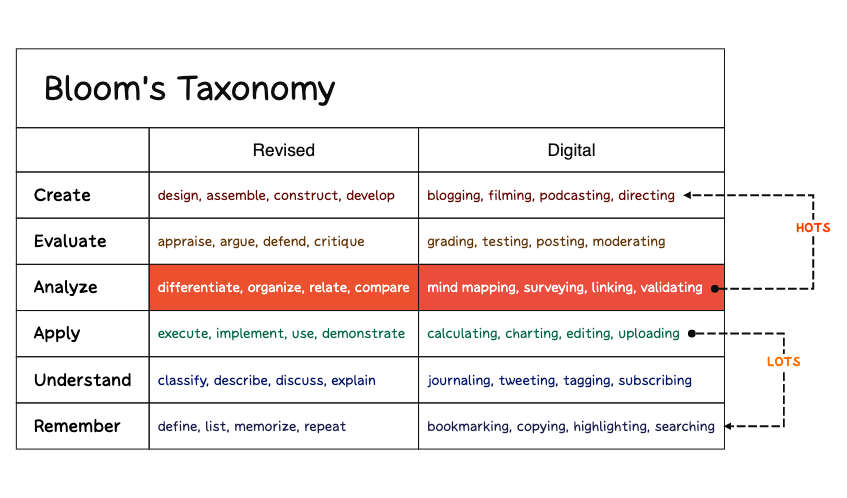
The Morphological Box (Persona) template is a structured mind map designed to help educators, instructional designers, and learners analyze cognitive skills using Bloom's Taxonomy. It organizes 6 major categories—Create, Evaluate, Analyze, Apply, Understand, and Remember—each with specific action verbs and practical activities. For example, the 'Create' branch includes verbs like 'design, assemble, construct, develop' and activities such as 'blogging, filming, podcasting, directing'. This template serves as a cheat sheet for aligning learning objectives with appropriate tasks, making it a versatile tool for lesson planning and curriculum design. The mind map layout presents the taxonomy in a clear, hierarchical format, enabling quick reference and customization within Xmind.
이용약관Designing a new course curriculum that requires alignment of learning objectives with cognitive levels.
Creating lesson plans that incorporate varied activities to engage different thinking skills.
Preparing for a workshop on active learning strategies and assessment design.
Open the .xmind file to explore the six core branches of Bloom's Taxonomy and their associated action verbs.
Edit the existing node text to align the action verbs and practical activities with your specific curriculum goals.
Add new sub-nodes to detail your lesson plan before saving or exporting the map as a PDF or image for sharing.
The template includes six major cognitive levels: Create, Evaluate, Analyze, Apply, Understand, and Remember. Each level lists specific action verbs and practical activities, such as 'design, assemble, construct, develop' under Create and 'blogging, filming, podcasting, directing' as activities.
You can use the template to align learning objectives with appropriate verbs and activities. For example, for the 'Evaluate' level, you might assign tasks like 'grading' or 'moderating' to assess student understanding. Customize the nodes in Xmind to fit your subject.
Yes, the template is free to use and fully editable in Xmind. You can add, remove, or modify nodes to match your specific educational context. The .xmind file can be opened on desktop or web.
Use the 'Evaluate' and 'Analyze' branches to design assessment tasks. For instance, have students 'critique' or 'compare' concepts. The template helps ensure assessments target higher-order thinking skills.
Absolutely. In Xmind, you can edit any node to replace verbs or activities with your own. This allows you to tailor the template for different subjects or grade levels.
전 세계 크리에이터와 마인드맵 템플릿을 공유하고 작품으로 수익을 창출하세요.

