




Product managers and UX designers
Planning the user onboarding flow for a new finance app
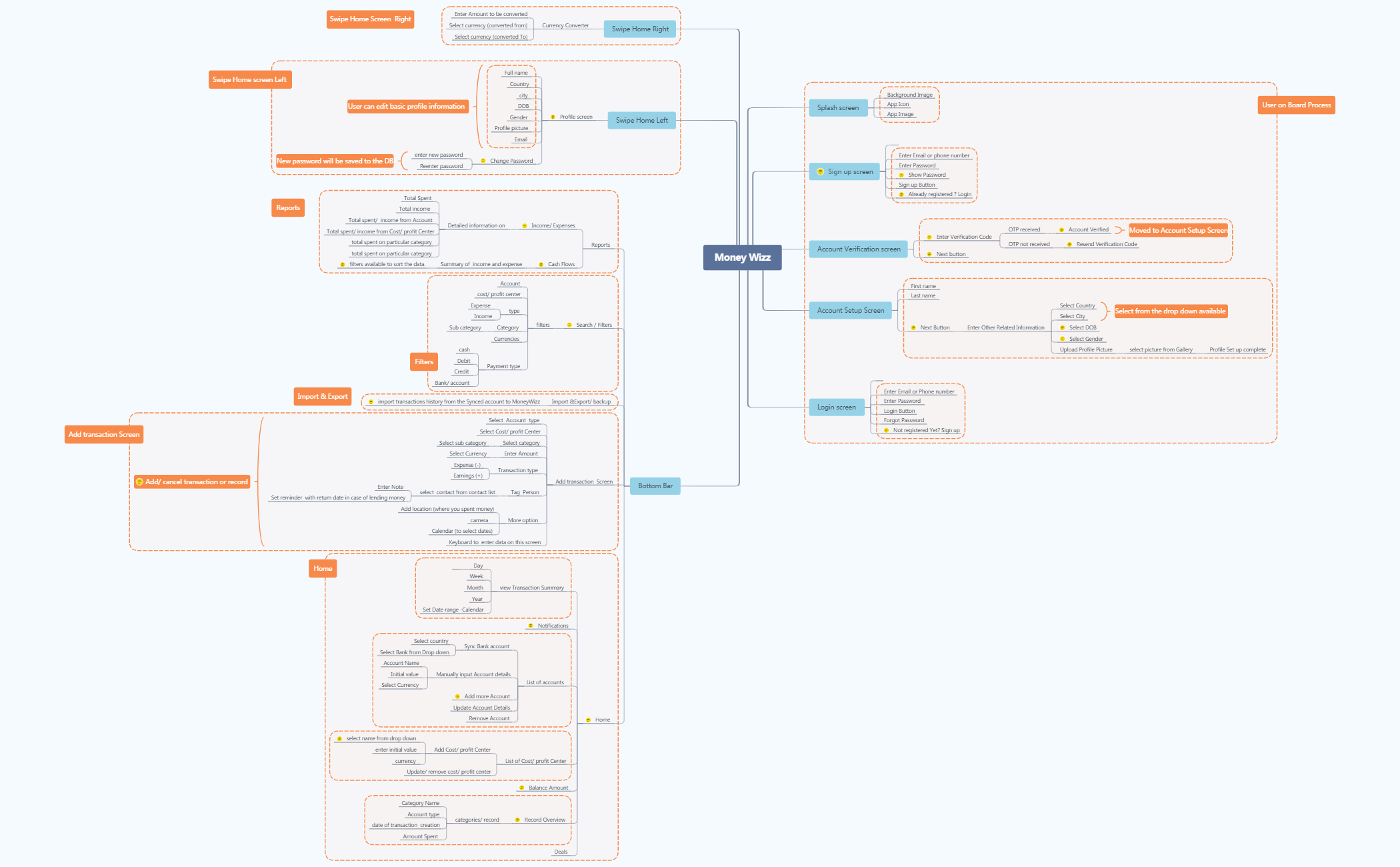
The Money Wizz mind map template is a comprehensive blueprint for designing a personal finance tracking mobile application, covering over 150 nodes across 15+ core screens including Splash screen, Sign up screen, Account Verification screen, Account Setup Screen, Login screen, Bottom Bar, Swipe Home Left, Swipe Home Right, User on Board Process, Filters, Swipe Home screen Left, Swipe Home Screen Right, Reports, Import & Export, Add transaction Screen, and Home. This Money Wizz template maps out every user flow from onboarding to daily transaction logging, with detailed branches for features like 'Sync Bank account', 'Currency Converter', and 'Tag Person'. It serves as a ready-to-use Money Wizz cheat sheet for product managers, UX designers, and developers building a budgeting app. The structure emphasizes data entry (e.g., 'Select category' → 'Select sub category'), reporting ('Income/ Expenses' with 'Detailed information on'), and account management ('List of accounts' with sync and manual options).
Terms and ConditionsPlanning the user onboarding flow for a new finance app
Defining the transaction logging feature with categories and subcategories
Designing the bottom navigation bar and report screens for expense tracking
Open the .xmind file to explore the comprehensive structure of over 150 nodes covering essential screens from onboarding to transaction logging.
Modify node labels and add specific branches for unique features like bank syncing or currency conversion to align with your app's branding.
Export your finalized mind map as an image or PDF to provide your development team with a clear visual blueprint of the application's architecture.
The template includes over 150 nodes covering 16 screens such as Splash screen, Sign up, Account Verification, Login, Bottom Bar, Add transaction Screen, Home, and more. It details user flows, data fields, and navigation logic for a personal finance app.
Open the .xmind file in Xmind, then explore each branch to understand screen layouts and user interactions. Use the node hierarchy as a checklist for feature implementation and UI design.
Yes, all nodes are fully editable. You can add, remove, or modify branches to tailor the app flow to your specific requirements.
It defines how users log a transaction: selecting account type, cost/profit center, category and subcategory, entering amount with currency, choosing transaction type (Expense or Earnings), tagging a person, and adding optional location, camera, or calendar data.
Yes, the Filters branch includes nodes like Account, cost/profit center, type, Category, Currencies, and Payment type. You can rename or expand these to match your app's filter options.
Use it during the planning and design phase of a personal finance or budgeting app to map out all screens, user flows, and data requirements before coding begins.
Share your mind map templates with creators around the world and start earning from your work.

