




Product managers and system architects
When designing or documenting the admin panel for a railway inspection web application.
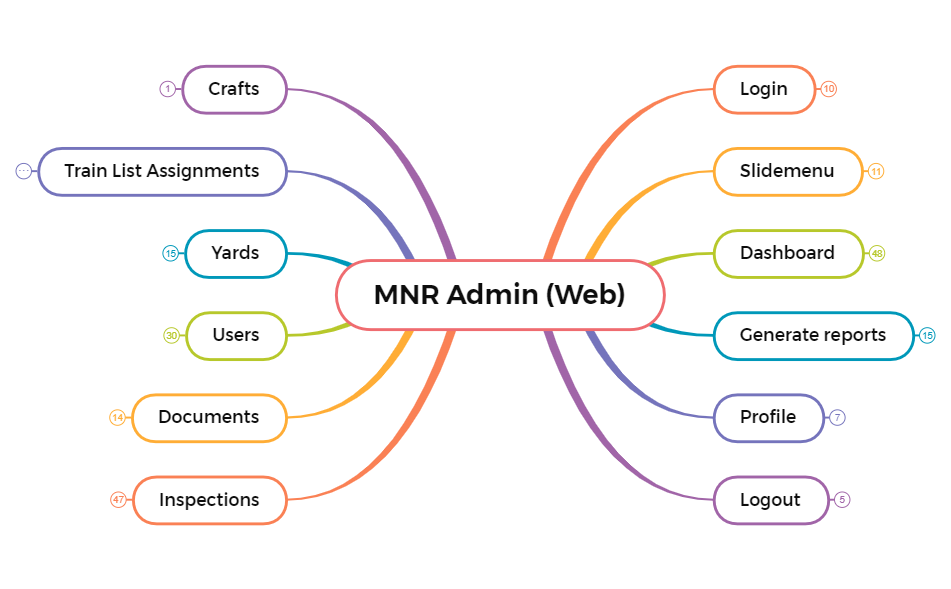
The MNR Admin (Web) mind map template provides a structured overview of a railway inspection administration web application, covering 10 core modules across 343 nodes. Designed for system administrators and product teams, this template details functionalities for Login, Dashboard, Inspections, Users, Yards, Documents, and Generate Reports. Key features include a 'Slidemenu' with modules like 'Train List Inspectiona' and 'Dcuments', and a Dashboard that displays 'Total number of inspections created' and 'Total number of inspections completed' as read-only metrics. The template serves as a comprehensive reference for understanding administrative workflows, user management, and reporting capabilities within the MNR Admin platform.
Условия использованияWhen designing or documenting the admin panel for a railway inspection web application.
During onboarding of new developers or QA testers who need to understand the admin module structure.
When planning user management features including bulk upload and role-based access control.
Open the .xmind file to navigate through the structured branches covering the Login, Dashboard, and core inspection modules.
Double-click any node to modify administrative requirements or use the Insert key to add new features to the railway inspection workflow.
Save your customized map and export it as a PDF or PNG to share the system overview with your product team.
The template covers 10 modules: Login, Slidemenu, Dashboard, Generate reports, Profile, Logout, Inspections, Documents, Users, and Yards, plus Train List Assignments and Crafts.
Yes, the template is fully editable in Xmind. You can rename nodes, add or remove branches, and adapt the structure to match your own admin system's requirements.
No, the Dashboard is described as read-only. It displays inspection counts and a list of inspections with details like Inspection ID, Yard name, and Status, but no data is editable.
The Users module includes a 'Download template' feature to get a CSV/Excel format, and a 'Bulk Upload' pop-up where the admin can upload the file to add multiple employees at once.
Users can generate reports by specifying the type of report, inspection date, inspection name/ID, and inspector/employee name, with Generate and Reset buttons.
Поделитесь своими шаблонами интеллект-карт с авторами по всему миру и начните зарабатывать на своих работах.

