




IT managers and decision-makers
Evaluating mind mapping software for an enterprise deployment
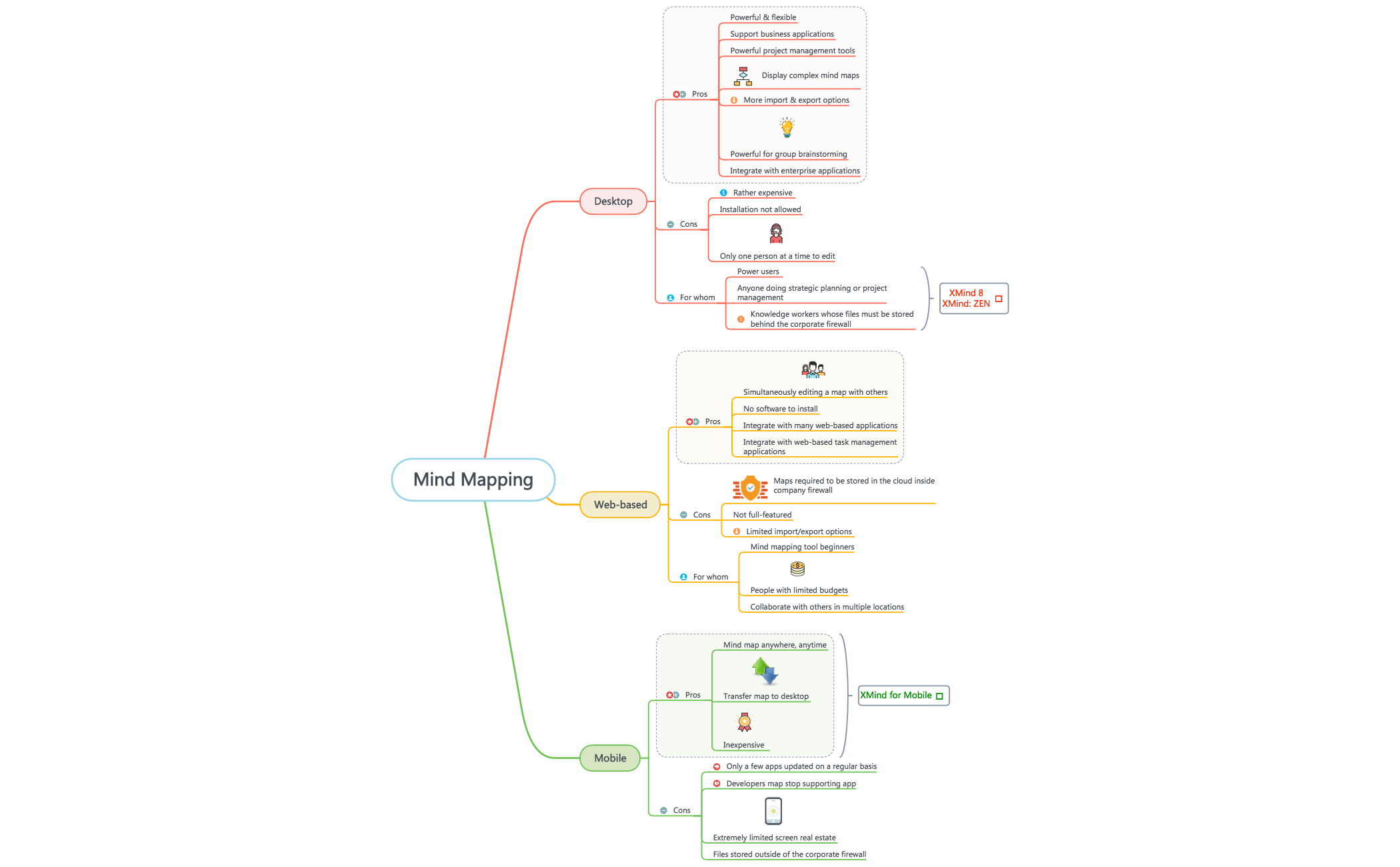
The Mind Mapping template provides a structured comparison of mind mapping software across three platforms: Desktop, Web-based, and Mobile. With 44 nodes organized under these three main branches, it evaluates each platform's pros, cons, and target users. Desktop tools are noted for 'Powerful project management tools' and 'More import & export options', while Web-based solutions enable 'Simultaneously editing a map with others'. Mobile apps offer 'Mind map anywhere, anytime' but face 'Extremely limited screen real estate'. This template serves as a decision-making framework for selecting the right mind mapping tool based on user needs and constraints.
NutzungsbedingungenEvaluating mind mapping software for an enterprise deployment
Choosing a collaborative tool for a remote team project
Selecting a budget-friendly mobile app for on-the-go brainstorming
Launch the template in Xmind to explore the three main branches covering Desktop, Web-based, and Mobile platforms.
Expand the branches to analyze pros and cons while adding your own criteria or notes by inserting new child topics.
Complete your decision-making framework and export the map as an image or PDF to share the results with your team.
The template compares mind mapping tools across Desktop, Web-based, and Mobile platforms, detailing pros, cons, and target users for each category.
Review each platform's pros and cons against your needs. For example, if you need real-time collaboration, focus on the Web-based section; if you work offline, consider Desktop options.
Yes, you can customize the template by adding or removing nodes, editing text, and reorganizing branches to fit your specific evaluation criteria.
Desktop tools offer more features and offline access but are expensive and single-user. Web-based tools enable collaboration and require no installation but have limited import/export options.
Absolutely. The template's structured comparison makes it ideal for team discussions, allowing members to weigh pros and cons collaboratively.
Teilen Sie Ihre Mindmap-Vorlagen mit Erstellern weltweit und verdienen Sie mit Ihrer Arbeit.

