




Project managers and team leads
Preparing for a weekly team sync meeting to ensure all critical topics are covered
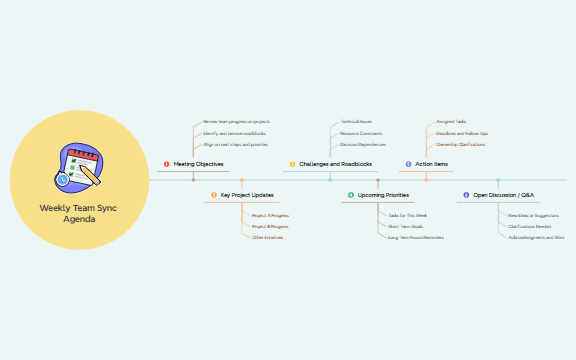
The Weekly Team Sync Agenda mind map template provides a structured 6-branch outline for running efficient team meetings, covering Meeting Objectives, Key Project Updates, Challenges and Roadblocks, Upcoming Priorities, Action Items, and Open Discussion / Q&A. Designed for project managers and team leads, this template helps streamline weekly syncs by ensuring all critical topics—from Technical Issues to Deadlines and Follow-Ups—are addressed in a consistent format. With 25 nodes organized across a single sheet, it serves as both a meeting agenda template and a collaborative checklist that keeps teams aligned on next steps and priorities.
Termos e condiçõesPreparing for a weekly team sync meeting to ensure all critical topics are covered
Onboarding a new team member who needs to understand the meeting structure and reporting expectations
Conducting a remote stand-up or sync where a visual agenda helps keep distributed team members focused
Open the template in Xmind and adjust the six main branches to align with your team's specific terminology and project names.
Fill in the branches for project updates, challenges, and priorities before the meeting to ensure a structured and efficient discussion.
Record assigned tasks and deadlines during the sync, then export the map as a PDF or image to distribute to all team members.
The template includes six main sections: Meeting Objectives, Key Project Updates, Challenges and Roadblocks, Upcoming Priorities, Action Items, and Open Discussion / Q&A, with 25 nodes covering specific topics like Project A Progress and Deadlines and Follow-Ups.
Open the .xmind file in Xmind, then populate each branch with your team's actual updates. During the meeting, follow the agenda order to review objectives, project status, blockers, priorities, action items, and open discussion.
Yes, the template is fully editable in Xmind. You can add, remove, or rename nodes to fit your team's specific needs, such as adding a 'Customer Feedback' branch or adjusting the 'Upcoming Priorities' structure.
Use the Action Items branch to list Assigned Tasks, set Deadlines and Follow-Ups, and clarify Ownership. After the meeting, export the mind map or share it with the team to ensure everyone knows their responsibilities.
Absolutely. The template works well for remote teams using Xmind's collaboration features. Share the .xmind file or use Xmind Web to co-edit during a video call, ensuring all team members stay aligned.
Compartilhe seus modelos de mapas mentais com criadores ao redor do mundo e comece a ganhar com seu trabalho.

