




Robotics engineers and drone software developers
Developing a drone system that needs to geolocate a target using LRF sensor data.
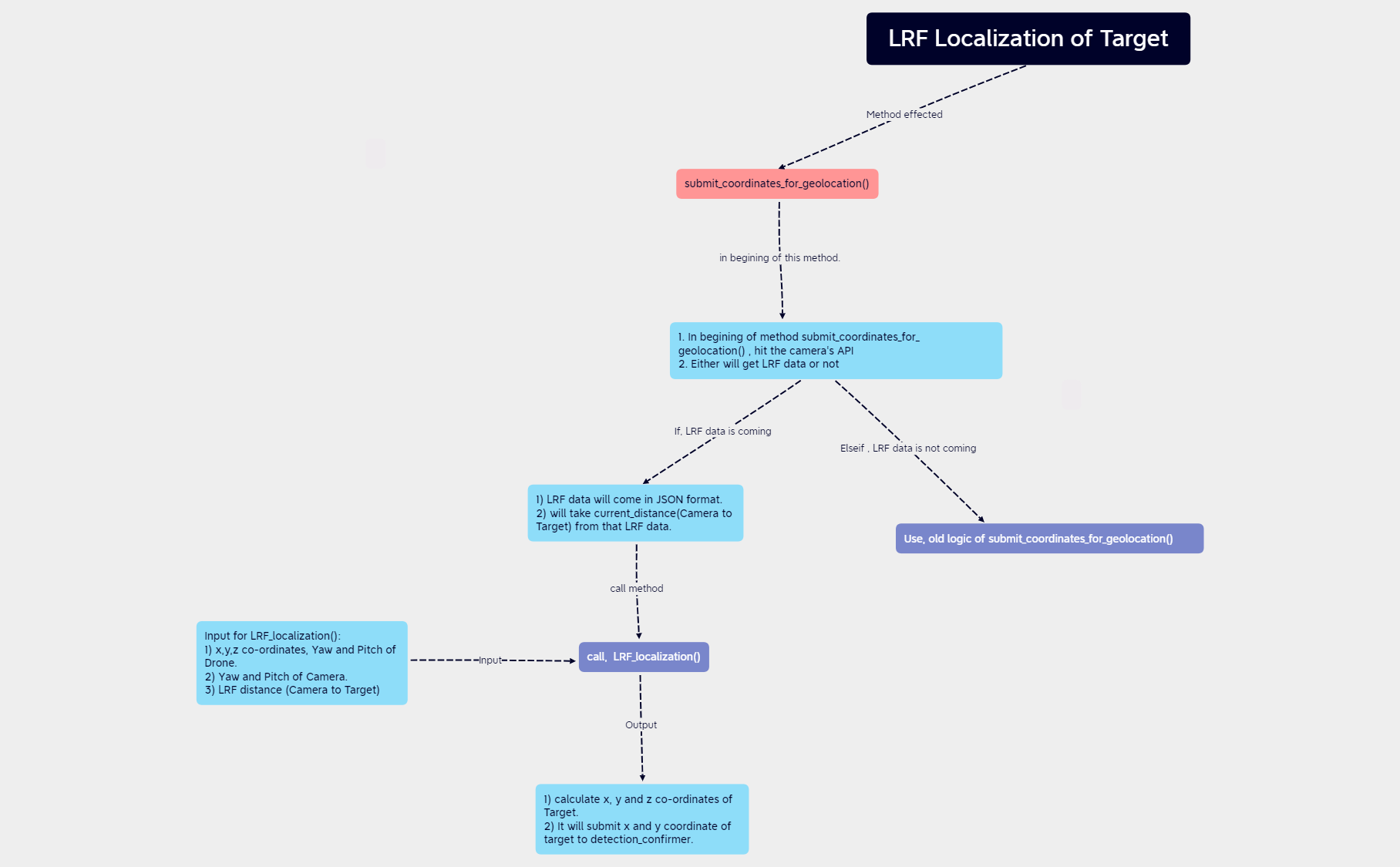
The LRF Localization of Target mind map template provides a step-by-step technical guide for geolocating a target using Laser Range Finder (LRF) data integrated with drone and camera parameters. It covers the entire workflow from calling the camera API to submitting coordinates to a detection confirmer, including handling LRF data in JSON format and extracting the current distance. Key nodes include 'submit_coordinates_for_geolocation()', 'Input for LRF_localization()', and 'call, LRF_localization()'. This template is designed for engineers and developers working on drone-based target localization systems, offering a concise cheat sheet for the LRF localization process.
Terms and ConditionsDeveloping a drone system that needs to geolocate a target using LRF sensor data.
Debugging the coordinate submission pipeline in a target detection and confirmation system.
Documenting the LRF localization algorithm for team onboarding or code review.
Launch the Xmind file to analyze the root node and expand branches covering the LRF localization process from API calls to coordinate submission.
Replace placeholder variables and API endpoints with your specific drone, camera, and LRF data logic to match your technical requirements.
Tailor the nodes to your specific hardware configuration and export the map as an image or PDF for your development team's reference.
The template covers the complete workflow for target localization using LRF data, including API calls, JSON data handling, input parameters for LRF_localization(), and coordinate submission to detection_confirmer.
Open the .xmind file in Xmind, then follow the branches from 'submit_coordinates_for_geolocation()' through the logic flow, input requirements, and final coordinate calculation to implement the localization process.
Yes, the template is fully editable. You can customize node names, add new steps, or adjust the logic to fit your specific drone and camera system.
The inputs include drone x,y,z coordinates, yaw and pitch, camera yaw and pitch, and the LRF distance from camera to target.
The template outlines a sequential localization process; it can be adapted for real-time use by integrating with live sensor data feeds.
Share your mind map templates with creators around the world and start earning from your work.

