


'%3e%3cpath%20d='M26.7002%206.05468C26.7002%205.85186%2026.7636%205.68707%2026.8904%205.5603C27.0171%205.43354%2027.1788%205.37332%2027.3753%205.37966L27.9267%205.37966C28.1295%205.37966%2028.2911%205.43987%2028.4116%205.5603C28.532%205.68073%2028.5922%205.84869%2028.5922%206.06419L28.5827%2023.4206L27.8696%2025.8069C27.8506%2025.864%2027.8253%2025.9083%2027.7936%2025.94C27.7555%2025.9781%2027.7112%2025.9971%2027.6605%2025.9971C27.5844%2025.9971%2027.5242%2025.9749%2027.4798%2025.9305C27.4418%2025.8925%2027.4165%2025.8481%2027.4038%2025.7974L26.6907%2023.4301L26.7002%206.05468Z'%20fill='%23FF9334'/%3e%3cpath%20d='M18.8701%2012.6006C19.3331%2012.6006%2019.6787%2012.9599%2019.6787%2013.4092C19.6786%2013.8694%2019.3338%2014.2295%2018.8701%2014.2295H9.80762C9.33292%2014.2294%208.98744%2013.8702%208.9873%2013.4092C8.9873%2012.9591%209.33368%2012.6007%209.80762%2012.6006H18.8701ZM18.8701%208.44531C19.3313%208.44531%2019.6787%208.79114%2019.6787%209.24219C19.6785%209.70065%2019.3354%2010.0742%2018.8701%2010.0742H9.80762C9.33132%2010.0741%208.98752%209.70148%208.9873%209.24219C8.9873%208.79034%209.33542%208.44539%209.80762%208.44531H18.8701Z'%20fill='%23FF9334'/%3e%3cpath%20d='M14.0703%2016.7578C14.5315%2016.7578%2014.8789%2017.1036%2014.8789%2017.5547C14.8787%2018.0132%2014.5356%2018.3867%2014.0703%2018.3867H9.80762C9.33132%2018.3866%208.98752%2018.014%208.9873%2017.5547C8.9873%2017.1028%209.33542%2016.7579%209.80762%2016.7578H14.0703Z'%20fill='%23FF9334'/%3e%3crect%20x='5.8398'%20y='4.2402'%20width='17.12'%20height='21.92'%20rx='2.16'%20stroke='%23FF9334'%20stroke-width='2.08'/%3e%3c/g%3e%3cdefs%3e%3cclipPath%20id='clip0_11502_53292'%3e%3crect%20width='32'%20height='32'%20fill='white'/%3e%3c/clipPath%3e%3c/defs%3e%3c/svg%3e)

IT students and system administrators
Preparing for a Linux certification exam (e.g., LPIC or RHCSA) that requires understanding kernel components and architecture.
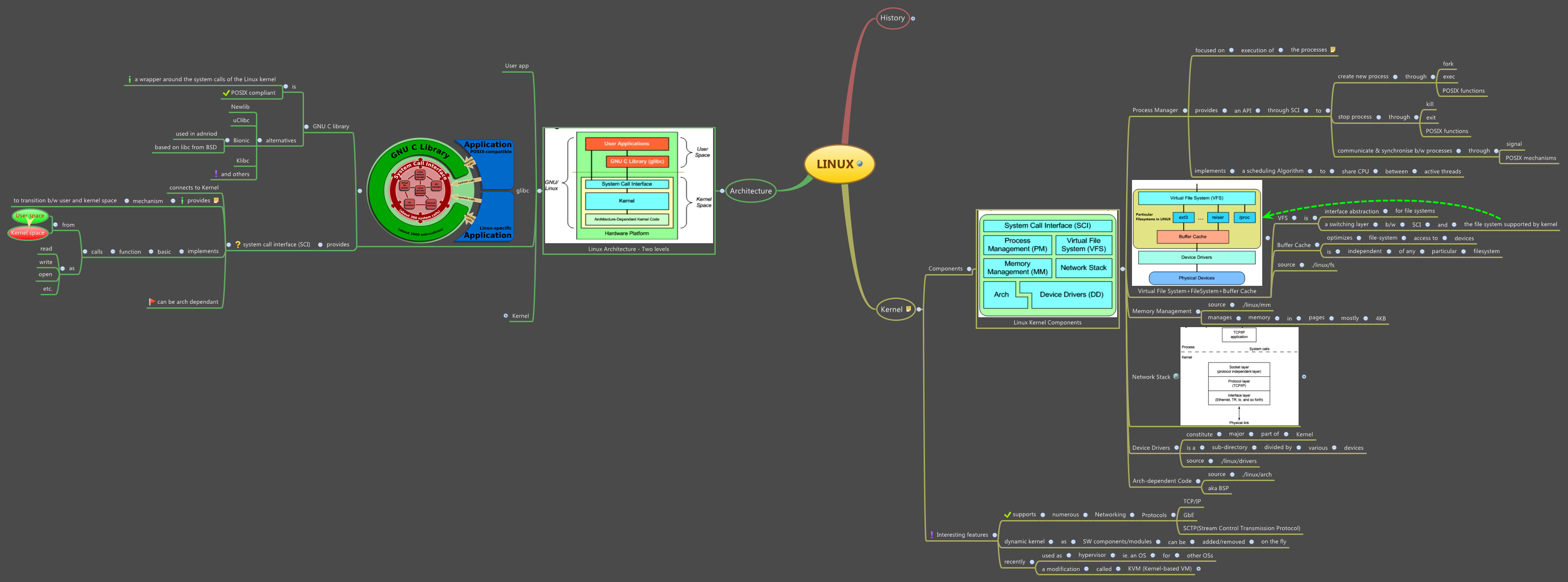
The LINUX mind map template offers a structured overview of the Linux operating system, covering its history, kernel components, and system architecture across 216 nodes. It traces Linux's origins from 1960s MIT projects through AT&T's involvement, Andrew Tanenbaum's creation of MINIX, and Linus Torvalds' development in the early 1990s, including the adoption of the GNU GPL. The kernel section details key components such as the Process Manager, Virtual File System, Memory Management, Network Stack, Device Drivers, and Arch-dependent Code. The architecture is presented as a two-level model comprising User app, glibc (GNU C library), and the Kernel with two parts. This template serves as a comprehensive Linux cheat sheet for students, developers, and IT professionals.
Условия использованияPreparing for a Linux certification exam (e.g., LPIC or RHCSA) that requires understanding kernel components and architecture.
Teaching an introductory operating systems course where students need a visual overview of Linux history and design.
Onboarding new developers to a Linux-based project, helping them grasp the kernel's modular structure and system layers.
Open the template in Xmind to navigate the three primary branches covering Linux history, kernel components, and system architecture.
Select any of the 216 nodes to read detailed information or personalize the content by adding your own notes, subtopics, and attachments.
Adjust the visual style to suit your learning goals and export the final document as an image, PDF, or Markdown file for sharing.
The template includes 216 nodes covering Linux history, kernel components (Process Manager, Virtual File System, etc.), and system architecture (User app, glibc, Kernel).
Open the .xmind file in Xmind, then explore the 'Kernel' branch to review components like Memory Management and Device Drivers. Customize by adding notes or expanding subtopics.
Yes, the template is fully editable in Xmind desktop or web. You can add, remove, or reorganize nodes, and export as PDF or image for printing.
It represents platform-specific kernel code that handles hardware differences, such as CPU architectures (x86, ARM). The template helps visualize how Linux abstracts these dependencies.
Absolutely. The glibc node under Architecture can be expanded with details about GNU C library functions, version history, or porting considerations for different systems.
Поделитесь своими шаблонами интеллект-карт с авторами по всему миру и начните зарабатывать на своих работах.

