




IT students and certification candidates
Preparing for a Linux certification exam like LPIC or RHCSA
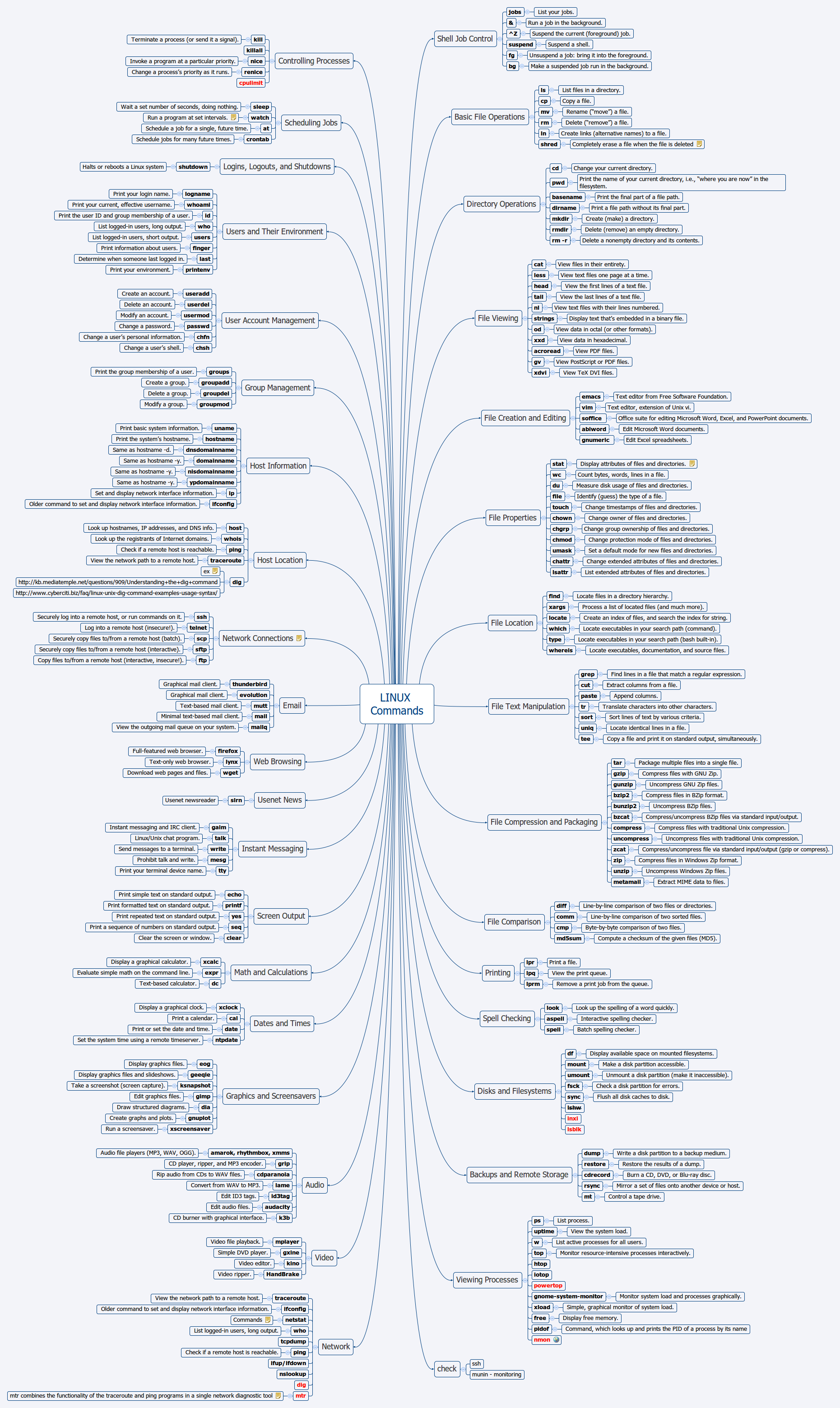
The LINUX Commands mind map template is a comprehensive reference for system administrators, developers, and power users, covering over 440 essential Linux commands across 30+ categories. It includes detailed entries for Shell Job Control (jobs, fg, bg), File Operations (ls, cp, shred), Directory Operations (cd, pwd, mkdir), File Viewing (cat, less, tail), File Creation and Editing (emacs, vim, soffice), File Properties (stat, chmod, chattr), File Location (find, locate, which), File Text Manipulation (grep, cut, sort), File Compression (tar, gzip, zip), File Comparison (diff, cmp, md5sum), and more. This LINUX Commands cheat sheet organizes commands by function, making it easy to find the right tool for tasks like process control, scheduling, user management, networking, and multimedia. With node names like 'Shell Job Control', 'File Text Manipulation', and 'File Compression and Packaging', the template serves as both a learning roadmap and a quick-reference guide for effective system management.
이용약관Preparing for a Linux certification exam like LPIC or RHCSA
Setting up a new server and needing to recall file permission commands
Writing a shell script that requires text manipulation with grep and sed
Download the .xmind file and open it to browse over 440 commands organized into functional categories like File Operations and Networking.
Click on specific command nodes to read usage notes and customize the map by adding your own examples or removing unnecessary categories.
Save your customized Linux cheat sheet as a PDF or image file to keep a handy reference for your system administration tasks.
The template includes over 440 Linux commands organized into 30+ categories like Shell Job Control, File Operations, File Viewing, File Text Manipulation, and more. Each command has a brief description of its purpose.
Open the .xmind file in Xmind, then browse categories like 'Basic File Operations' or 'File Compression and Packaging'. Click on any command node to read its description, and use the mind map layout to see related commands grouped together.
Yes, the template is fully editable in Xmind. You can add your own notes, examples, or custom commands, and reorganize branches to suit your workflow.
Yes, Xmind allows you to export the mind map as PDF or image, which you can print as a poster or reference sheet.
Use the template as a study guide by focusing on one category at a time, such as 'File Text Manipulation'. Practice each command in a terminal, then mark nodes as completed in Xmind.
전 세계 크리에이터와 마인드맵 템플릿을 공유하고 작품으로 수익을 창출하세요.

