




Sales development representatives (SDRs) and lead qualification teams
When a new lead registers via the website and needs to be qualified before entering the sales pipeline.
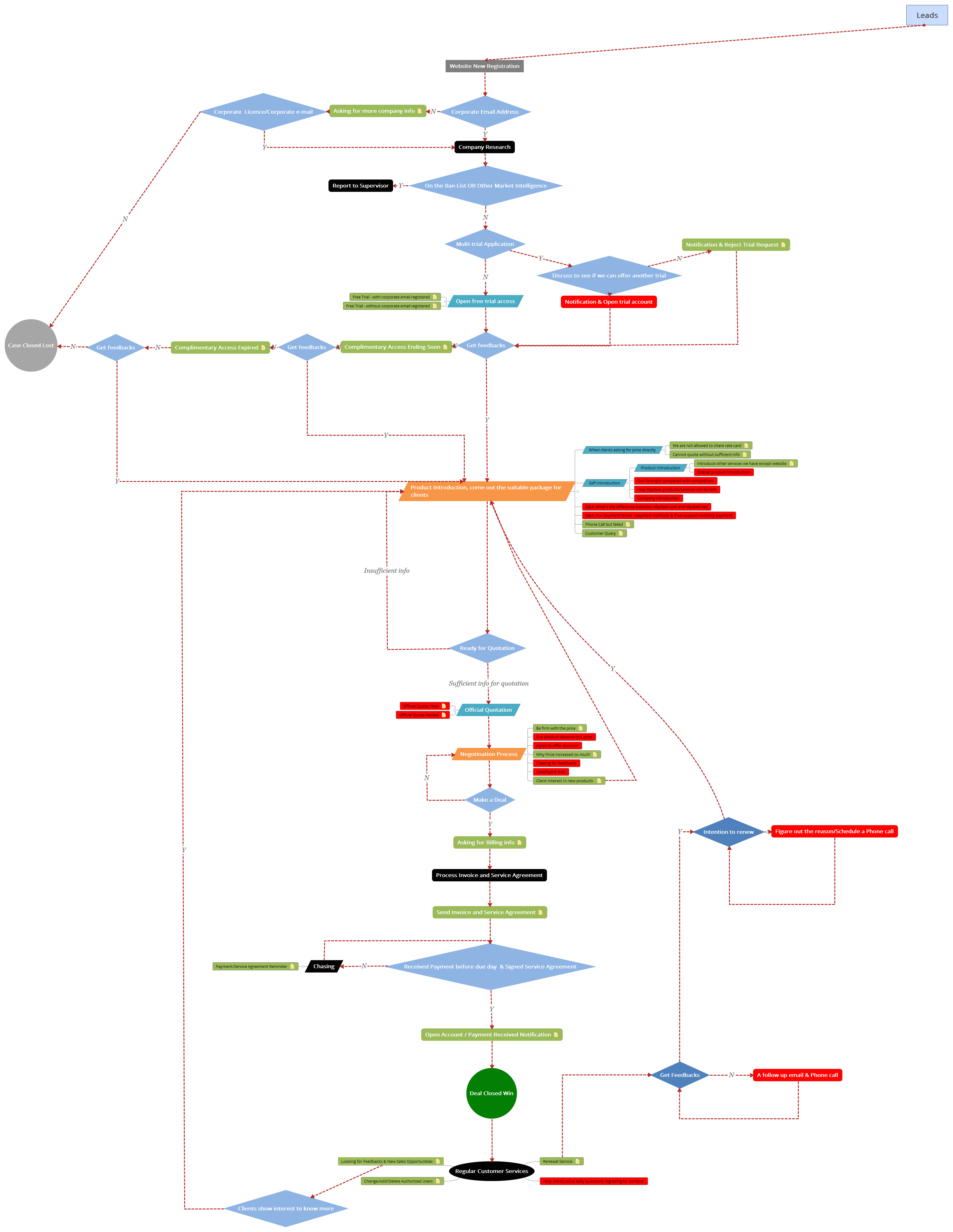
The Leads sales workflow mind map template from Xmind provides a comprehensive 67-node pipeline covering the entire B2B lead lifecycle, from Website New Registration through Deal Closed Win and Renewal. It includes critical stages such as Company Research, Product Introduction, Negotination Process, and Regular Customer Services. This template serves as a practical cheat sheet for sales teams managing complex enterprise sales cycles, with specific nodes like 'Free Trial - with corporate email registered' and 'Q&A: What's the difference between Mysteel.com and Mysteel.net' addressing real-world objections. The structure is organized as a linear flowchart with branching decision points, making it easy to track lead status and follow-up actions.
Terms and ConditionsWhen a new lead registers via the website and needs to be qualified before entering the sales pipeline.
During the negotiation phase when a client pushes back on pricing or requests discounts.
At the renewal stage when existing clients show intention to renew and need follow-up.
Open the template in Xmind to familiarize yourself with the 67-node workflow covering the entire lead lifecycle from registration to renewal.
Modify the node labels and branching structures to align with your specific company research methods, product introductions, and negotiation processes.
Update lead statuses using markers or colors as they move through the pipeline and export the map to PDF or image format for team alignment.
The template includes 67 nodes covering the full B2B lead lifecycle: from registration, qualification, trial access, product introduction, quotation, negotiation, invoicing, payment, account opening, customer service, to renewal and follow-up.
Open the .xmind file in Xmind, then follow the flowchart from 'Website New Registration' through each stage. Customize node labels to match your products and update status as leads progress. Use branches like 'Chasing' to manage reminders.
Yes, the template is free to download and fully editable in Xmind. You can add, remove, or modify nodes to fit your sales process, and export it as an image or PDF for sharing.
This branch helps sales reps handle price negotiations, including being firm on price, offering discounts, explaining price increases, and sending goodbye emails if the deal is lost. It also captures client interest in new products.
Absolutely. The template includes nodes for 'Open free trial access' with sub-branches for corporate email registration. You can rename these to match your trial types and add decision points for multi-trial applications.
Share your mind map templates with creators around the world and start earning from your work.

