




UX designers and information architects
Planning a new website's navigation and content hierarchy from scratch
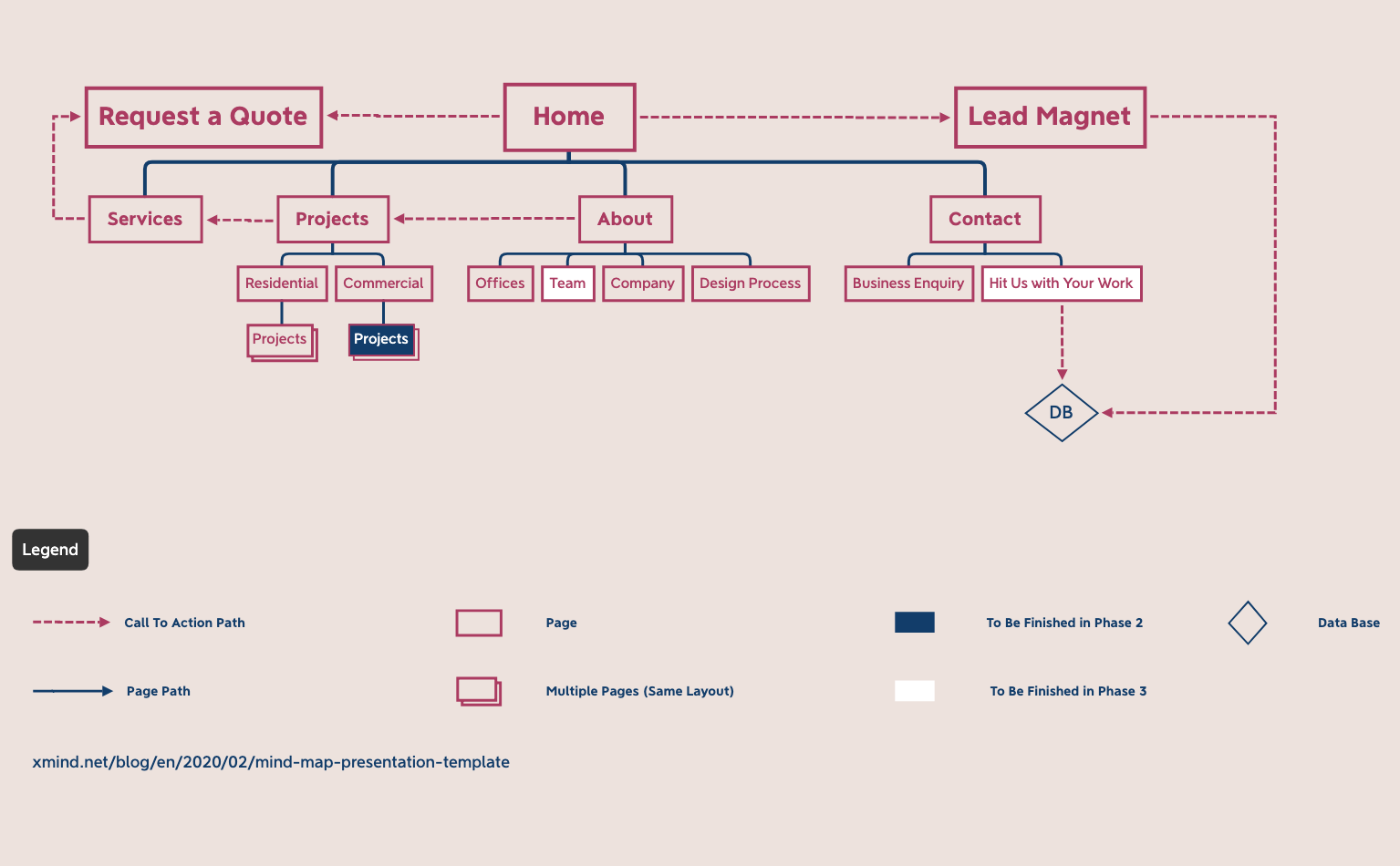
The Information Architecture mind map template by Xmind provides a structured framework for planning website navigation and content hierarchy. It covers 34 nodes across 1 sheet, with root topic 'Home' and branches including Services, Projects, About, Contact, and Request a Quote. Specific nodes like 'Call To Action Path' and 'Page Path' help define user flows, while 'Legend' and 'DB' support technical documentation. This template is ideal for UX designers and web strategists mapping out site structure.
Điều khoản sử dụngPlanning a new website's navigation and content hierarchy from scratch
Redesigning an existing site to improve user flow and conversion paths
Documenting site structure for developer handoff during a web build
Open the template in Xmind to review the pre-defined hierarchy including the Home root and branches like Services and Projects.
Rename existing nodes to match your specific site requirements and add new branches using the Insert key to build out your unique architecture.
Refine your user flows and technical documentation before exporting the map as a PDF or image to present to your design team.
The template includes a root 'Home' with branches for Services, Projects, About, Contact, Request a Quote, Lead Magnet, DB, Call To Action Path, Page Path, Legend, and more. It covers 34 nodes for comprehensive site planning.
Open the .xmind file in Xmind, then customize each branch with your own content. For example, replace 'Residential' and 'Commercial' under Projects with your actual project categories. Use 'Call To Action Path' to map user flows.
Yes, the template is free to use and fully editable in Xmind (desktop, web, or mobile). You can add, remove, or rename nodes to fit your project.
The 'Call To Action Path' node helps define the sequence of actions a user takes to convert, such as clicking a button or filling a form. It's useful for conversion rate optimization.
Yes, the structure is platform-agnostic. You can adapt the branches for mobile app screens, replacing 'Page Path' with screen flows and 'DB' with local storage schemas.
Chia sẻ mẫu sơ đồ tư duy của bạn với người sáng tạo trên khắp thế giới và bắt đầu kiếm tiền từ tác phẩm của mình.

