




Team leads and project managers
Planning a weekly team sync to review progress and assign tasks
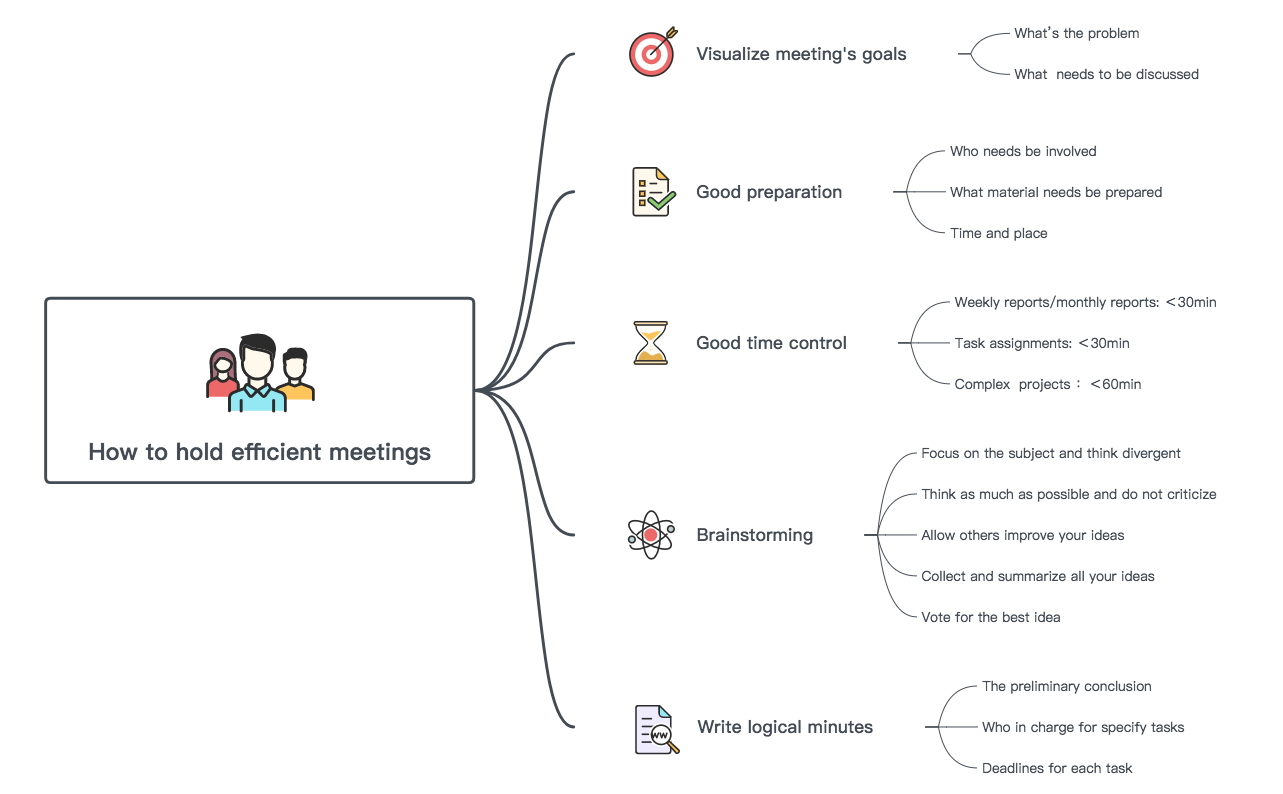
The 'How to hold efficient meetings' mind map template provides a structured framework for planning, executing, and following up on productive meetings. Covering five key areas—goal visualization, preparation, time control, brainstorming, and minute writing—this template helps professionals reduce meeting waste and increase actionable outcomes. Key nodes include 'Weekly reports/monthly reports: <30min', 'Focus on the subject and think divergent', and 'Who in charge for specify tasks'. This meeting cheat sheet is ideal for team leads, project managers, and anyone seeking to streamline their meeting culture.
Điều khoản sử dụngPlanning a weekly team sync to review progress and assign tasks
Facilitating a brainstorming session to generate solutions for a complex problem
Conducting a post-mortem or retrospective to document decisions and action items
Open the .xmind file to review the five main branches covering goal visualization, preparation, and time control.
Replace the placeholder text with your specific meeting topics and adjust the time limits to fit your session duration.
Use the brainstorming and minute-writing nodes to document conclusions and assign specific task owners for actionable results.
It covers five branches: visualizing meeting goals, good preparation, time control, brainstorming techniques, and writing logical minutes. Each branch contains actionable sub-nodes like setting time limits and assigning tasks.
Focus on the 'Good time control' branch to keep weekly reports under 30 minutes. Use 'Visualize meeting's goals' to define the problem and discussion points, then capture minutes with task assignments and deadlines.
Yes, the template is free to download and fully editable in Xmind (desktop, web, or mobile). You can customize nodes, add icons, and adjust time limits to fit your team's needs.
Follow the 'Brainstorming' branch: focus on the subject, think divergently, avoid criticism, allow idea improvement, then collect and vote for the best idea. This keeps sessions productive.
Absolutely. The template suggests defaults like '<30min' for weekly reports, but you can edit these to match your organization's meeting culture directly in Xmind.
Chia sẻ mẫu sơ đồ tư duy của bạn với người sáng tạo trên khắp thế giới và bắt đầu kiếm tiền từ tác phẩm của mình.

