




New XMind users
When a new user downloads XMind: ZEN for the first time and needs guidance on activation.
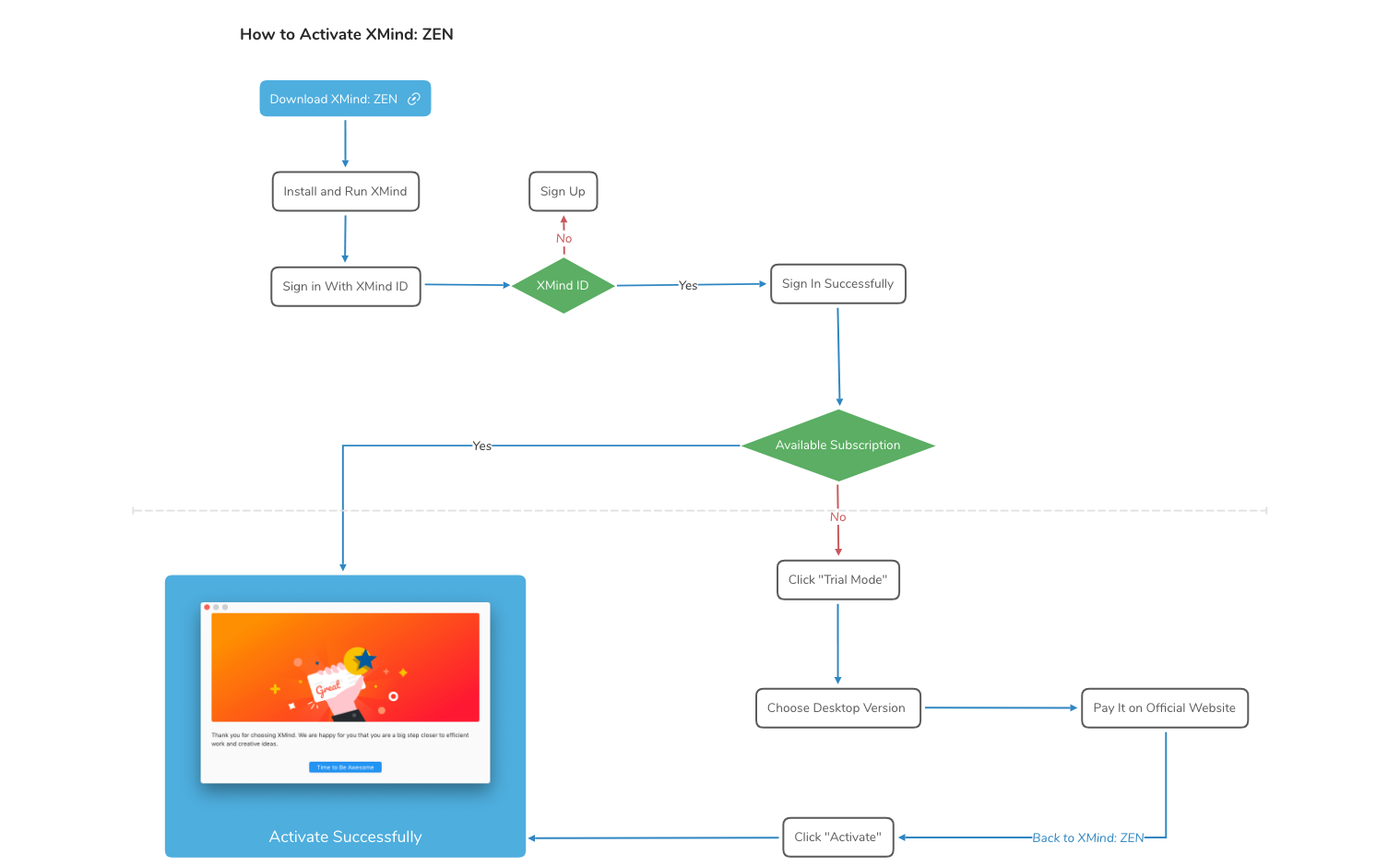
The 'How to Activate XMind: ZEN' mind map template provides a step-by-step guide for activating XMind: ZEN software. It covers the entire activation process, from downloading the desktop version to signing in with an XMind ID and choosing a subscription. Key nodes include 'Download XMind: ZEN', 'Sign Up', 'XMind ID', 'Activate Successfully', 'Sign In Successfully', and 'Available Subscription'. This template is ideal for new users who need a clear visual roadmap to activate their software efficiently.
NutzungsbedingungenWhen a new user downloads XMind: ZEN for the first time and needs guidance on activation.
When a user forgets their activation steps or needs a quick reference to complete the process.
When a team is onboarding new members and wants to provide a clear activation workflow.
Open the template in XMind to visualize the complete activation roadmap from downloading to final sign-in.
Follow the structured nodes to download the software, create your XMind ID, and select your preferred subscription plan.
Add custom notes or checkmarks to the map as you complete each step and export the final result for future reference.
The template includes a step-by-step guide covering downloading XMind: ZEN, signing up, creating an XMind ID, activating, signing in, and choosing a subscription.
Follow the nodes sequentially: download the desktop version, sign up for an XMind ID, then click 'Activate' and sign in. Finally, select a subscription and pay on the official website.
Yes, the template is free to use and fully editable in XMind. You can customize it to add notes or modify steps as needed.
The 'XMind ID' node represents your account credential needed for activation and signing in to XMind: ZEN.
The template is specifically designed for XMind: ZEN activation, but similar steps may apply to other versions with minor adjustments.
Teilen Sie Ihre Mindmap-Vorlagen mit Erstellern weltweit und verdienen Sie mit Ihrer Arbeit.

