




Student project teams and group coordinators
Kicking off a new group assignment to align on requirements and initial task splits.
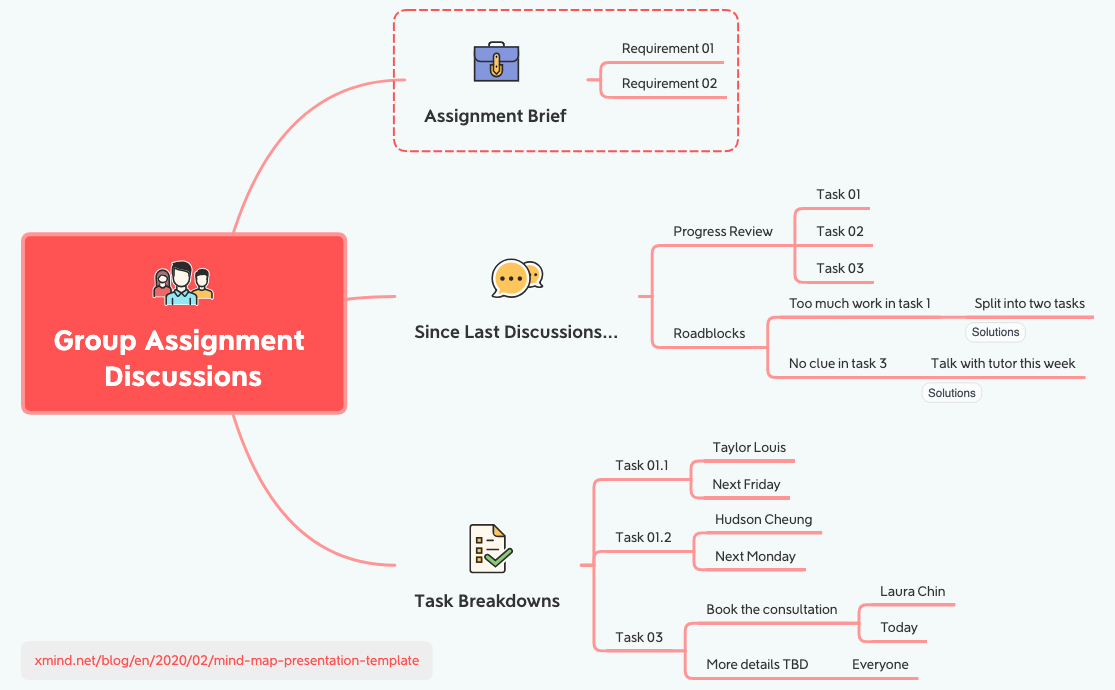
The Group Discussions mind map template helps student teams structure their assignment meetings with 28 nodes across 4 branches. It covers assignment requirements, progress review, roadblocks, and task breakdowns. Key nodes include 'Assignment Brief', 'Progress Review', and 'Split into two tasks'. This template is ideal for tracking who does what by when, with named assignees like 'Taylor Louis' and 'Hudson Cheung'. It also links to Xmind's presentation template for sharing updates. The layout uses a central root with color-coded branches for quick visual scanning during group discussions.
이용약관Kicking off a new group assignment to align on requirements and initial task splits.
Weekly check-in meetings to review progress and identify roadblocks like 'No clue in task 3'.
Finalizing task breakdowns with specific owners and deadlines before a submission deadline.
Open the template in Xmind to review the central root and expand the four color-coded branches for a full overview of your assignment.
Replace the placeholder text in the Assignment Brief with your specific requirements and update the progress review nodes to reflect completed tasks.
Customize the task breakdown with specific team member names and deadlines before using the presentation mode to share updates with your group.
The template includes 4 main branches: Assignment Brief, Since Last Discussions (with Progress Review and Roadblocks), Task Breakdowns, and a link to a presentation template. It has 28 nodes covering requirements, task status, blockers, and assignments.
Open the .xmind file in Xmind, then fill in your assignment requirements under Assignment Brief. Update the Progress Review with completed tasks and note any roadblocks. Use Task Breakdowns to assign owners and deadlines.
Yes, the template is free to download and fully editable in Xmind (desktop, web, or mobile). You can add or remove nodes, change colors, and attach files or links.
Absolutely. The Task Breakdowns branch is designed to be customized: replace placeholder names like 'Taylor Louis' with your team members, and update deadlines to match your schedule.
Use the included link to Xmind's presentation template to convert your mind map into a slideshow. Alternatively, export the map as an image or PDF to share during the meeting.
전 세계 크리에이터와 마인드맵 템플릿을 공유하고 작품으로 수익을 창출하세요.

