




Backend developers and solution architects
Starting a new .NET MVC project with multiple layers (API, MVC, Services) and need a clear architecture blueprint.
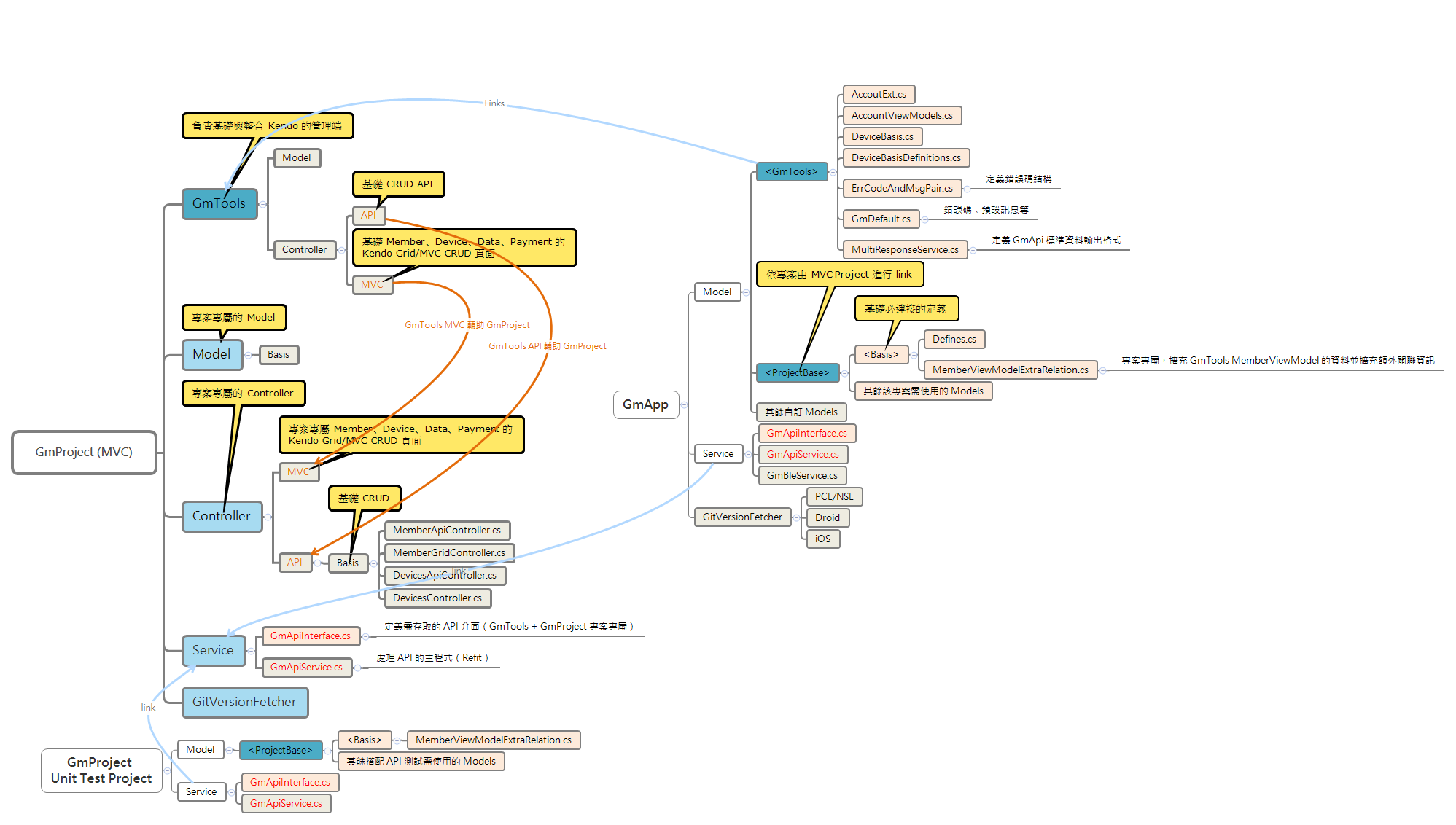
The GmProject (MVC) mind map template provides a comprehensive architecture overview for .NET projects following the Model-View-Controller pattern, covering 59 nodes across GmTools, Model, Controller, Service, GitVersionFetcher, GmApp, and GmProject Unit Test Project branches. It includes specific implementations like MemberApiController.cs, MemberGridController.cs, and GmApiService.cs (handling API via Refit). This GmProject (MVC) template serves as a cheat sheet for developers structuring multi-layered applications with API and MVC controllers, service interfaces, and cross-platform Git versioning.
利用規約Starting a new .NET MVC project with multiple layers (API, MVC, Services) and need a clear architecture blueprint.
Refactoring an existing project to separate concerns between GmTools, GmApp, and unit tests.
Onboarding new team members to understand the project structure and component relationships.
Open the template in Xmind to explore the pre-defined branches for GmTools, Model, Controller, and Service layers.
Replace placeholder nodes like MemberApiController.cs and GmApiService.cs with your specific class names and file structures.
Add or remove sub-nodes to match your project's unique requirements and update the map as your MVC application evolves.
It includes 59 nodes covering GmTools, Model, Controller (API and MVC), Service, GitVersionFetcher, GmApp, and a Unit Test Project. Specific files like MemberApiController.cs and GmApiService.cs are mapped.
Open the .xmind file in Xmind, then follow the branches to organize your project layers. Replace placeholder files with your own controllers, services, and models while keeping the architecture intact.
Yes, the template is free to use and fully editable in Xmind (desktop, web, or mobile). You can add, remove, or rename nodes to fit your project.
It represents a component that retrieves Git version information. In GmApp, it has platform-specific implementations for PCL/NSL, Droid, and iOS.
Absolutely. The Service branch defines GmApiInterface.cs and GmApiService.cs; you can modify them to match your API endpoints and Refit configuration.
It mirrors the main project with Model and Service branches, including its own GmApiInterface.cs and GmApiService.cs for testing purposes.
あなたのマインドマップ テンプレートを世界中のクリエイターと共有して、作品から収入を得ましょう。

