


'%3e%3cpath%20d='M14.8644%204.33597C15.6164%203.58397%2016.3844%203.58397%2017.1364%204.33597L20.4644%207.66397C21.2164%208.41597%2021.6004%209.32797%2021.6004%2010.4V17.6C21.6004%2018.672%2021.3924%2020%2020.0004%2020.8C20.0004%2020.8%2017.6804%2022.4%2016.0004%2022.4C14.3204%2022.4%2012.0004%2020.8%2012.0004%2020.8C10.4004%2020%2010.4004%2018.672%2010.4004%2017.6V10.4C10.4004%209.32797%2010.7844%208.41597%2011.5364%207.66397L14.8644%204.33597Z'%20stroke='%234FA49A'%20stroke-width='1.92'%20stroke-linejoin='round'/%3e%3cpath%20d='M16.0001%2015.0402C17.0605%2015.0402%2017.9201%2014.1806%2017.9201%2013.1202C17.9201%2012.0598%2017.0605%2011.2002%2016.0001%2011.2002C14.9397%2011.2002%2014.0801%2012.0598%2014.0801%2013.1202C14.0801%2014.1806%2014.9397%2015.0402%2016.0001%2015.0402Z'%20stroke='%234FA49A'%20stroke-width='1.92'/%3e%3cpath%20d='M10.4007%2014.3999L7.20067%2017.5999L6.40067%2020.7999C6.19267%2021.3279%206.35267%2021.5999%206.88067%2021.5999L10.4007%2020.7999'%20stroke='%234FA49A'%20stroke-width='1.92'%20stroke-linecap='round'%20stroke-linejoin='round'/%3e%3cpath%20d='M21.5996%2014.3999L24.7996%2017.5999L25.5996%2020.7999C25.8076%2021.3279%2025.6476%2021.5999%2025.1196%2021.5999L21.5996%2020.7999'%20stroke='%234FA49A'%20stroke-width='1.92'%20stroke-linecap='round'%20stroke-linejoin='round'/%3e%3cpath%20d='M13.2793%2022.3999C13.2793%2024.7999%2014.3993%2027.0399%2015.9993%2028.3199C17.5993%2027.0399%2018.7193%2024.7999%2018.7193%2022.3999'%20stroke='%234FA49A'%20stroke-width='1.92'%20stroke-linecap='round'%20stroke-linejoin='round'/%3e%3c/g%3e%3cdefs%3e%3cclipPath%20id='clip0_11502_52996'%3e%3crect%20width='32'%20height='32'%20fill='white'/%3e%3c/clipPath%3e%3c/defs%3e%3c/svg%3e)

Product managers and UX designers
Planning a new feedback feature for a mobile app before launch
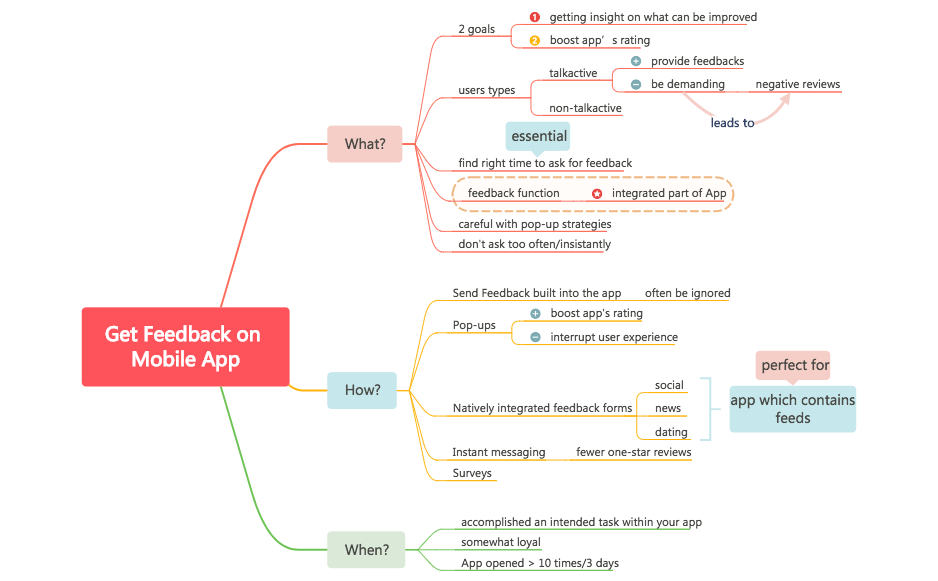
The 'Get Feedback on Mobile App' mind map template helps product managers, UX researchers, and mobile app developers design an effective in-app feedback strategy. It covers 3 core branches—What?, How?, and When?—with 34 nodes detailing goals, user types, feedback channels, and timing rules. Key nodes include 'talkactive' users who 'provide feedbacks' and 'be demanding', and the timing rule 'App opened > 10 times/3 days'. This template serves as a practical cheat sheet for balancing rating boosts with user experience, emphasizing 'Natively integrated feedback forms' for social, news, and dating apps.
Terms and ConditionsPlanning a new feedback feature for a mobile app before launch
Reducing one-star reviews by optimizing when and how to ask for feedback
Choosing between pop-ups, surveys, and in-app forms for a social or dating app
Open the template in Xmind to explore the three core branches of What, How, and When for your mobile feedback strategy.
Edit the What branch to define your specific research goals and identify target user segments like talkative or demanding users.
Select your preferred feedback channels and adjust the engagement timing rules to match your app's specific usage metrics.
The template covers 34 nodes across three branches: What? (goals, user types, feedback function), How? (five feedback channels), and When? (timing rules). It includes specific user segments like 'talkactive' and 'non-talkactive' and channel comparisons.
Start by reviewing the 'What?' branch to define your goals and identify user types. Then explore the 'How?' branch to choose a feedback channel—like 'Natively integrated feedback forms' or 'Pop-ups'—and apply the 'When?' rules to ask at the right moment, such as after a user has 'accomplished an intended task'.
Yes, the template is free to download and fully editable in Xmind. You can customize node text, add branches, and adjust the structure to fit your app's specific feedback strategy.
'Talkactive' users are those who actively provide feedback and can be demanding. The template suggests they are more likely to respond to feedback requests, so you can prioritize engaging them for insights.
The template advises against asking too often or insistently, and warns that 'Pop-ups' can 'interrupt user experience'. It also suggests not asking until the user has opened the app more than 10 times in 3 days, indicating they are 'somewhat loyal'.
Share your mind map templates with creators around the world and start earning from your work.

