




HR managers and recruiters
When an HR team needs to standardize their recruitment workflow for a new hiring cycle.
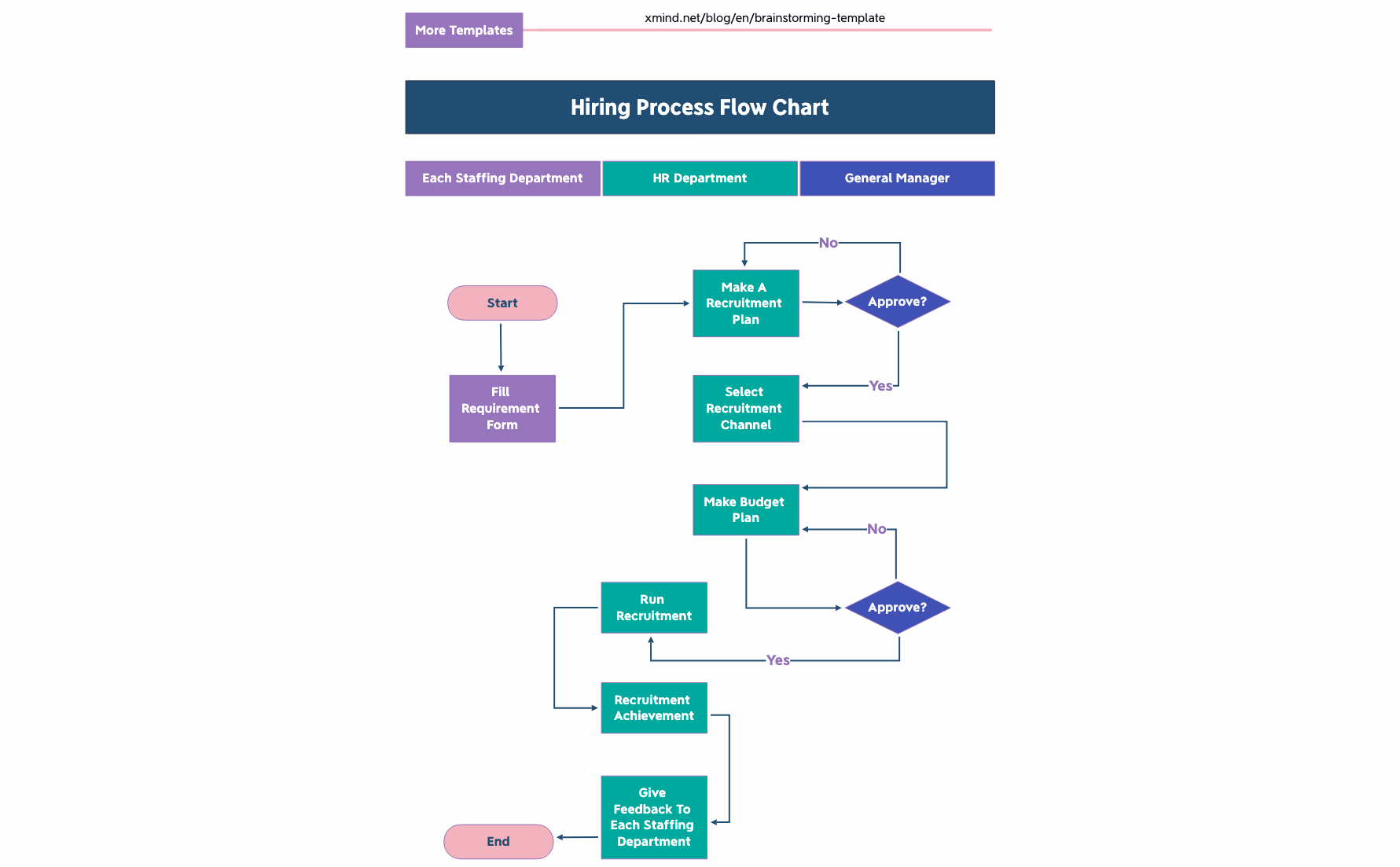
The Hiring Process Flow Chart mind map template from Xmind provides a structured 17-node diagram for HR teams to manage end-to-end recruitment. It covers key stages from 'Start' through 'fill requirement form', 'make a recruitment plan', 'approve?', 'make budget plan', 'Select recruitment channel', and 'run recruitment', ending with 'recruitment achievement' and 'give feedback to each staffing department'. This template serves as a hiring process cheat sheet for HR departments, general managers, and staffing teams, ensuring no step is missed. The flowchart layout visualizes decision points like 'approve?' and 'Approve?' with clear branching, making it easy to customize for any organization's workflow.
이용약관When an HR team needs to standardize their recruitment workflow for a new hiring cycle.
During a process audit to identify bottlenecks in the current hiring pipeline.
When onboarding new HR staff who need a visual guide to the company's hiring steps.
Open the .xmind file to review the pre-built flowchart structure and trace the decision branches from start to finish.
Update the generic department names and define specific approval criteria within the decision nodes to match your organization's workflow.
Complete your recruitment plan and export the final flowchart as an image or PDF to distribute among your HR team and managers.
The template includes 17 nodes covering the full hiring cycle: from start, requirement form, recruitment plan, approvals, budget, channel selection, to recruitment execution and feedback.
Open the .xmind file in Xmind, then replace placeholder nodes like 'HR Department' and 'general manager' with your actual team members and add your specific approval criteria.
Yes, the template is fully editable in Xmind desktop or web. You can customize nodes, add subtopics, and export as PDF or image for printing.
The 'approve?' node represents a gate where the recruitment plan or budget must be approved before proceeding. It helps visualize bottlenecks and accountability.
Absolutely. You can expand that node with your preferred channels (e.g., LinkedIn, job boards, referrals) and add notes or icons for each.
전 세계 크리에이터와 마인드맵 템플릿을 공유하고 작품으로 수익을 창출하세요.

