




CTOs and IT managers
Evaluating a new collaboration platform for a growing startup
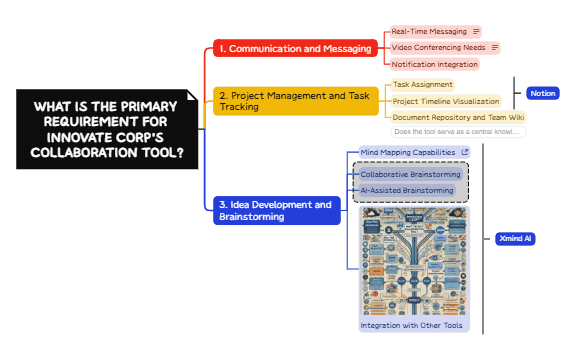
The Decision Tree for Best Collaboration Tool mind map helps teams systematically evaluate software choices by starting with a single root question: 'What is the primary requirement for Innovate Corp’s collaboration tool?' The template branches into three core needs—'Communication and Messaging', 'Project Management and Task Tracking', and 'Idea Development and Brainstorming'—each with 3-5 specific sub-nodes like 'Real-Time Messaging', 'Task Assignment', and 'Mind Mapping Capabilities'. This structured decision tree mind map template provides a clear, repeatable framework for selecting tools based on organizational priorities, making it an essential collaboration tool cheat sheet for IT managers and team leads. The visual layout uses a left-to-right branching hierarchy, with each branch ending in actionable criteria or tool recommendations such as 'Notion' and 'Xmind AI'.
Условия использованияEvaluating a new collaboration platform for a growing startup
Comparing existing tools during a quarterly software review
Onboarding a new team and standardizing communication tools
Launch the template in Xmind and replace the placeholder organization name with your own to define the primary decision goal.
Identify the core requirement branch that fits your needs and customize the sub-nodes to match your specific software evaluation criteria.
Use the structured visual layout as a collaborative guide during team discussions to systematically reach a final decision on the best tool.
The template includes a root question about primary requirements, three main branches (Communication and Messaging, Project Management and Task Tracking, Idea Development and Brainstorming), and detailed sub-nodes like 'Real-Time Messaging' and 'Task Assignment'.
Start by answering the root question based on your team's top priority. Follow the branch that matches your need, then evaluate each sub-node criterion. The template helps you compare tools like Notion or Xmind AI against your specific requirements.
Yes, the template is free to download and fully editable in Xmind. You can add or remove nodes, customize criteria, and adapt it to your organization's unique needs.
Absolutely. The root question and branches are placeholders. You can rename 'Innovate Corp' to your company name and adjust the sub-nodes to reflect your specific evaluation criteria.
Open the template in Xmind during a team meeting. Collaboratively work through each branch, discussing and scoring each criterion. Use the visual layout to align on priorities and document your final tool selection.
Поделитесь своими шаблонами интеллект-карт с авторами по всему миру и начните зарабатывать на своих работах.

