




Team leads and project managers
During a morning stand-up meeting to prioritize the day's tasks.
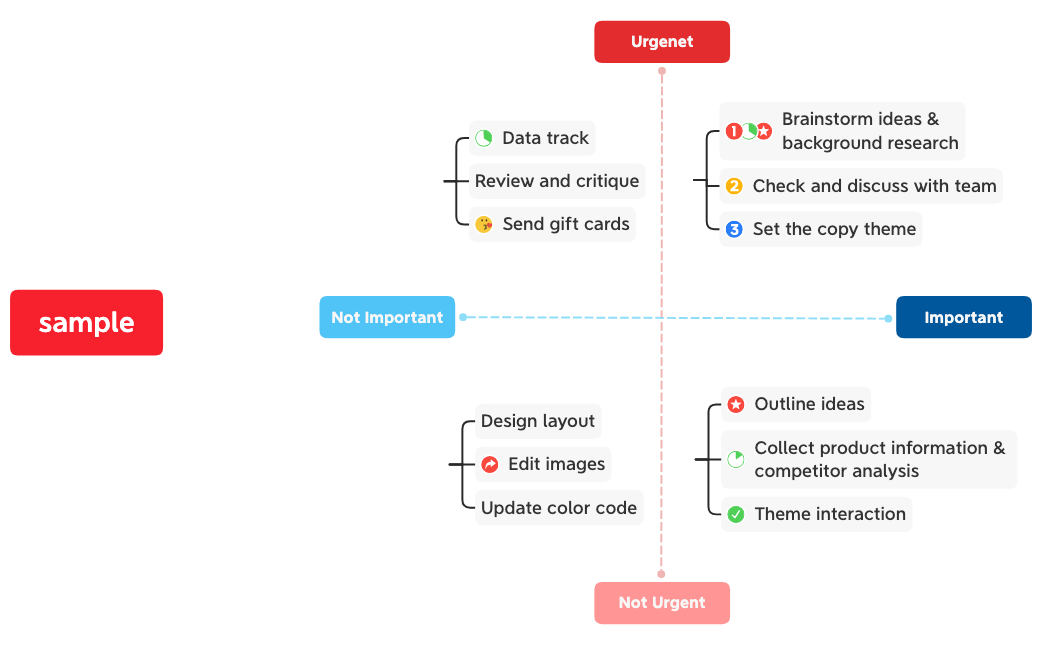
The Decision Matrix mind map template from Xmind provides a structured 2x2 framework for prioritizing tasks by urgency and importance. With 21 nodes organized under four quadrants—'Urgenet', 'Not Urgent', 'Important', and 'Not Important'—this template helps users categorize items visually. It is ideal for project managers, students, and professionals who need to make quick, informed decisions. The matrix layout allows for easy comparison and sorting of tasks, making it a practical tool for daily planning and strategic prioritization. By mapping out tasks into these four categories, users can focus on what truly matters and avoid wasting time on low-priority activities.
Điều khoản sử dụngDuring a morning stand-up meeting to prioritize the day's tasks.
When planning a new project to identify critical milestones and deadlines.
While studying for exams to focus on high-yield topics first.
Open the template in Xmind to view the four quadrants organized by urgency and importance.
Add your specific tasks as child nodes under the appropriate quadrants using the Insert key or double-clicking.
Drag and drop tasks between quadrants as priorities shift and export your final matrix as an image or PDF.
The template includes a 2x2 matrix with four quadrants: Urgenet, Not Urgent, Important, and Not Important. It contains 21 nodes for categorizing tasks, making it easy to prioritize work.
Open the template in Xmind, then list your tasks under the appropriate quadrant. Focus on 'Urgenet' and 'Important' items first, schedule 'Not Urgent' tasks, and minimize 'Not Important' ones.
Yes, the template is free to use and fully editable in Xmind. You can add, remove, or rename nodes to fit your specific needs.
Absolutely. You can rename the quadrants (e.g., change 'Urgenet' to 'Urgent') and add sub-nodes under each category to tailor the matrix to your workflow.
Share the .xmind file with your team and collaboratively fill in tasks. Use color coding to assign ownership or priority levels within each quadrant.
Chia sẻ mẫu sơ đồ tư duy của bạn với người sáng tạo trên khắp thế giới và bắt đầu kiếm tiền từ tác phẩm của mình.

