




IT procurement managers and product owners
Choosing between multiple software vendors for a new tool
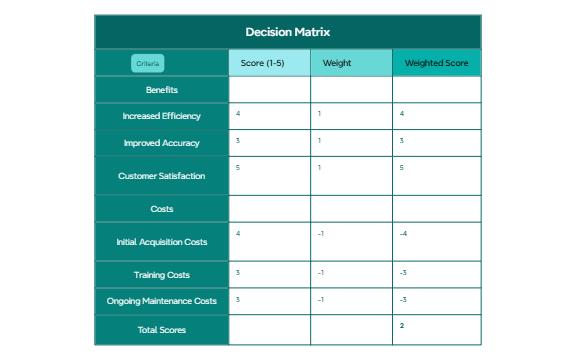
The Decision Matrix mind map template from Xmind provides a structured framework for evaluating up to six options against multiple criteria using a weighted scoring system. This 27-node template organizes decision-making into four key branches: Score (1-5), Weight, Weighted Score, and Criteria, allowing users to assign numerical values and importance weights to each option. For example, the template includes pre-filled scores like '4' and '5' with corresponding weights of '1' or '-1', and calculates weighted scores such as '-4' and '2' to highlight net benefits. Ideal for project managers, business analysts, and anyone facing complex choices, this Decision Matrix template transforms subjective trade-offs into an objective, quantifiable comparison. By systematically weighing pros and cons, users can identify the highest-value option with clarity and confidence.
使用条款Choosing between multiple software vendors for a new tool
Evaluating project proposals against budget and timeline constraints
Deciding on a career move by weighing salary, growth, and location factors
Open the .xmind file to familiarize yourself with the four main branches including Score, Weight, Weighted Score, and Criteria.
Replace the sample criteria with your own factors and enter a Score from 1 to 5 along with its corresponding Weight for each option.
Review the Weighted Score branch to compare the calculated numerical values and identify the most objective choice for your decision.
It helps you compare multiple options by scoring them against weighted criteria, making it easier to choose the best alternative objectively.
Replace the sample numbers (e.g., '4', '3') under Score with your own ratings (1-5), and adjust the Weight values (e.g., '1' or '-1') to reflect each criterion's importance.
Yes, you can duplicate branches under Criteria or Score to expand the matrix—Xmind allows unlimited nodes for custom analysis.
Yes, the template is free to use and fully editable in Xmind (desktop, web, or mobile). You can change scores, weights, and criteria as needed.
The Weighted Score multiplies each Score by its Weight, giving a net value per option. Summing these helps you see which option has the highest overall benefit.
把你的思维导图模板分享给全球创作者,从你的作品中获得收益。

