




Project managers and team leads
Kicking off a new project with multiple competing initiatives
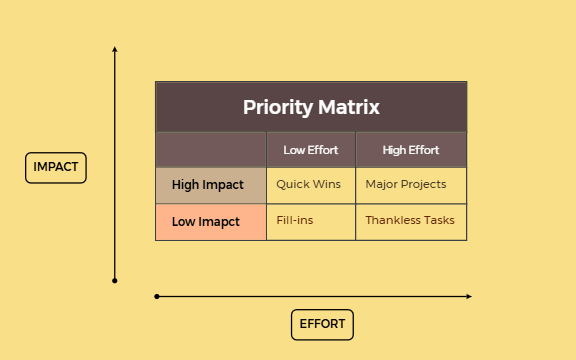
The Priority Matrix mind map template is a structured framework for project prioritization, mapping tasks across two axes: IMPACT and EFFORT. It categorizes items into four quadrants: Quick Wins (high impact, low effort), Major Projects (high impact, high effort), Fill-ins (low impact, low effort), and Thankless Tasks (low impact, high effort). This template helps teams and individuals identify which tasks deliver the greatest return for the least investment. It includes 12 nodes organized under a single sheet, with branches for High Impact and Low Impact. The visual layout uses a 2x2 matrix, making it easy to plot and compare initiatives at a glance.
使用條款Kicking off a new project with multiple competing initiatives
Quarterly planning to allocate resources effectively
Daily task prioritization to focus on high-value work
Open the template in Xmind to familiarize yourself with the four quadrants categorized by impact and effort.
Add your projects as child nodes under the appropriate quadrant and adjust the axis labels to fit your specific project context.
Review the visual layout of your prioritized initiatives and export the final matrix as an image or PDF for team distribution.
The template includes a 2x2 matrix with four quadrants: Quick Wins, Major Projects, Fill-ins, and Thankless Tasks. It also features IMPACT and EFFORT axes, plus floating topics for additional notes.
Open the .xmind file in Xmind, then drag each task or project into the appropriate quadrant based on its impact and effort. Use the floating topics to add context or deadlines.
Yes, the template is fully editable in Xmind. You can add, remove, or rearrange nodes. Export as PDF or image for printing.
List all potential tasks, then place those with high impact and low effort into the Quick Wins quadrant. These are your top priorities for immediate action.
Yes, you can rename the axes, add sub-scales, or change the labels to fit your specific context, such as 'Value' and 'Complexity'.
把你的心智圖範本分享給全球創作者,從你的作品中獲得收益。

