




HR managers and team leads
Onboarding new employees to explain the company's reporting structure and key contacts.
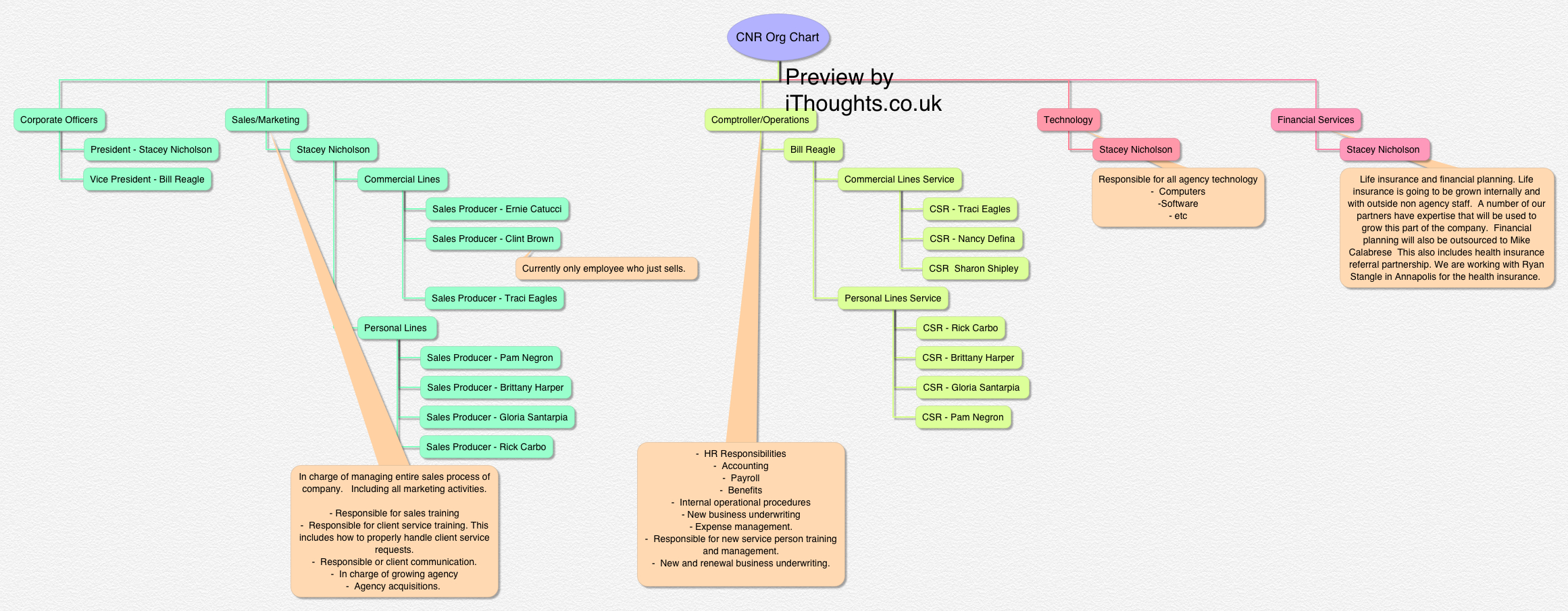
The CNR Org Chart mind map template provides a structured overview of a mid-sized insurance agency's organizational hierarchy, covering 5 core departments and 35 nodes. It maps roles from Corporate Officers (President - Stacey Nicholson, Vice President - Bill Reagle) through Financial Services, Technology, Sales/Marketing, and Comptroller/Operations, including specific positions like Sales Producer - Ernie Catucci and CSR - Rick Carbo. This template serves as a ready-to-use organizational chart for insurance agencies, small businesses, or teams needing a clear reporting structure. It visually organizes leadership, sales teams, service staff, and operational functions, making it ideal for onboarding, restructuring, or documenting team responsibilities. The layout uses a central root with five main branches, each expanding into named roles and their key duties, such as 'Life insurance and financial planning' under Financial Services and 'HR Responsibilities - Accounting - Payroll' under Comptroller/Operations.
이용약관Onboarding new employees to explain the company's reporting structure and key contacts.
Restructuring departments and needing a visual overview of current roles before making changes.
Creating a quick reference chart for a small business or startup to clarify team responsibilities.
Open the CNR Org Chart in Xmind to review the five core departments and thirty-five pre-defined nodes.
Click on any node to replace the placeholder names and titles with your own team members and specific job descriptions.
Add new sub-nodes to grow your hierarchy and use the Format panel to apply your company's unique branding and colors.
The template includes 35 nodes across 5 departments: Financial Services, Technology, Corporate Officers, Sales/Marketing, and Comptroller/Operations, with specific roles and responsibilities for each position.
Open the .xmind file in Xmind, then replace the names and roles under each branch with your own team members. Adjust the structure by adding or removing nodes to match your hierarchy.
Yes, the template is fully editable in Xmind. You can modify node text, add new branches, change colors, and rearrange the layout to fit your organization.
Absolutely. While the example uses insurance-specific roles, you can adapt the department structure (e.g., Sales, Operations, Technology) to any industry by renaming nodes.
Use the existing hierarchy to show direct reports under each manager. You can add connector lines or color-code branches to highlight reporting relationships.
전 세계 크리에이터와 마인드맵 템플릿을 공유하고 작품으로 수익을 창출하세요.

