




Aerospace engineers and MDO researchers
Defining a new MDO workflow for aircraft wing design
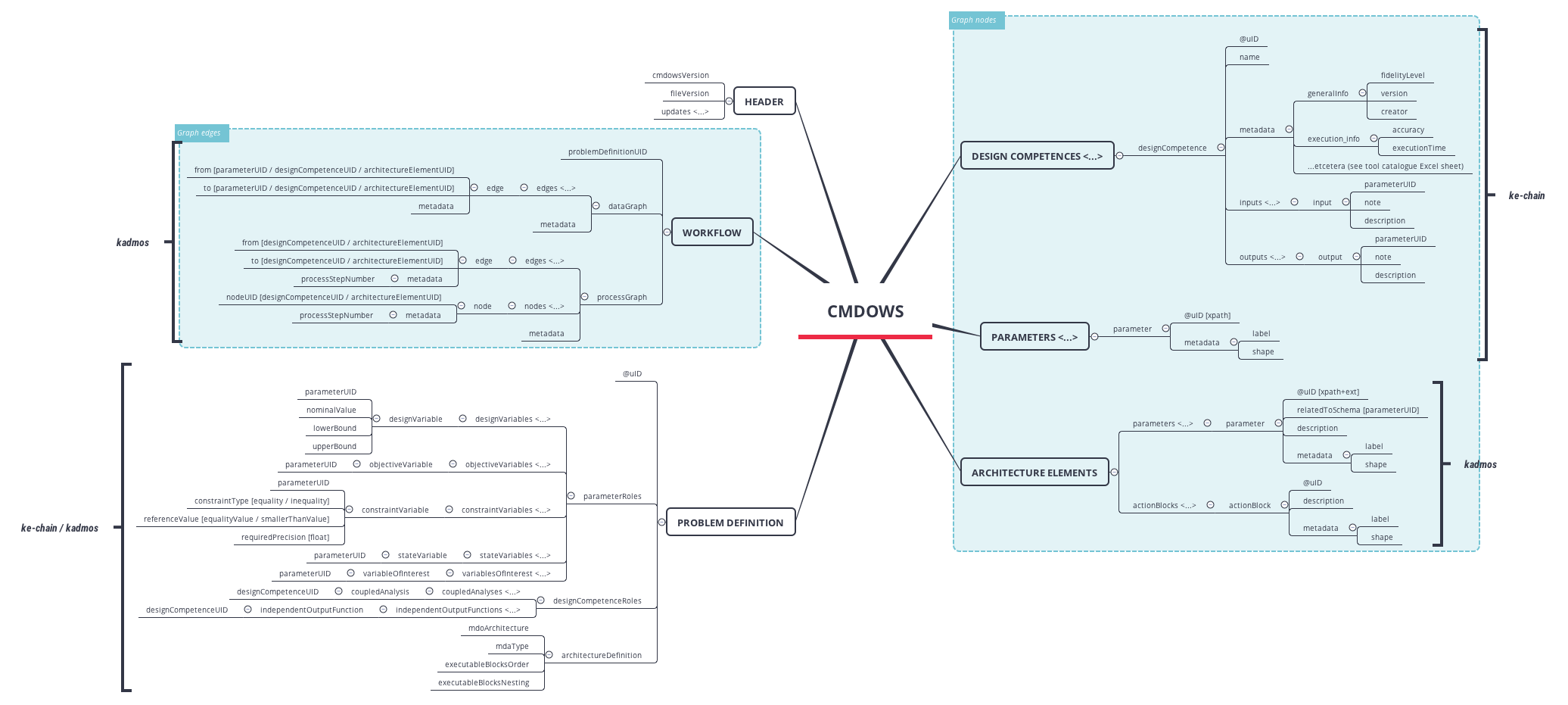
The cmdows mind map template defines the Common MDO Workflow Schema (CMDOWS), a structured XML-based schema for describing Multidisciplinary Design Optimization (MDO) workflows. It covers 112 nodes across key domains such as design competences, parameters, architecture elements, problem definition, and workflow graphs. The template includes specific nodes like 'designCompetence' with inputs/outputs, 'parameterRoles' distinguishing design variables from objective variables, and 'dataGraph' with edges for workflow connectivity. This cheat sheet serves as a visual reference for engineers and researchers building MDO frameworks, ensuring consistent schema usage across tools like KADMOS and KE-Chain.
Terms and ConditionsDefining a new MDO workflow for aircraft wing design
Standardizing data exchange between KADMOS and KE-Chain tools
Teaching multidisciplinary optimization concepts in a graduate course
Download the cmdows .xmind file and open it in the Xmind application to access the full schema tree.
Expand the branches for design competences and parameters to review the specific node definitions and data roles.
Modify the workflow edges and design variables to fit your project before exporting the map for documentation.
CMDOWS (Common MDO Workflow Schema) is an XML-based schema for describing multidisciplinary design optimization workflows. It standardizes how design competences, parameters, and problem definitions are exchanged between MDO tools like KADMOS and KE-Chain.
The template is organized into major branches: design Competences, parameters, architecture Elements, problem Definition, workflow, and header. Each branch contains detailed sub-nodes for attributes like @uID, metadata, and relationships.
Yes, you can open the .xmind file in Xmind and edit node labels, add new parameters, or modify the workflow graph. The template serves as a starting point for your own MDO schema definitions.
The 'dataGraph' describes data dependencies between workflow elements via edges, while the 'processGraph' defines the execution order and nesting of executable blocks in the MDO workflow.
Yes, the cmdows mind map template is available on Xmind's template marketplace. You can download and use it for free, then customize it for your own MDO projects.
Share your mind map templates with creators around the world and start earning from your work.

