




Product engineers and change management teams
Tracking engineering change orders (PCOs) for product variant removal due to obsolete parts
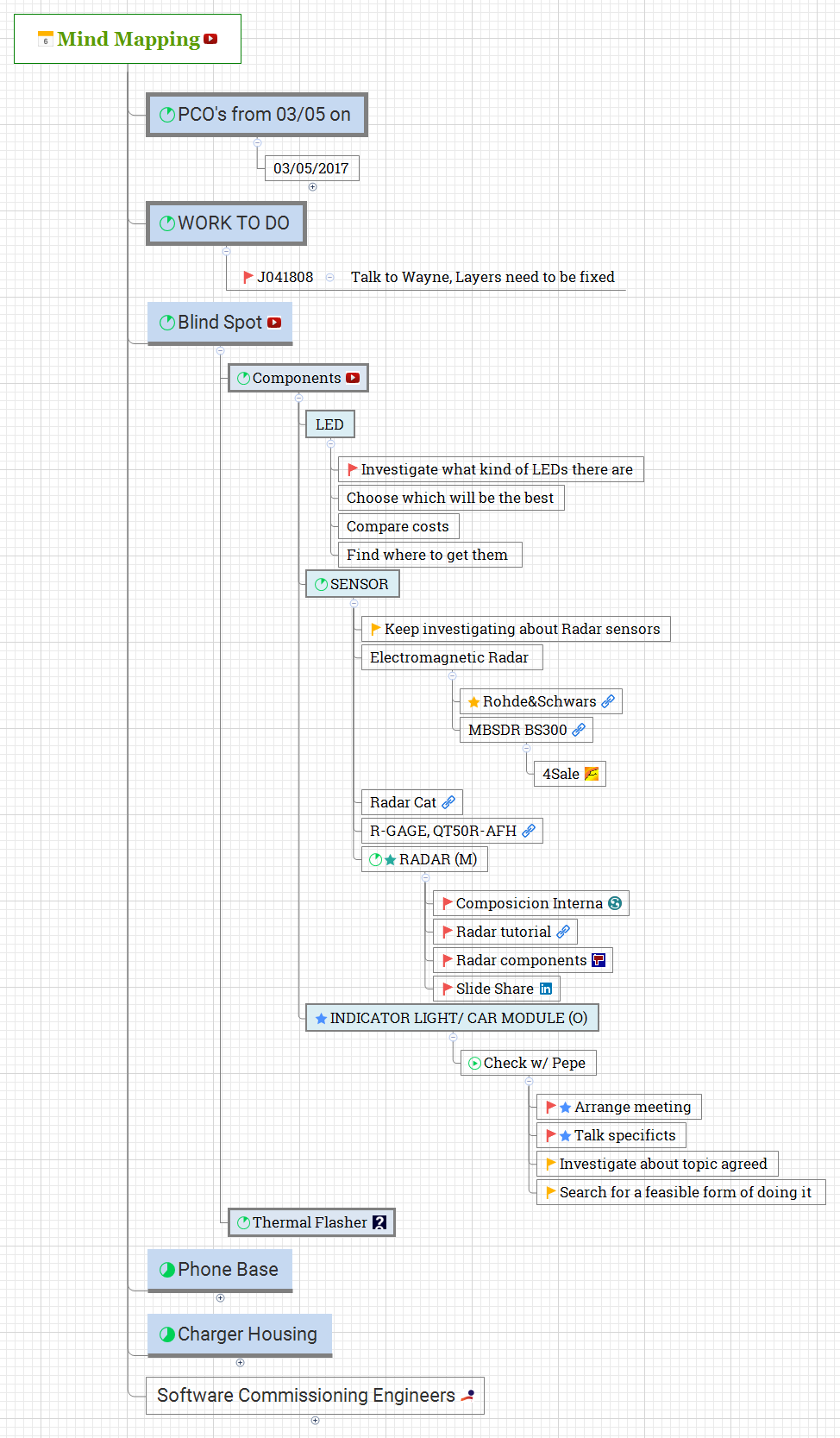
The BSDS mind map template organizes 43 nodes across a single sheet, starting from a 'Mind Mapping' root that branches into six major workstreams: PCO's from 03/05 on, WORK TO DO, Blind Spot, Phone Base, Charger Housing, and Software Commissioning Engineers. It serves as a project tracking and engineering task breakdown tool, capturing specific actions like 'MDR /K041999 Create PCO to remove variant AAB because the obsolete part (K0419-2201A) is only used on that variant' and 'Investigate what kind of LEDs there are'. The template is ideal for engineers and project managers who need a visual BSDS cheat sheet to monitor progress on hardware components, software commissioning, and change orders. Key nodes such as 'Blind Spot' detail sensor and LED investigations, while 'Charger Housing' includes 'HOUSING 2.0' modeling tasks. This BSDS template provides a structured overview of concurrent engineering activities.
Условия использованияTracking engineering change orders (PCOs) for product variant removal due to obsolete parts
Investigating and selecting sensor and LED components for a new blind spot detection system
Managing concurrent modeling tasks for phone base and charger housing designs
Open the BSDS template in Xmind to visualize the six major workstreams and the overall engineering project structure.
Expand the branches for hardware components and software commissioning to replace example nodes with your specific project tasks.
Utilize the 'WORK TO DO' branch and sub-nodes to assign owners, log pending actions, and update project status.
The template covers 43 nodes across six main branches: PCO's from 03/05 on, WORK TO DO, Blind Spot, Phone Base, Charger Housing, and Software Commissioning Engineers. It includes specific tasks like creating a PCO for variant AAB removal and investigating sensor types.
Open the .xmind file in Xmind, then expand each branch to view detailed tasks. Replace placeholder items like 'LED' investigations with your own components and deadlines. Use the 'WORK TO DO' section to log action items such as 'Talk to Wayne, Layers need to be fixed'.
Yes, the template is fully editable in Xmind. You can add new nodes, modify existing task descriptions, and reorganize branches to match your project's specific requirements.
The 'Blind Spot' branch organizes research on components like LEDs and sensors (e.g., electromagnetic radar, Radar Cat). It helps engineers compare costs, choose the best options, and identify suppliers.
Absolutely. The 'Software Commissioning Engineers' branch includes a 'PLC info' node, which can be expanded with specific PLC programming tasks, testing protocols, and integration steps.
Поделитесь своими шаблонами интеллект-карт с авторами по всему миру и начните зарабатывать на своих работах.

