


'%3e%3cpath%20d='M26.7002%206.05468C26.7002%205.85186%2026.7636%205.68707%2026.8904%205.5603C27.0171%205.43354%2027.1788%205.37332%2027.3753%205.37966L27.9267%205.37966C28.1295%205.37966%2028.2911%205.43987%2028.4116%205.5603C28.532%205.68073%2028.5922%205.84869%2028.5922%206.06419L28.5827%2023.4206L27.8696%2025.8069C27.8506%2025.864%2027.8253%2025.9083%2027.7936%2025.94C27.7555%2025.9781%2027.7112%2025.9971%2027.6605%2025.9971C27.5844%2025.9971%2027.5242%2025.9749%2027.4798%2025.9305C27.4418%2025.8925%2027.4165%2025.8481%2027.4038%2025.7974L26.6907%2023.4301L26.7002%206.05468Z'%20fill='%23FF9334'/%3e%3cpath%20d='M18.8701%2012.6006C19.3331%2012.6006%2019.6787%2012.9599%2019.6787%2013.4092C19.6786%2013.8694%2019.3338%2014.2295%2018.8701%2014.2295H9.80762C9.33292%2014.2294%208.98744%2013.8702%208.9873%2013.4092C8.9873%2012.9591%209.33368%2012.6007%209.80762%2012.6006H18.8701ZM18.8701%208.44531C19.3313%208.44531%2019.6787%208.79114%2019.6787%209.24219C19.6785%209.70065%2019.3354%2010.0742%2018.8701%2010.0742H9.80762C9.33132%2010.0741%208.98752%209.70148%208.9873%209.24219C8.9873%208.79034%209.33542%208.44539%209.80762%208.44531H18.8701Z'%20fill='%23FF9334'/%3e%3cpath%20d='M14.0703%2016.7578C14.5315%2016.7578%2014.8789%2017.1036%2014.8789%2017.5547C14.8787%2018.0132%2014.5356%2018.3867%2014.0703%2018.3867H9.80762C9.33132%2018.3866%208.98752%2018.014%208.9873%2017.5547C8.9873%2017.1028%209.33542%2016.7579%209.80762%2016.7578H14.0703Z'%20fill='%23FF9334'/%3e%3crect%20x='5.8398'%20y='4.2402'%20width='17.12'%20height='21.92'%20rx='2.16'%20stroke='%23FF9334'%20stroke-width='2.08'/%3e%3c/g%3e%3cdefs%3e%3cclipPath%20id='clip0_11502_53292'%3e%3crect%20width='32'%20height='32'%20fill='white'/%3e%3c/clipPath%3e%3c/defs%3e%3c/svg%3e)

GIS developers and certification candidates
Preparing for an ESRI ArcEngine certification exam and need a structured review of key topics.
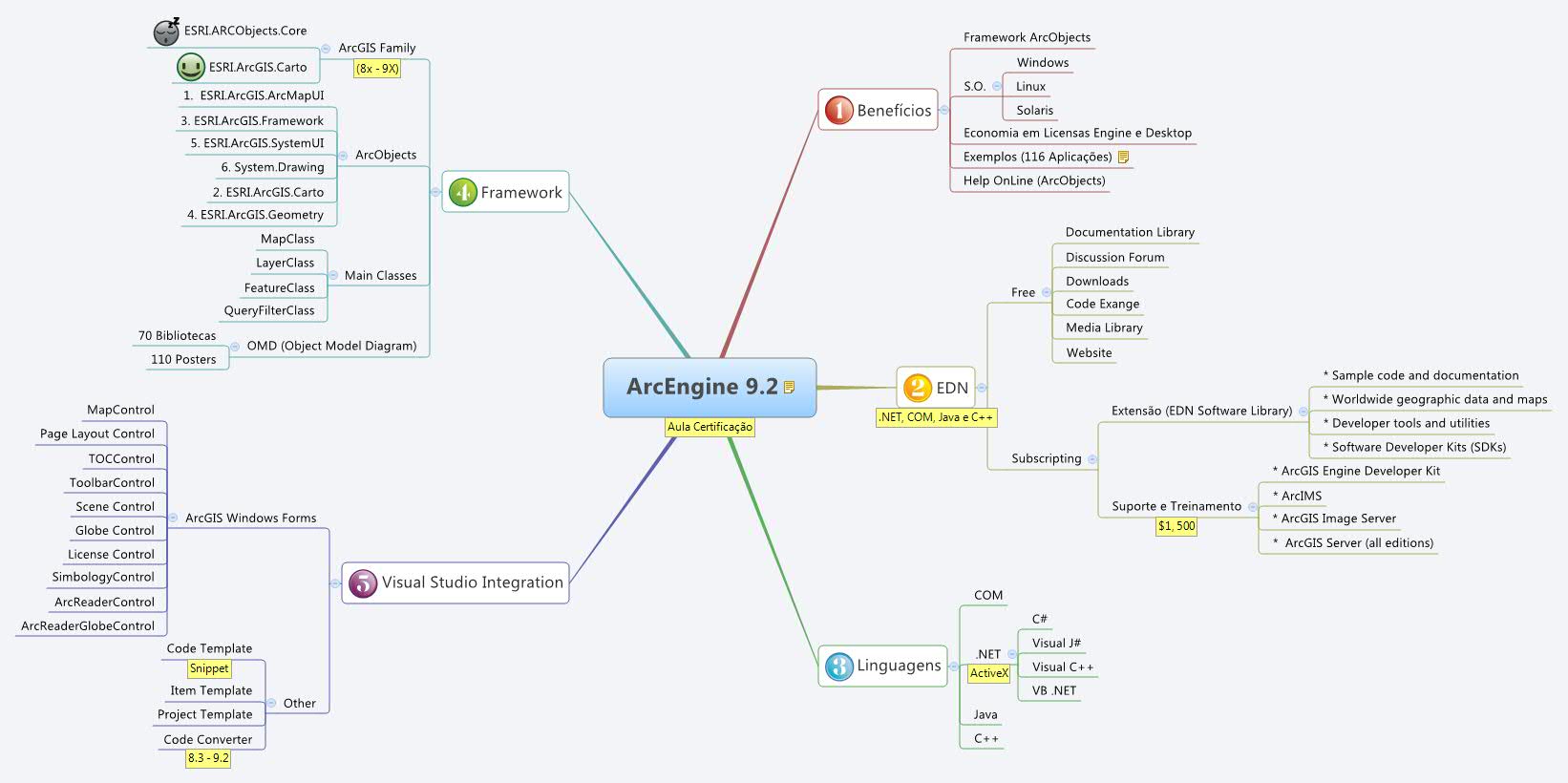
ArcEngine 9.2 mind map template covers the ESRI ArcEngine 9.2 framework, detailing its benefits, EDN resources, supported languages, framework components, and Visual Studio integration. With 74 nodes across 5 major branches, it includes specific nodes like 'Framework ArcObjects', 'Help OnLine (ArcObjects)', and 'OMD (Object Model Diagram)'. This ArcEngine 9.2 template serves as a cheat sheet for developers preparing for ESRI certification, highlighting key areas such as the 70 libraries and 110 posters in the OMD. The map is structured as a radial diagram with color-coded branches for quick reference.
Terms and ConditionsPreparing for an ESRI ArcEngine certification exam and need a structured review of key topics.
Starting a new ArcEngine development project and need a quick overview of available libraries and controls.
Evaluating the benefits of ArcEngine vs. ArcGIS Desktop for a project, focusing on license costs and framework capabilities.
Open the template in Xmind to browse the five main branches covering benefits, EDN resources, and framework components.
Expand the 74 nodes to review specific ArcObjects libraries, online help links, and Object Model Diagrams for developer certification.
Personalize the radial diagram with your own notes or color-coding before exporting the final map as a PDF or image.
The template covers 5 main branches: Benefícios, EDN, Linguagens, Framework, and Visual Studio Integration, with 74 nodes detailing ArcObjects, supported languages, and integration tools.
Open the .xmind file in Xmind, then explore each branch to review key concepts like the OMD (Object Model Diagram) and ArcGIS controls. Customize by adding notes or expanding nodes.
Yes, the template is fully editable. You can add, remove, or modify nodes, change colors, and attach files or links to personalize your study material.
ArcEngine 9.2 supports COM, .NET (C#, VB .NET, Visual J#, Visual C++), Java, and C++, as detailed in the Linguagens branch.
Yes, the Visual Studio Integration branch lists controls like MapControl and TOCControl, and you can add your own notes or expand with specific project templates.
Share your mind map templates with creators around the world and start earning from your work.

