


'%3e%3cpath%20fill-rule='evenodd'%20clip-rule='evenodd'%20d='M16.0002%203.2002C8.93095%203.2002%203.2002%208.93095%203.2002%2016.0002C3.2002%2023.0695%208.93095%2028.8002%2016.0002%2028.8002C23.0695%2028.8002%2028.8002%2023.0695%2028.8002%2016.0002C28.8002%208.93095%2023.0695%203.2002%2016.0002%203.2002ZM5.6002%2016.0002C5.6002%2010.2564%2010.2564%205.6002%2016.0002%205.6002C21.744%205.6002%2026.4002%2010.2564%2026.4002%2016.0002C26.4002%2021.744%2021.744%2026.4002%2016.0002%2026.4002C10.2564%2026.4002%205.6002%2021.744%205.6002%2016.0002ZM16.0002%208.0002C11.5819%208.0002%208.0002%2011.5819%208.0002%2016.0002C8.0002%2020.4184%2011.5819%2024.0002%2016.0002%2024.0002C20.4184%2024.0002%2024.0002%2020.4184%2024.0002%2016.0002C24.0002%2011.5819%2020.4184%208.0002%2016.0002%208.0002ZM10.4002%2016.0002C10.4002%2012.9074%2012.9074%2010.4002%2016.0002%2010.4002C19.093%2010.4002%2021.6002%2012.9074%2021.6002%2016.0002C21.6002%2019.093%2019.093%2021.6002%2016.0002%2021.6002C12.9074%2021.6002%2010.4002%2019.093%2010.4002%2016.0002ZM16.0002%2013.6002C14.6747%2013.6002%2013.6002%2014.6747%2013.6002%2016.0002C13.6002%2017.3256%2014.6747%2018.4002%2016.0002%2018.4002C17.3256%2018.4002%2018.4002%2017.3256%2018.4002%2016.0002C18.4002%2014.6747%2017.3256%2013.6002%2016.0002%2013.6002Z'%20fill='%234FA49A'/%3e%3c/g%3e%3cdefs%3e%3cclipPath%20id='clip0_11502_53171'%3e%3crect%20width='32'%20height='32'%20fill='white'/%3e%3c/clipPath%3e%3c/defs%3e%3c/svg%3e)

Managers and HR professionals
Conducting annual performance reviews for team members
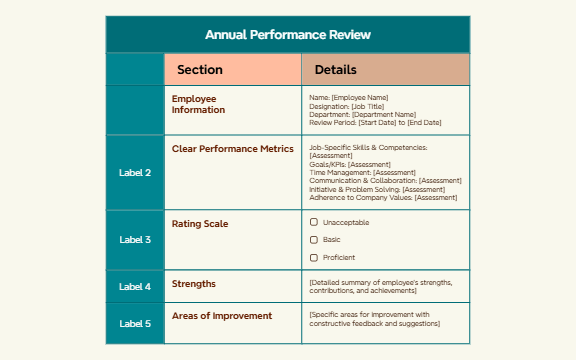
The Annual Performance Review mind map template provides a structured framework for conducting comprehensive employee evaluations, covering 15 nodes across two main branches: Section and Details. It includes fields for Employee Information, Clear Performance Metrics, a 3-level Rating Scale (Unacceptable, Basic, Proficient), and dedicated nodes for Strengths and Areas of Improvement. This template helps managers and HR professionals systematically assess job-specific skills, goals/KPIs, time management, communication, and initiative. By using this template, reviewers can ensure consistent, objective feedback aligned with organizational standards.
Terms and ConditionsConducting annual performance reviews for team members
Preparing for a mid-year check-in or quarterly review
Facilitating self-assessment before a review meeting
Open the template in Xmind and fill in the central nodes with the employee's name, department, and specific review period.
Systematically assess each performance metric using the three-level rating scale to provide objective scores for goals and job-specific skills.
Detail specific strengths and areas for improvement before exporting the final mind map as a PDF or image for official records.
The template includes employee information fields, performance metrics (job-specific skills, goals/KPIs, time management, communication, initiative), a three-level rating scale, and sections for strengths and areas of improvement.
Open the .xmind file, fill in employee details, rate each metric using the scale (Unacceptable, Basic, Proficient), and add qualitative comments in the Strengths and Areas of Improvement nodes.
Yes, you can rename or add rating levels in the Rating Scale branch to match your organization's performance tiers.
Absolutely. Employees can use the same structure to evaluate themselves, providing a consistent basis for discussion during the review meeting.
Use the Strengths node to list achievements and contributions, and the Areas of Improvement node to provide specific, constructive feedback with suggestions for growth.
Share your mind map templates with creators around the world and start earning from your work.

